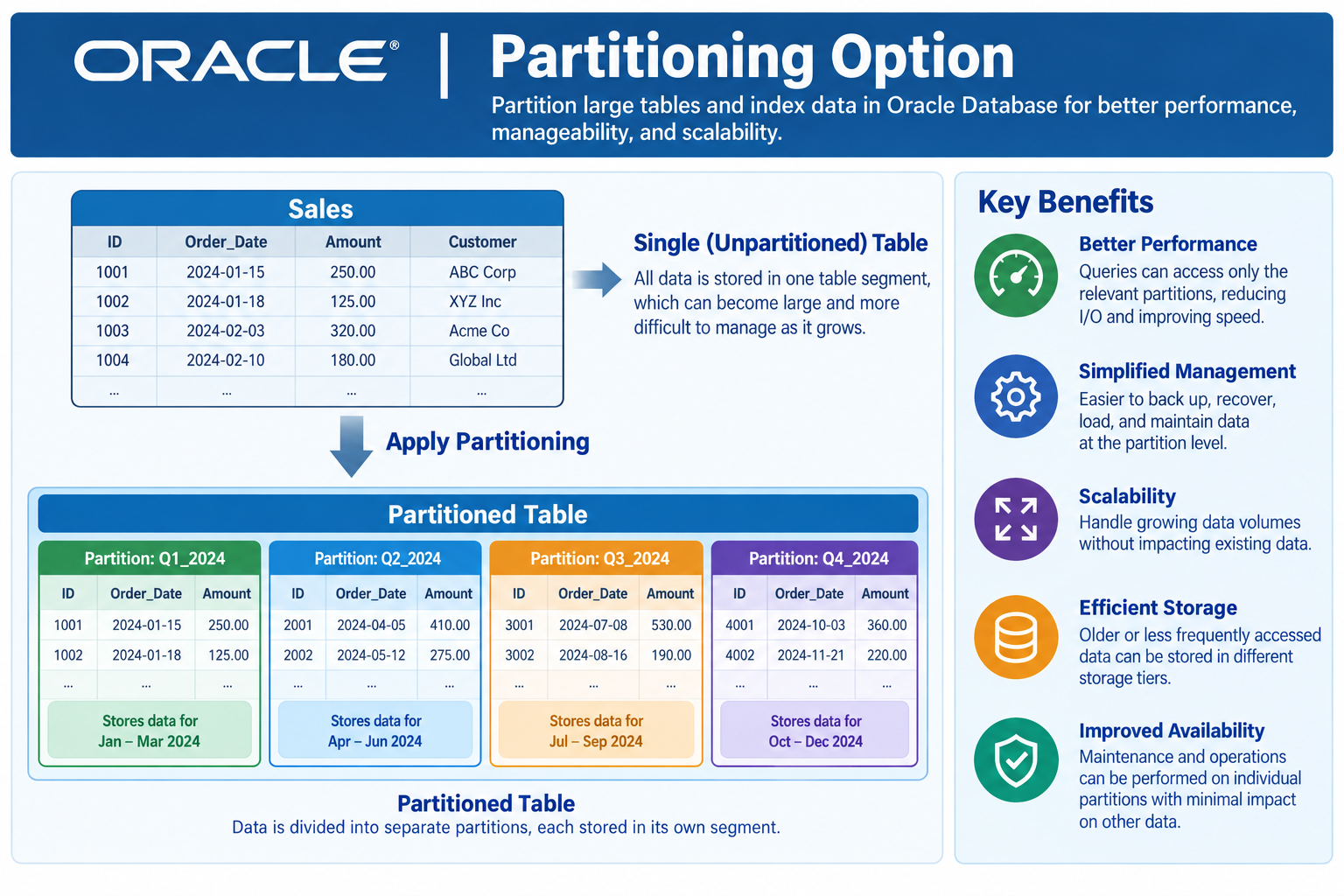
This article gives a structured approach to implementing data partitioning using Oracle AI Database. Following a set of simple rules makes the job much easier. While Oracle partitioning is most often associated with Analytic or Data Warehouse applications, it’s best to let the application characteristics guide you rather than putting too much stock in simple labels like DW or OLTP. The approach outlined here can be used with Oracle Databases deployed on commodity infrastructure, on commodity clouds, with Exadata, or even with Oracle Autonomous Database. I always follow a set of discovery questions to learn more about the application to determine the best approach to partitioning data.
What is the most voluminous data?
Oracle is a converged database that handles just about any type of data. You don’t need to worry about ALL of the data in your database, so just focus on what takes the most amount of space. Is that data held in a JSON structure, is it images you’re concerned about, or relational tables with rows and columns taking the most amount of space? I have seen extremely large Oracle Databases (hundreds of Terabytes) with just about every use-case under the sun. Partitioning is an important tool in the bag of tricks for dealing with large data volumes. I’ve seen healthcare data had simply accumulated over years and years because they keep it forever. Another case involved cell phone tower metrics that was only useful for about 2 years (used for determining tower placement). In short, learn something about the data and what it’s used for.
How does that data arrive?
Once you know more about the data you’re dealing with, the next consideration is how the data arrives to the database. Does the data arrive in bulk such as through a batch feed, or do you have individual users inputing data? For Analytic or Data Warehouse databases, the data might arrive in the form of an ETL (Extract Transform and Load) type file, fed from an OLTP system or from an ODS (Operational Data Store). I have seen databases the customer called a “Data Warehouse”, but it was really just a large-scale OLTP system with users entering data manually. The data in that case involved genetic characteristics of an organism they were tracking (I can’t say more due to confidentiality concerns). Another one involved photographs that were uploaded by individual users. Yet another involved data fed from external vendors, with the entire set of data for each vendor getting replaced each time.
How often does bulk data arrive?
The frequency of arrival is sometimes extremely important. How often the data arrive (in bulk) is especially important of it needs to be processed quickly. If the data arrives in bulk and loaded into the database, it can be processed in advance and readied for promotion into the database and made available to users. This can affect decisions about how to partition the data, but also how to index those partitions. I’ve seen data that arrived every few minutes, while in other cases the data might arrive once per week, once per month, or even annually.
How fast does bulk data need to be processed?
Oracle Partitioning can play an important role in making data available to users quickly, especially if the data arrives in bulk and loaded into the database (such as by ETL processing). The combination of how the data arrives, how often it arrives, and speed with which it needs to be processed can determine whether partition exchange loading is feasible or not. Decisions in this area may also affect how the data gets indexed. It has gotten more common that data needs to be processed rather quickly, but it’s even more common that users can’t be interrupted while data is being loaded.
What about data retention?
For large volume data, you need to know the data retention requirements. Some data effectively gets retained forever (like healthcare data), whereas other data needs to be purged or deleted from the database due to space consumption, or due to some data retention limits. It’s important to understand the data retention requirements so you can understand if it’s important to optimize for data purge, or if that simply isn’t going to matter.
Does the data get updated?
If the data being partitioned never gets updated, that opens up some interesting possibilities. The most highly effective data compression approach (Columnar Compression) doesn’t lend itself to updates, so you don’t want to assume Columnar Compression can be used if it’s not appropriate.
How does the data get queried?
In some cases, users are simply looking for a single row of data by a key value. However, in other cases, users are analyzing large volumes of data looking for patterns. How data gets queried is the primary factor used to determine:
- Partition
- Sub-Partition
- Sharding
- Local vs. Global Indexes
These factors should also be evaluated in light of how data arrives into the system, data retention rules, and how data is purged. If the data is always queried by date ranges, it might make sense to organized and partition by date ranges as well. You might also have data queried by something like a “region” key or other value, which might provide your sub-partition key. You can also consider Sharding (Oracle Globally Distributed Database) to be part of the partitioning scheme, which therefore gives a 3rd level of partitioning. Finally, it’s important to understand if local or global indexes will be needed. It’s helpful to think of the partitioning scheme as a coarse index, while indexes are more granular.
Oracle Partition Advisor
The partition Advisor is an integrated part of the SQL Access Advisor feature in Oracle Tuning Pack. It analyzes an actual query workload and provides optimal partitioning recommendations for existing unpartitioned base tables, as well as recommendations for partitioned indexes and materialized views. The Partition Advisor is useful when you have a running application with active SQL queries and you are evaluating whether (and how) to add partitioning to the database. The Partition Advisor doesn’t help if you are in the design phase for the application when you don’t necessarily have SQL that can run.
Indexing Partitioned Data
The 2 major types of indexes available for partitioned tables are GLOBAL versus LOCAL indexes. The partition scheme itself can be thought of as a coarse index. Local indexes cover individual partitions or sub-partitions, whereas GLOBAL indexes cover the entire table and span partitions. If your SQL query predicates identify specific partitions that need to be accessed first, a local index then helps find the rows you need to access. However, if your SQL doesn’t include WHERE clause predicates used for partition elimination, you’ll need a global index.
What backup solution?
Partitioning can be used to alleviate strains on your backup solution. If partitions can be marked read-only, those partitions only need to be backed up once. In some cases, the volume of data and backup/recovery performance needs can dictate how data is partitioned. That can be a problem if other factors such query performance dictate a different partitioning scheme.
ZDLRA (on-premises) or ZRCV (for Cloud) only ingest changes to data, so marking data read-only isn’t necessary for backup/recovery optimization.
What compliance needs?
Marking data read-only is often done for compliance reasons. If using ZDLRA/ZRCV for backups, the read-only feature can be devoted to compliance.
What platform?
The target platform can bring some other capabilities that can affect partitioning decisions. For example the following platforms enable use of Hybrid Columnar Compression:
- Exadata
- Oracle Database Appliance
- Exadata Cloud
- Oracle Database @Hyperscaler
- Oracle Autonomous Database
- Oracle Exadata Exascale
All of the above platforms work with Oracle Hybrid Columnar Compression, opening up the full range of data compression capabilities. The first two are available on any platform running Oracle Database, while the HCC algorithms only work on the platforms above.
- Basic Compression
- Advanced Compression
- HCC – Query High
- HCC – Query Low
- HCC – Archive High
- HCC – Archive Low
Advanced Compression is an extra-cost Oracle database option that generally pays for itself in storage savings.
Summary
This article covers the approach I use to implement Oracle Partitioning. I always start with a set of discovery questions so I can learn something about the application, the business, and how the data will be used. Those answers guide me in making decisions about which tables need to be partitioned, how the partitioning scheme should be implemented, what sort of indexes are needed, and how the data can be compressed.

