Advantages of Exadata Exascale

Exadata Exascale was first introduced in 2024, and brings some big advantages over the ASM (Automatic Storage Management) architecture that we’ve had since Exadata was first introduced in 2008. You need to run Oracle Database 23ai to use Exascale, but that simply means you get access to over 300 new database features like AI Vector Search and JSON Relational Duality in 23ai.

More Efficient Space Usage

Exascale puts all storage in a single pool rather than separate Disk Groups for DATA and RECO (and the optional SPARSE Disk Group) we have with ASM. Those separate silos of storage end up wasting space and it’s not easy to change the allocations. Exascale storage capacity is simpler to manage because it’s pooled storage.

Eliminates Duplicate Management

You create an ASM Disk Group for RECO, then you create an FRA (Fast Recovery Area) in each database and put it in RECO. That’s a bit of duplicate effort that gets eliminated because Exascale doesn’t need a separate RECO area to hold recovery data like your FRA. You size RECO, then you size FRA for each database with ASM. With Exascale, you just size the FRA.

Vaults for Security and Resource Management

Within a Exascale Storage Pool, you have Vaults, which are logical constructs that provide security isolation and resource controls. You can have arbitrarily large numbers of Vaults, and it’s fast and easy to add more of them and change their resource limits. Each Vault can include limits on:

  • Storage space
  • IOPS
  • XRMEM Cache
  • Flash Cache

These controls let administrators keep one tenant from impacting another, meaning they prevent “noisy neighbor” problems. When I say “tenant” here, I’m talking about a Virtual Machine cluster, which contains one or more databases (more about that later).

Scale Extra Small to Extra Large

Exascale allows storage for a tenant to scale from Gigabytes to Petabytes, giving it a much wider range than Exadata with ASM storage. The smallest Exadata system gives you about 52 TB of storage for DATA for each Storage Server (with triple mirroring) and there is a minimum of 3 Storage Servers. You can easily see how the number of tenants (VM Clusters) gets large very quickly if you set the smallest storage for a tenant at 300 GB or even 1 TB in size.

Separation of Compute & Storage

ASM uses software running on each compute server to control allocation of and access to storage. This architecture creates a tight coupling between compute and storage. Exascale eliminates this coupling and provides better separation between compute and storage, making management simpler and more flexible.

Database Aware Thin Clones

Thin Clones are copies of databases that don’t consume space until changes are made. Being “database-aware” means there is a single DDL command to create them rather than using a bolt-on utility. Easy, fast, and space efficient copies of databases.

Multi-Generation – Mixed Disk Sizes

Disks often get larger from on hardware generation to the next. ASM requires equally sized disk slices. You could expand an older system with newer generation storage, but you would either sacrifice the extra space or create extra Disk Groups with that space. Exascale lets you just put the storage into the same pool and it handles it without sacrificing space.

VM Images on Shared Storage

The storage for a Virtual Machine includes the boot volume, Oracle Database homes (software) and other contents of a running VM. Exadata has always put VM images on each Database Server. Exascale lets you put VM storage on the Exascale shared storage, which brings multiple advantages as we will see.

Effectively Unlimited VM Storage

The amount of space each VM needs is relatively small compared to the shared storage of Exadata. Moving VM storage off the Database Servers to the Exascale storage side gives you access to more VM space than you’ll ever need, regardless of how many VMs you run.

Massive Numbers of VMs (tenants)

Exadata has been limited to 4, 8, or 12 Virtual Machines for each Database Server, but Exascale dramatically increases that limit. The highest number any customer has asked for was 25, so we doubled that to 50 as our initial limit. We want to make sure it’s rock-solid, so we put a stake in the ground and called it 50. One point about being “rock solid” is they ALL need to boot in a reasonable amount of time on server startup.

RDMA Enabled Storage – High Performance

All of the storage in Exascale is RDMA enabled, whether it’s being used for databases or VM images. The advantage is performance. RDMA is a protocol used by software for extremely low latency and fastest access. It’s completely unique to Exadata. The Oracle Database software makes RDMA calls, and that is only implemented on Exadata.

Live Migration is Coming

We announced at Oracle Cloud World last year that Live Migration would be coming to Exascale. This means that you’ll be able to move a VM from one Database Server to another without shutting it down. What makes this impressive is the fact that Oracle Database uses RDMA for communication and IO on Exadata. RDMA is extremely fast, but it turns Live Migration into rocket science.

Conclusion

Exascale is the next generation software architecture for Exadata. It provides advantages for databases and virtual machines, allowing you to scale from XS to XL in virtually any dimension.

What Makes Exadata Faster?

In this blog post, we will explore what makes Exadata the fastest database platform in the universe.  We see Exadata being compared to servers like IBM’s Power Systems.  We also see Exadata compared to All-Flash disk arrays such as Dell/EMC Xtremio and Pure Storage. We also see Exadata compared to various solutions proposed by Cloud vendors  How does Exadata stack up against these technologies?  How can Oracle claim Exadata is faster?

Keep reading to learn what makes Exadata faster, including the latest innovations as of November 2022, and watch for more innovations to come!

Integrated Hardware & Software

To begin with, Exadata is a fully integrated system, while these competing technologies are simply one component.  Exadata is comprised of:

  • Clustered Servers
  • Cluster Interconnect Network
  • Storage Network
  • Active Storage
  • Software

Comparing Exadata to servers ignores the storage.  Comparing Exadata to storage ignores the servers.  The only valid comparison is to evaluate Exadata against another full-stack configuration of servers, networking, storage, and software.

Unique Integration + Portability

The Oracle DBMS software has always run on virtually ANY hardware platform.  Oracle came of age in the era of Open Systems, where Oracle gained significant advantage over competitors by being portable across platforms that supported open standards.  To this day, Oracle still runs on Solaris, AIX, Windows, and a wide array of Linux distributions including RedHat, SUSE Linux, and Oracle’s own Linux distribution.

While we can expect Oracle to continue supporting Open Systems, that approach to product development has essentially run out of room for innovation.  Oracle reached a point in the early 2000’s where significant advancements were required to achieve the next level of performance.  Integration of the Oracle DBMS software with a specific (Oracle-supplied) hardware configuration was necessary to move beyond the limits of open standards.

What is most surprising about the rise of Exadata is that Oracle has been able to achieve this tighter integration without jepoardizing portability and interoperability with existing platforms.  Databases can be migrated back and forth between Exadata, AIX, Windows, Linux, and all platforms that Oracle supports.  Those databases simply run better on Exadata.

Fast & Cost Effective

Oracle has focused primarily on the fact that Exadata is FAST and delivers the highest database performance of any platform possible.  Database performance is obvious and easy to understand.  Database performance has a direct (positive) impact on application performance, delivering benefits to business users that are quite obvious and easy to quantify.

What is less obvious about Exadata is that the same performance advantages also make Exadata extremely cost effective.  The cost of Exadata needs to be compared to cost of servers, networking, storage, and software, not against one or another of these components.  As we shall see in the following sections, the features that make Exadata fast also combine to make Exadata cost effective as well.

High Availability, Redundancy & Scalability

It’s critical to understand that Exadata is a fully redundant system that provides high availability as well as scalability.  This fundamental fact of systems architecture underlies the entire design of Exadata.  Exadata is also able to deliver HIGH PERFORMANCE while still delivering these capabilities.

Other competing systems can deliver high performance, but only by sacrificing one of these attributes of high availability, redundancy, and/or scalability.  For example, a system that puts all data in memory (DRAM) can provide high performance, but such a system cannot scale to larger data volumes, and simply cannot provide redundancy and high availability.  Likewise, a system with Flash Disks on the internal system bus (such as PCIe) will provide high performance, but without scalability or high availability.  These systems cannot scale beyond the amount of data that can be stored internally, and non-shared Flash disk storage eliminates the possibility of clustering.

Fast & Large Servers

From a pure “brute force” hardware standpoint, Oracle offers fast & large servers that equal or exceed anything on the market.  Exadata is constantly updated with the latest CPU chips with each new generation.  The current generation X9M-2 Exadata machines for on-premises deployment (either traditional on-prem purchase or Cloud@Customer) have 32-core Intel Xeon processors and 2 sockets, for a total of 64 cores per Database Server or 128 vCPU (Virtual CPU).  Exadata also comes with a MINIMUM of 2 database servers for redundancy. The upper-end scale of Exadata is exceedingly large, including the ability to cross-connect Exadata up to 18 racks wide.

Consider the example of a single Exadata “machine” with 32 Database Servers (NOT the absolute limit!), which delivers 2,408 processor cores or 4,096 vCPU! Exadata Database Service (X9M) on Dedicated Infrastructure runs even larger AMD chips with 126 processor cores (252 vCPU) per Database Server, which gives 4,032 processor cores, or 8,064 vCPU per system! This means a SINGLE DATABASE can run with 8,064 vCPU worth of processing power on Exadata in the Oracle Cloud.

By any measure, Exadata meets or exceeds the raw “brute force” processing power of any competing server on the market.  Exadata then EXCEEDS those competitors through vastly better clustering technology that is enabled through hardware/software integration as outlined in this blog.

Large Memory Capabilities (DRAM)

The fast & large database servers within Exadata also come with large memory (DRAM) capabilities as well. The X9M-2 (on-premises) model can be configured with as much as 2TB per node, or 16TB per rack in a standard “fractional” configuration with 8 Database Servers.  The DRAM is configured into the global database buffer cache that is effectively aggregated across nodes.

Optimized Device Drivers, O/S, Network, VM, DBMS

Oracle Development puts an enormous amount of effort into holistic optimization of device drivers, the Linux Operating System, Networking, Virtual Machine software, along with the Oracle DBMS software.  These efforts are a major factor that has kept Exadata ahead of all other platforms for the past decade.

All-Flash Storage Option

Although most customers choose the Flash + Disk configuration of Exadata, Oracle also offers an All-Flash Storage Option for on-premises customers.  Oracle has invested heavily in Flash Cache capabilities that are outlined in this blog post, making the Flash + Disk configuration outperform the largest All-Flash disk arrays on the market.  Flash + Disk in Exadata provides the best possible combination of price/performance on the market.  However, some customers still need an all-Flash capability in some cases.

The All-Flash option of Exadata (known as Extreme Flash or EF) ensures that I/O will always be satisfied at the speed of Flash.  The standard Flash + Disk configuration of Exadata will see the vast majority of I/O (95% or more) going to Flash in most cases.  However, some I/O still hits spinning disk before the data is finally cached into the Exadata Smart Flash Cache.  Oracle offers Extreme Flash for those situations where customers need a guarantee that 100% of I/O will come at Flash speeds all the time.

What Makes Exadata Special

After more than 10 years of continuous development, Exadata now has features big and small that make it the most effective platform possible for running Oracle databases.  These features include:

  • SQL Offload
  • Active Storage – Cell Offload
  • Massively Parallel Processing (MPP) Design
  • Bloom Filters
  • Storage Indexes
  • High Bandwidth, Low Latency Storage Network
  • High Bandwidth, Low Latency Cluster Interconnect
  • Fast Node Death Detection
  • Smart Flash Cache
  • Write-Back Flash Cache
  • Large Write Caching & Temp Performance
  • Smart Flash Logging
  • Smart Fusion Block Transfer
  • NVMe Flash Hardware
  • Columnar Flash Cache
  • In-Memory Fault Tolerance
  • Adaptive SQL Optimization
  • Exadata Aware Optimizer Statistics
  • DRAM Cache in Storage

SQL Offload – The 1st Exadata Innovation

The first innovation Exadata brought to the market when it was released in 2008 was the SQL Offload feature.  All other platforms aside from Exadata work by moving data from storage into database servers.  By contrast, Exadata works by moving SQL processing and other logic from the database server(s) into the storage layer.  The following is a simple example that shows how Exadata handles SQL query processing.
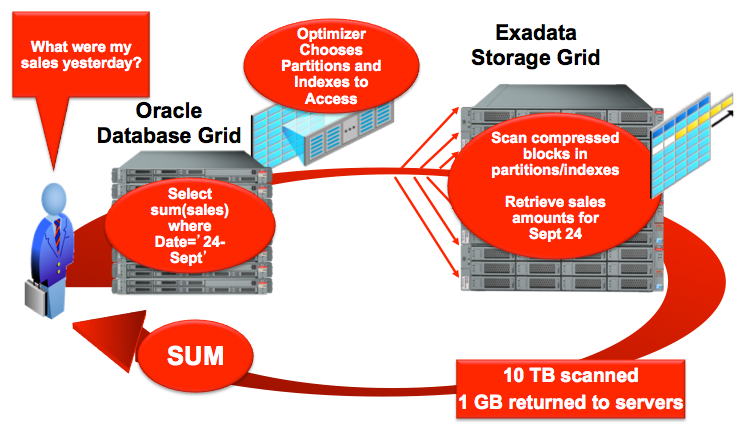
Screen Shot 2018-02-09 at 2.20.45 PM

It’s important to note that this is ONE SIMPLE EXAMPLE that shows how query offloading works.  Complex queries that involve querying and filtering data will have operations offloaded into the “active storage” layer of Exadata for processing.  Query logic is moved to the data rather than moving data to the database server to be operated on by the query.

Exadata storage processes SQL fragments (component pieces of SQL statements) that are derived from the SQL execution plan.  The Exadata storage then returns data to the database server in what is known as “row source format”, which is a subset of both rows and columns from the underlying table.  As discussed previously, Exadata has an extremely high bandwidth, low latency storage network.  SQL Offloading means than Exadata also places less demand on this storage network than other architectures.

Active Storage – Cell Offload

Exadata has what can be described as an “Active Storage” layer, which means that database processing of all sorts happens within the storage layer.  All other storage products in the market are what Oracle calls “block servers” that simply accept and process requests for I/O on database blocks or ranges of blocks.

The “Active Storage” layer of Exadata will act as a “block server” in some cases, but it is also able to process higher level commands from the database engine.  Some examples of the “active storage” capabilities of Exadata include the following:

  • SQL Offload
  • XML & JSON Offload
  • RMAN Backup (BCT) Filtering
  • Data file vs. REDO I/O Segregation
  • Encryption/Decryption Offload
  • Fast Data File Creation

Oracle has pushed numerous database functions into the storage tier on Exadata, leveraging the “active storage” capabilities of the platform to provide higher performance than can be achieved on any other platform.

All-Flash disk arrays cannot achieve the performance that Exadata delivers, simply because that fast Flash sits behind a slow network.  Even though Exadata has the highest bandwidth, lowest latency network in the industry (exceeding the speeds of Fiber Channel SAN networks), it’s simply not enough to overcome the laws of physics and “speed of light” limitations.  Cell Offloading moves LOGIC to DATA in order to take full advantage of the I/O capabilities of Flash.

To give an example of the horsepower available in the Exadata storage layer, the standard fractional configurations of Exadata (Quarter, Half, and Full Racks) deliver an additional 87.5% more processing power in the storage tier for each core in the database tier.  For example, a standard “fractional” full rack of Exadata X9M-2 has 512 processor cores in the database tier, and 448 processor cores within storage.

Massively Parallel Processing (MPP)

Some of Oracle’s competitors still highlight their “shared nothing” architecture and the fact that Oracle database (on non-Exadata platforms) is a “shared everything” architecture.  This has often risen to the level of a religious war, with some people claiming that Exadata isn’t really (truly) a Massively Parallel Processing (MPP) platform.

For some background, consider this…

In a shared nothing design, each node of an MPP cluster owns a set of data and handles all processing of data that resides on that node.

In a shared everything design, each node of the cluster can access all data, and data can be processed on any node.

While the Oracle database on non-Exadata hardware is a “shared everything” design, Exadata is really a hybrid of both approaches.  Each Exadata storage cell owns a set of data and handles all processing on that data.  Database functions that are more data intensive (process large volumes of data) are offloaded into the storage layer.  Other functions of the database are processed in the central core or processing cluster of Exadata.

The argument that Exadata isn’t truly a “Massively Parallel Processing” (MPP) platform is quite silly based on that fact a Full Rack of Exadata has 674 processor cores. If that amount of processing power isn’t “massive”, consider the fact that Exadata can scale to 18 racks wide, or 12,132 processor cores.  One piece of so-called “evidence” that competitors cite is how JOINS are processed in Exadata, but customers need to understand Bloom Filters to understand the implications.

Bloom Filters

Exadata does not directly process JOIN conditions inside the Exadata storage layer, but this does not tell the full story.  Exadata makes use of “Bloom Filters” to facilitate JOIN processing.  Filter criteria from the JOIN is pushed into the Exadata storage tier to filter the data.  According to the processing methodology outlined by Burton Howard Bloom (the father of Bloom Filters), this technique is a probabilistic approach that will return a small percentage of false-positives, but will filter-out the vast majority of non-qualifying data.

Bloom Filters allow Exadata to offload the vast majority of data filtration related to SQL JOIN processing.  While the final process of merging data into a single result set is done on the central RAC cluster of Exadata, the vast majority of processing (data filtration) is performed on the cells using Bloom Filters.

Storage Indexes

Exadata internally generates indexes of data value ranges on Oracle database blocks stored within each Exadata Storage Cell.  These are referred to as Storage Indexes, and allow Exadata to bypass database blocks that don’t contain values specified in the SQL where clause or join criteria.

Storage indexes are often used for secondary index access on the Exadata platform, and often eliminate the need for secondary b-tree indexes.  Oracle recommends that customers create PRIMARY KEY and UNIQUE KEY indexes where required to enforce uniqueness.  Oracle also recommends that customers create Foreign Key Covering Indexes because those will represent the most likely access paths.  However, beyond those simple indexing rules of thumb, Exadata typically will not require additional indexes.

It’s also important to note that PARTITIONS also represent what is essentially a coarse-grained index, and SUB-PARTITONS serve essentially the same function as well.  Beyond basic indexing and data partitioning, Exadata’s Storage Index feature generally provides all that is needed for final data indexing to deliver needed performance.

High Bandwidth, Low Latency Storage Network

Exadata has an internal storage network that provides both high bandwidth and low latency.  This storage network is currently based on RoCE (RDMA over Converged Ethernet), but the specific physical technology used inside of Exadata isn’t nearly as important as what it delivers.  The storage network of Exadata is the “blackplane” of the system, and is isolated from the customer’s data center network(s).  Customers should retain this isolation to make future upgrades of Exadata easier without disrupting the large data center network, and without requiring upgrades to the data center network.  Put another way, customers should avoid extending the RoCE network of Exadata unless absolutely necessary.

The current RoCE network inside of Exadata delivers 100 Gigabits per second, and is bi-directional for overall 200 Gbps.  Bandwidth to and from storage is critical for database operations that involve large data movements, such as data loading (usually for Data Warehouse) and large data extracts from the database (ETL outbound to other systems).  Notice that I didn’t highlight “table scans” in this case, because Exadata uses SQL Offloading as discussed in the previous section.

While I/O bandwidth to/from storage is certainly important for certain database operations, I/O latency is also critical for many other operations.  Single block or single row lookups are examples of cases where I/O latency can be critical.  Even more critical is I/O latency for REDO LOG operations.  Redo log writes are especially sensitive to I/O latency, and even more sensitive when transaction COMMIT is involved.  The DBMS must externalize COMMIT markers to storage before transactions can proceed, so low latency is critical on these types of writes.

Oracle has been a big contributor to the advancement of networking technologies, and Oracle will continue these contributions to the industry.  One example of this is the advent of RDMA (Remote Direct Memory Access), which highly benefits Exadata in terms of I/O latency.
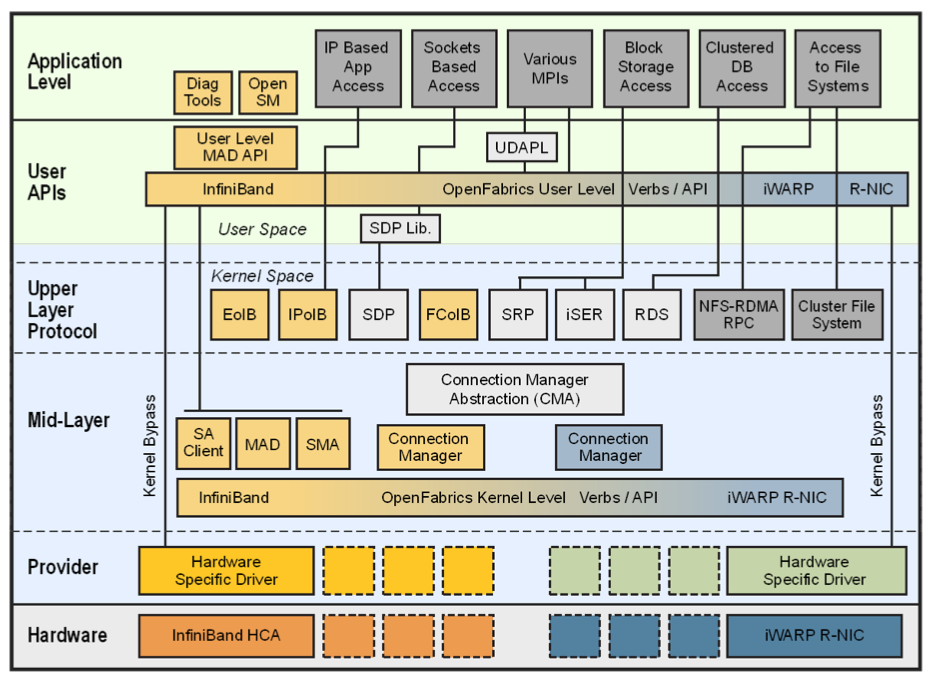
Screen Shot 2018-02-09 at 12.41.19 PM

High bandwidth, low latency access to storage is critical to Oracle database performance, and Exadata delivers these capabilities better than any other platform.  The integration of hardware and software in Exadata are what make this possible.  The following white paper provides an in-depth look at this topic.

http://www.oracle.com/technetwork/server-storage/networking/documentation/o12-020-1653901.pdf

High Bandwidth, Low Latency Cluster Interconnect

Exadata uses a unified network for all internal communication, including access to storage as well as for the cluster interconnect.  The previous section on storage networking within Exadata also applies to the cluster interconnect.  However, most other platforms use a SEPARATE network for storage and cluster interconnect.  All systems that are based on Fiber Channel SAN technology (Storage Area Networks) will have a separate IP (Ethernet) network for the cluster interconnect.

We have seen that the cluster interconnect often provides critical performance advantages in a active/active clustered system.  In fact, the cluster interconnect can be vastly more important for some workloads than performance of the storage network.  We have seen Exadata achieve more than 2X higher OLTP transaction throughput (measured at the application layer) compared to other systems, purely because of the cluster interconnect performance differences.

RDMA Cluster Interconnect

Starting in the X8M generation and continuing with X9M, Exadata uses RDMA (Remote Direct Memory Access) to speed transfer of data between Database Servers across the cluster interconnect. This technology eliminates the typical request/response mode of network communication, delivering ~6µsec (microsecond!) access latencies, which is dramatically faster than other platforms. It is important to note that the Oracle Database Software itself performs these RDMA calls to transfer database blocks between nodes of the cluster (in a secure manner of course!), which is yet another example of the tight software/hardware integration on Exadata.

Fast Node & Cell Death Detection

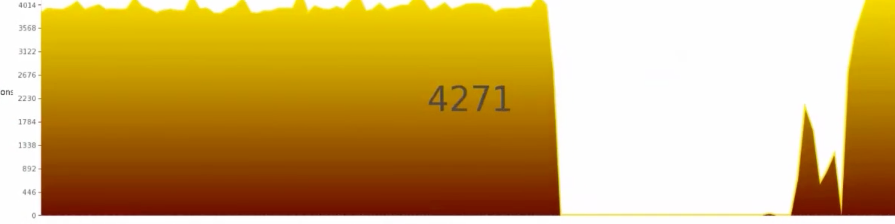
The typical cluster interconnect network uses standard IP (Internet Protocol) over ethernet, which is high performance and supported across virtually all platforms, but brings some disadvantages.  Even in earlier versions of Exadata, the ability of the system to quickly detect failure of nodes within a cluster was hampered by network timeout waits.  The following graph from testing by Oracle’s MAA (Maximum Availability Architecture) team in 2013 shows the issue with node failure detection.
Screen Shot 2018-02-09 at 12.56.35 PM

This graph shows a 30-second delay in transaction processing, while the system waits for network timeouts before it can determine that a node has died.  The full video by Oracle’s MAA team can be found on Vimeo at this link (HERE).  Other platforms might seen network timeouts lasting as long as 120 seconds, which can be a significant business impact on large scale systems.  While Exadata was certainly better than other systems back in 2013 when this video was produced, Oracle has since improved upon this capability with the Fast Node Death Detection feature.

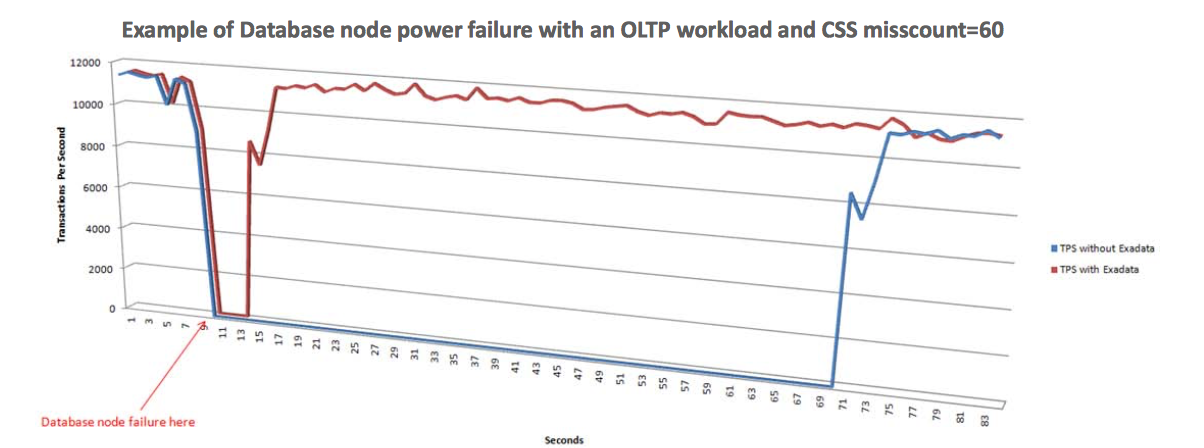
As we said earlier, Exadata is an integrated hardware/software solution, and Fast Node Death Detection is a stunning reminder of this fact.  Rather than relying on network timeouts to determine if a node has failed, Exadata moves the cluster member oversight function into the cluster interconnect network.  The cluster interconnect network is now responsible for detecting the death of nodes in each cluster.  The following graph shows how node death detection is vastly improved.
Screen Shot 2018-02-09 at 1.07.51 PM

This feature also applies to detection of cell death in an Exadata environment, resulting in much faster system reconfiguration and the lowest possible application/business impact possible.

Smart Flash Cache

The best way to understand Exadata’s Smart Flash Cache capability is to first compare it to the “tiered storage” concept used by Storage vendors.  Tiered storage is an attempt to deliver a better combination of price and performance as compared to a single type of storage.  Tiered storage moves “hot” data to faster media, such as moving from spinning disk to Flash storage.  Storage tiering can be accomplished through manual data placement, but some vendors have attempted to automate movement of data between slower and faster tiers of storage, typically with corresponding higher and lower storage density, such as spinning disk versus Flash storage.

Instead of using a “tiered storage” concept, Exadata automatically CACHES data into Flash instead of moving the data.

Write-Back Flash Cache

In the early days of Exadata, the Flash Cache was used to provide improved response for READ operations.  However, Oracle later enhanced this feature to also cover write operations.  Most database writes are done “asynchronously” from end-user transactions, so improving write performance doesn’t always improve application performance.  As long as the Oracle database writer process (DBWR) stays ahead of transactions and clears dirty blocks from the buffer cache fast enough, write operations won’t slow the database.

Although it’s true that most writes are not time sensitive in the Oracle database, write operations do become critical in some cases.  Redo writes in particular are quite sensitive to latency.  See the section of Smart Flash Logging for more information.

TEMP writes occur when SQL statements sort data using an ORDER BY clause, and when the amount of data being sorted is too large to fit into memory.  In these cases, each “sort run” is written from memory onto storage, and those writes should be cached.  See the section on Large Write Caching for more information on this topic.

Beyond redo writes and large writes (especially for TEMP processing), the Oracle database on Exadata can still gain performance through use of write-back Flash Cache.  Use of Write-back Flash Cache requires that ALL mirror copies are cached, meaning that TWO copies of each write are stored in Flash Cache with NORMAL redundancy, or THREE copies are stored in Flash Cache with HIGH redundancy.  Earlier versions of Exadata had smaller capacity Flash hardware.  As “Moore’s Law” has brought larger and larger Flash modules, Exadata now offers an even larger Flash Cache than with earlier versions.

RDMA Capable Cache Using PMEM

Exadata also uses a separate cache to speed single-block I/O that is accessed by the DBMS using Remote Direct Memory Access (RDMA). The current X9M generation of Exadata uses Intel Optane Persistent Memory (PMEM) as the basis of this cache because PMEM provides a memory-addressable location. Exadata Storage Server software determines which database blocks are subject to the highest rates of single-block I/O and places those blocks in a memory-addressable in the storage itself. Oracle Database Software is then able to access those blocks using Remote Direct Memory Access (RDMA), which is dramatically faster than even the fast I/O response Exadata delivers from FlashCache. Customers can expect less than 19µsec (microsecond!) response time for single-block I/O, which is included in AWR Reports (reported as “cell single block physical read” on Exadata or “db file sequential read” on non-Exadata platforms).

Large Write Caching & TEMP Performance

Exadata even caches large writes (128KB and larger) into Flash Cache, taking full advantage of Flash capabilities.  As the hardware has evolved and larger Flash drives have come on the market, Oracle has also evolved the Exadata software to match these capabilities.  For more information on this topic, please see Section A.2.6 of the Exadata manual details (HERE).

Smart Flash Logging – Fast OLTP

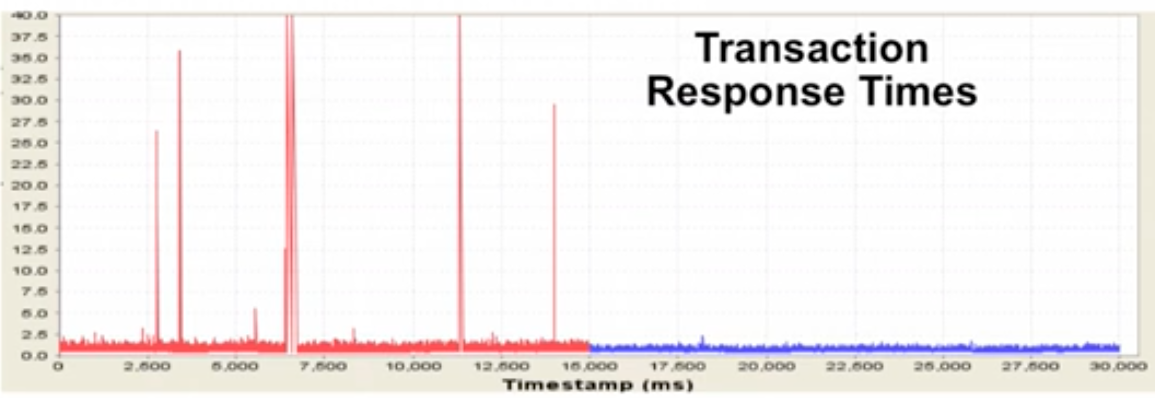
OLTP performance often suffers from spikes in latency of redo log writes.  While average redo write performance might be good, these periodic spikes in latency often have a detrimental impact on overall application performance.  This can be easily seen on systems by looking at AWR historical data.  It’s critical to look beyond the averages and look for spikes, which are often seen in the standard deviation of redo log write latency.  The following graph shows the existence of spikes in redo write response times that impact transaction response, and how these spikes are corrected by this important Exadata feature:
Screen Shot 2018-02-09 at 11.11.49 AM

Using unique hardware/software integration, Exadata is able to treat I/O activity for redo logs in a distinctly different manner than I/O for other database structures.  Exadata knows which I/O’s are highly critical to database performance and treat those I/O’s differently from less critical I/O.  Generic disk or Flash storage technologies lack this tight integration with the Oracle database.  The result is faster OLTP application performance.

Smart Fusion Block Transfer – Fast Clustered OLTP

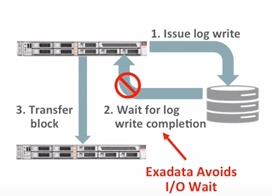
Smart Fusion Block Transfer is an Exadata-specific feature that improves performance of OLTP applications running across clustered database nodes within Exadata.  This feature requires close synchronization of processing within the Oracle database, including how log writes are tracked across nodes within Exadata.  Exadata is able to transfer database blocks across nodes without waiting for completion of redo log writes.
Screen Shot 2018-02-09 at 10.54.36 AM

While this is a highly technical feature that requires deep understand of the inner workings of the Oracle database, customers simply need to understand this feature results in higher performance of OLTP applications on Exadata.

NVMe Flash Hardware

The fundamental architecture and design of the Exadata hardwre allows Oracle to quickly adopt the latest technology innovations as they are introduced into the market.  Exadata internally is a very modular design that can accept hardware revisions more quickly than large, monolithic server designs that come from some Oracle competitors.

The introduction of NVMe Flash in Exadata is only the most recent example of how Oracle has very quickly adopted new hardware technologies to keep Exadata ahead of the competition.  Non Volatile Memory Express (NVMe) is the latest advancement in Flash disk technology.  Rather than essentially “emulating” the behavior of a spinning disk (as can be found in Flash SSD), NVMe Flash uses a protocol that is designed from the ground-up to support Flash.

Columnar Flash Cache

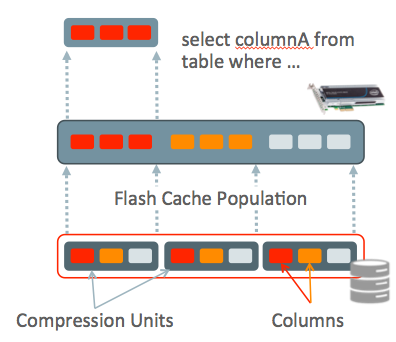
Exadata automatically transforms HCC data into pure columnar format when it places that data into Flash Cache.  Data on disk in HCC format is stored in “Compression Units”, which represent an unnecessary fragmentation of data once it’s brought into the Flash Cache.  The following diagram shows how data is represented differently in Flash Cache without being organized into Compression Units:
Screen Shot 2018-02-09 at 4.23.15 PM

Organizing HCC data into a pure columnar format will increase performance by 5X on queries that access data in the Flash Cache.  This feature also facilitates bring data into the DRAM cache using the In-Memory capabilities of Exadata.

In-Memory Fault Tolerance

The Oracle In-Memory database option is not specific to Exadata, but there are significant advantages to running In-Memory on the Exadata platform.  Chief among these advantages is the Exadata specific In-Memory Fault Tolerance feature.  The following diagram shows this feature graphically:
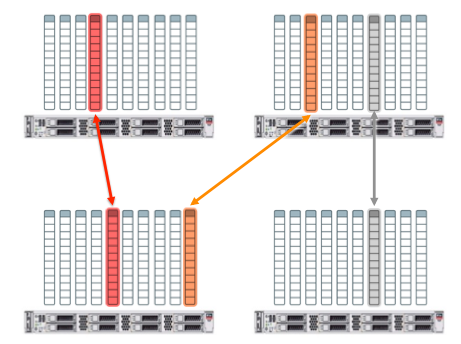
Screen Shot 2018-02-09 at 4.28.41 PM

In-Memory Fault Tolerance means that data can be effectively mirrored across nodes of the database cluster inside of Exadata.  This feature gives customers more options for using the DRAM buffer cache on the nodes of the cluster.  In the event of a node failure, the contents of another node can be used to satisfy the query.

Adaptive SQL Optimization

Although not exclusively an Exadata feature, Adaptive SQL Execution is extremely critical for Exadata, since the majority of Oracle Data Warehouse deployments have moved to the Exadata platform.  Version 1 of Exadata was exclusively targeted at Data Warehouse deployments, and many Exadata features remain firmly targeted at Data Warehouse workloads.  Adaptive SQL Optimization applies specifically to the optimization of highly complex SQL statements.

The Oracle database engine was originally designed for OLTP (prior to Oracle 7.1.4), and the OLTP heritage was apparent in how it optimized SQL statements.  The Oracle SQL optimizer originally operated in a single-pass manner.  As the term implies, the optimizer would execute once at the start of each SQL statement execution, evaluating a limited number of SQL execution plans.  We could play with things like the maximum number of execution plan permutations, but the SQL optimization would only occur once.  SQL optimization needs to happen quickly, and generally in less than around 250msec, or it will appear to users as a performance problem.

Adaptive SQL Optimization means that it’s no longer a single-pass operation.  What generally happens is that the SQL plan is accurate to a certain number of levels, but intermediate result set cardinality estimates can be inaccurate with highly complex queries.  The cardinality (number of rows) in an intermediate result set will often determine the access path of the next level in the query plan.  If Oracle detects a significant variation in the actual vs. estimated intermediate result set cardinality, the SQL statement will be re-optimized on the fly.

Of course the fundamental accuracy of SQL execution plan selection is highly dependent on optimizer statistics.  Adaptive SQL Optimization should help to overcome issues with stale optimizer statistics, but a better solution is to gather proper statistics in the first place.  Fortunately, Exadata helps with statistics gathering as well.

Exadata Aware Optimizer Statistics

The Oracle SQL Optimizer is well aware of the capabilities of the Exadata platform.  Optimizer statistics are gathered using the DBMS_STATS package, and those statistics consider the capabilities of Exadata.

DRAM Cache in Storage

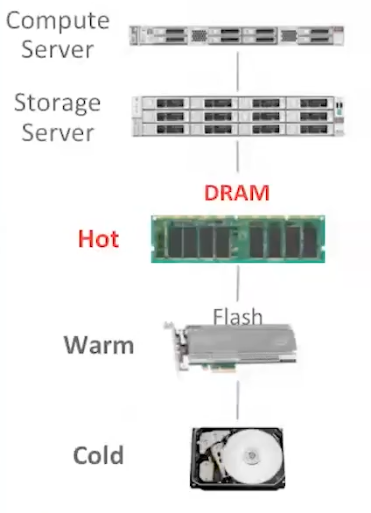
While Exadata Smart Flash Cache has been around since Version 2, the latest versions of Exadata also use DRAM for caching data at the storage tier.  While the Exadata Smart Flash Cache was already fast, the new DRAM caching at the storage layer provides an additional 2.5X faster data access.
Screen Shot 2018-02-10 at 11.49.55 AM

As shown above, the DRAM cache in Exadata storage provides another layer of automatic data caching to speed execution of database I/O, especially for OLTP applications.
12 Years Later, an Exadata 4X Larger than the biggest Amazon can offer

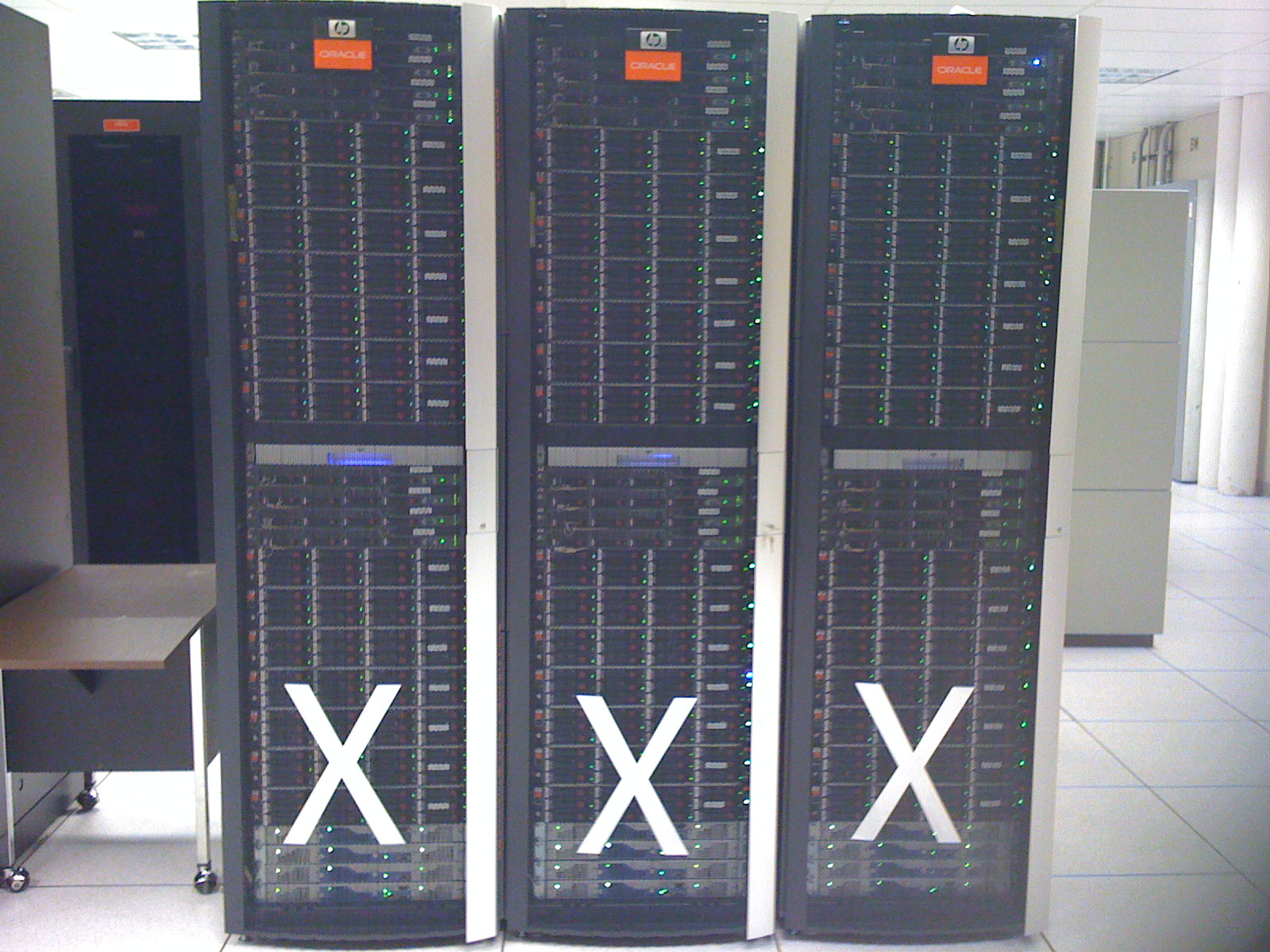
I ran across this photo from 12 years ago and got to thinking it’s still more than 4X larger than the largest system you can construct for an Oracle database on Amazon’s RDS (Relational Database Service). This is a single Exadata Version 1 system spanning 3 data center racks.

Exadata Version 1 – Triple Rack System

This was one of the first systems I had seen at a customer site and it was a triple-rack configuration.

  • 3 Data Center racks wide
  • 528 CPU cores
  • 504 disk drives
  • 226 Terabytes of storage

Of course the latest Exadata systems are much more powerful than this, but it’s stunning when you realize that Amazon cannot match even 1/4 of this machine from 12 years ago. The largest Oracle database you can run in Amazon is around 50 Terabytes. The largest number of CPU cores you can have in Amazon is 64 cores, but that system (db.x1.32xlarge) will cost MORE than Exadata Cloud Service!

Microservices, Sharding and Consolidation with Oracle Database

As the #1 database leader overall, Oracle is also the best database for microservices architectures and the best database for sharding. Microservices and Sharding are application development and data modeling decisions. Whether to consolidate those databases and how to consolidate them is a “macro-level” infrastructure management decision. In this article, we will explore these topics:

  • Microservices Design Pattern: Database Per Service
  • Sharding: Subdividing a Large Database into Shards
  • Why Isolate Databases?
  • How to Isolate Databases
  • Don’t Over-Isolate: Limit Virtual Sprawl
  • Stop Noisy Neighbors: Use Resource Manager
  • Use Resource Shapes for Simplicity
  • Reducing Blast Area Still Means a Blast!
  • HA is Still Important With Microservices & Sharding
  • Data Driven Apps: Benefits of Converged Database

Oracle is a Converged Database, providing the full range of database capabilities for modern Data Driven Applications. Oracle Database provides industry leading capabilities that exceed what point-solution databases can deliver.  You can deploy Oracle Databases as separate, dedicated databases supporting specific applications or microservices, or consolidate them to make more efficient use of system resources and administrative staff. Oracle Database can scale much larger than other databases, but can also scale-down to handle even the smallest microservices or sharding needs.

Microservices Design Pattern: Database Per Service

The Database Per Service Design Pattern says that each microservice has it’s own “database”, which means a collection of data and does not necessarily refer to a dedicated Oracle Database. In fact, (as outlined by Chris Richardson here) there are 3 ways for each microservice to have it’s own set of data as follows:

  • Private Tables per Service
  • Schema per Service
  • Oracle Database per Service

Each microservice has it’s own set of data, and that data is only accessed through API’s belonging to the microservice. Whether a particular microservice has a set of tables, a dedicated schema, or an entire dedicated database generally depends on the SIZE of data, volume of activity and need for isolation. Microservices with larger amounts of data will tend to have their own databases, whereas smaller amounts of data and activity would argue for a dedicated schema or even simply a number of tables within a schema. Of course an Oracle Database can be a stand-alone database, but multiple databases can also be combined together as Pluggable Databases within a Container Database. We will look at this and other isolation topics in later sections of this post.

Sharding: Sub-Dividing a Large Database into Shards

I have worked on multiple applications where we sub-divided a massive logical database into many physical Oracle databases going back to the 1990s. The sharding concept is really nothing new, but Oracle Database now offers Sharding as built-in, out-of-the-box services that make building sharded databases and applications much simpler. Sharding features are built into the Oracle Database so that application developers don’t need to implement those features in application code.

At the end of the day, when you shard a database into multiple smaller pieces, you still have the same amount of data. If you shard a 70TB database into 10 shards of 7TB each, it’s still 70TB. If you shard that data into 100 shards, it’s still 70TB. Oracle is the KING of managing massive amounts of data, and it doesn’t matter if that’s 1 database or 100.

The point of sharding is that each database will be smaller and therefore easier to operate. You can then isolate those databases in order to improve operations.  Let’s look at WHY it’s sometimes necessary to isolate databases, then we will look at HOW to isolate them.

Why to Isolate Databases

Multiple microservices can reside within a single database, or might have dedicated databases (or Pluggable Databases within Containers), while shards are always spread across databases. Once microservice databases and shards are defined at the database layer, there are 5 factors that govern why those databases need to be isolated vs. consolidated as follows:

  • Administrative Separation
  • Security Separation
  • Maintenance (patching and upgrades)
  • Blast Radius (scope of failure impact)
  • Resource Management

Administrative Separation refers to organizations that have multiple DBA teams or other needs to separate databases from an administrative standpoint. This is also common in SaaS (Software as a Service) providers, where customers of the service provider have administrative access, or the service provider has separate teams that administer databases. In either case, the multiple administrative teams means those databases need to be isolated from each other.

Security Separation refers to use of dedicated networking infrastructure to service specific databases (quarantine LAN, etc.), and subjecting certain databases to higher security standards such as for regulatory reasons (HIPAA, PCI, PII, etc.). Databases must be isolated in cases where security requirements differ widely between them.

Maintenance considerations include patching and upgrades of servers, databases, and any supporting infrastructure. As microservices are consolidated together more closely, any maintenance must be coordinated among those microservices and testing is often required to ensure compatibility. The biggest concern with maintenance is major version upgrades at the infrastructure layer (O/S, database, etc.), where there is greater potential for functional changes that might impact how services operate.

Blast radius (or fault isolation) considerations refer to the scope of impact any failure has. An outage of any single microservice can jeopardize the function of the application as a whole. However, smaller databases can be repaired more quickly than larger database, so limiting the scope of impact can result in faster service restoration during a failure.

Resource Management refers to ensuring each database receives the resources it requires, as well as guarding against the “noisy neighbor” problem. One approach to resource management is to isolate databases onto dedicated physical or virtual machines, but we recommend to simply use Oracle Resource Manager instead.

How to Isolate Databases

In addition to the reasons why to isolate databases, there is also the question of how the Database per Service Design Pattern and sharded databases are deployed at the physical infrastructure level. With Oracle, we have 4 options for how to isolate databases as follows:

  • Dedicated Physical Servers per Database
  • Dedicated Virtual Machine per Database
  • Multiple Databases per Physical/Virtual Machine
  • Multiple Pluggable Databases Per Container
  • Oracle Resource Manager (DBRM & IORM)

We need to make sure developers have the autonomy they’re looking for, but then balance how they are deployed in the infrastructure. Managers of the infrastructure must determine how and when to isolate vs. consolidate databases. Excessive isolation such as the “one database per virtual machine” approach results in high cost of operation, so we recommend a more balanced approach.

Don’t Over-Isolate: Limit Virtual Sprawl

Data Centers in the past often suffered from sprawl (physical sprawl), where each application and it’s database(s) ran on their own physical servers. Virtual Machine technology has allowed IT organizations to stem the tide of physical sprawl, but this has often resulted in virtual sprawl. Increasing compute and storage density has also allowed more workload to be laid on top of the same physical footprint, using virtualization to maintain the same (or even greater) isolation between workloads.

You will quickly build an administrative nightmare if each microservice uses a dedicated database, and if each database uses a dedicated Virtual Machine. You can easily meet the needs of your application developers by taking a more judicious approach to deploying databases by using the full range of options at your disposal, using the right tool for the task such as using Oracle Resource Manager to manage resources.

Stop Noisy Neighbors: Use Resource Manager

There is no reason to isolate Oracle Databases simply for the purposes of resource management. We can easily ensure each database receives the appropriate amount of resources using Oracle Database Resource Manager (DBRM).  There are 4 primary resources that need to be managed in any system:

  • CPU
  • Memory
  • Processes
  • I/O

CPU is managed using Oracle Database Resource Manager (DBRM), using shares & limits inside of a Container Database, Instance Caging (CPU_COUNT) across containers and non-pluggable databases, and within databases using Consumer Groups.  DBRM gives us control of ALL types of databases and workloads, and it’s integrated with IORM (see below for detail).

Memory usage for Oracle databases is managed by controlling SGA (System Global Area) and PGA (Process Global Area) settings.

Processes within Oracle databases are managed by controls for sessions and parallel query servers.

I/O resources are much simpler to manage on Exadata because we have IORM (I/O Resource Manager). Exadata is integrated hardware and software, spanning both compute and storage. Using IORM Objective “auto” allows IORM to inherit the same resource ratios set for CPU in DBRM, so you have one set of controls that handles everything.

See our demo series on Resource Management (starting here) that shows how you can manage resources between pluggable databases, between container databases and non-pluggable databases, and even within databases using Consumer Groups.

Use Resource Shapes for Simplicity

Of course we recommend establishing a standardized set of “resource shapes” to choose from rather than making each database a unique and special snowflake. It’s much easier to manage a large population of databases if they all follow some standards, including the resources assigned to them. Using Resource Shapes means you establish shapes with the same ratios for the following resources:

  • CPU
  • Memory (SGA & PGA)
  • Processes (Sessions & PQ Servers)
  • I/O

I covered this in detail in the MAA Best Practices white paper on Database Consolidation available here. The white paper includes different allocations for DW vs. OLTP databases, so you’ll see 2 different tables of Resource Shapes. DW systems need larger PGA memory and more processes are devoted to parallel processing than on OLTP systems.  You will see those differences in the resource shape tables.

Reducing Blast Area Still Means a BLAST!

Reducing the “blast area” by dividing the data by each microservice and sharding large databases doesn’t ELIMINATE the blast (meaning “failure”). What a smaller blast area gives you is pieces that are smaller and easier to fix (because they are smaller). It’s also important to realize that a piece of an application dead in the water is still dead in the water.  If that piece of the application (a microservice) is critical, the entire application might also be dead in the water.

Sharding is another design that reduces the “blast area” of a failure, but an outage of a shard is still an outage.  It’s just easier to fix because it’s smaller, but it still needs to be fixed! In the best case scenario, you have SOME of your users dead in the water because the data they need (and the microservice) isn’t available.  In the worst case scenario, you will have some microservices or portions of your application that need ALL of the shards available for it to function, and those portions of the application are dead in the water.

In short, reducing the blast area doesn’t necessarily increase availability, but might help in reducing the duration of an outage.

HA is still Important with Microservices & Sharding

High Availability (HA) systems are still important, even for microservices and sharded databases. There can still be a “blast” that takes down a database, which takes down a microservice or shard, which will impact at least some of your users if not all of them depending on how your application uses that data.

Just because you have things broken down into small pieces doesn’t mean there’s no impact of an outage on any piece. It’s still important to provide HA, which we do with these tools:

  • Core HA Features of Oracle Database
  • Oracle Real Application Clusters
  • Oracle Active Data Guard
  • Oracle Application Continuity

Core HA features of Oracle Database have become something that we almost don’t even consider these days, but are still huge differentiators compared to other databases on the market. Oracle experts often take for granted things like online index rebuilds, online table move, and other features that have been developed over the years. I am often surprised to find other databases haven’t caught up, and some of the newer database engines are still years behind.

Oracle Real Application Clusters (RAC) is still unique in the market after all of these years. We often think of RAC for scalability, but it’s a huge part of the Oracle Database availability solution as well.

Oracle Active Data Guard is the Oracle solution for providing Read Replicas  (or “reader farms”), but it’s also a critical part of the Oracle Database availability solution. Active Data Guard provides for availability when a “blast” (failure) occurs, but it’s also used to provide availability during proactive maintenance.

Oracle Application Continuity hasn’t gotten enough press over the past 5+ years, but it’s yet another completely unique capability that Oracle offers. People seem to remember TAF (Transparent Application Failover), but Application Continuity is a completely different animal.  TAF required application code changes, while AC has essentially pushed much of that complexity into the SQL driver for Oracle.

Oracle Database has long exceeded the capabilities of applications, and Application Continuity closes the gap. Applications need to tolerate rolling outages of a RAC Cluster, and Application Continuity is what makes this happen. Application Continuity is implemented through CONFIGURATION changes, not within application code.

Data Driven Apps: Benefits of Converged Database

The Oracle Converged Database brings a number of critical advantages for data driven applications compared to point-solution databases.  See Juan Loaiza’s talk on Data Driven Apps at OOW London 2019 for a great talk on this topic. Although point-solution databases are sometimes referred to as “best of breed”, many of them don’t live up to that claim. You would suppose a database with a narrow focus might do that job better, but that’s not necessarily the case. The Oracle Converged Database advantages include:

  • Data Modeling Flexibility
  • Simplified Data Movement
  • Portable Developer Skills
  • Increased Developer Productivity
  • Any Workload, Any Data
  • Simplified Consolidation & Isolation
  • Any Size, Any Scale

Data Modeling Flexibility comes from having a single database that provides the full range of data modeling needs. While developers might make the perfect decision and choose the exact point-solution database needed, requirements often change. A development team might choose a relational database, only to find that some data really needs a different modeling approach such as JSON Documents.

While Oracle Databases can be deployed using a SINGLE modeling technique (Relational, Document, Star Schema, Property Graph, etc.) you can also use MULTIPLE modeling approaches within the same Oracle Database. I have worked with data that didn’t fit easily into the relational model, so it’s great to be able to use JSON Documents or another technique that fits better for certain portions of your data model. It would be a huge pain (show-stopper really) if you had to switch databases or use another database for a small component like a single microservice.

Simplified Data Movement comes from using the same Oracle Database on both the sending and receiving side. That data movement is made vastly easier if the data resides with a single shared database, but is easier between Oracle Databases because both databases use the same tools, same drivers, same datatypes, etc. Data movement can be completely eliminated in cases where applications share the same data, such as combined OTLP and Reporting in a single database (yes, this is possible and quite common with Oracle). Data Movement can also be quite costly in Cloud environments, which is another benefit of using Oracle Converged Database rather than multiple point-solution databases.

Portable Developer Skills are a key benefit of the Oracle Converged Database, allowing developers to work on ANY microservice or application that uses the same database without extensive re-training. Developers who write analytic or Data Mining code can easily move into a development team working on transactional applications or vice-versa.

Increased Developer Productivity comes from having a common set of interfaces for all databases, regardless of what features are used within each database. Any feature provided by the database represents code that DOES NOT have to be written by a developer.

Any Workload, Any Data includes traditional OLTP and Analytic applications, but also includes Machine Learning, block chain, property graphs, Time Series analysis, Spatial, Internet of Things, and Event Processing. Oracle Database includes robust capabilities in these areas that have been proven over many deployments at customer sites worldwide.

Simplified Consolidation & Isolation comes by having databases that all run the same Converged Database. Administrators have the flexibility to isolate databases where needed, or consolidate them to ease the administrative burden as well as to improve resource efficiency. Oracle Databases can even be consolidated into a Container Database, for much greater density and lower cost of operation. Yes, this also applies to Cloud environments, where costs can easily escalate. The bottom line is you simply can’t do this with multiple divergent database engines such as one for Relational OLTP, one for Relational Star Schema DW, one for JSON Documents, etc.

Any Size, Any Scale database or workload can be handled by Oracle Database. It’s amazing to me that other databases haven’t caught up to Oracle after all these years. We still encounter customers who are faced with a database migration (to Oracle) because their chosen database engine simply can’t keep up. Oracle Database is able to easily support databases at least 10X larger than our competitors can handle, and the Exadata platform simply takes that number higher.

Microservices and Sharding increases the number of databases, while also reducing the maximum size of databases, but it’s great to know your can scale a database without worry if it’s running Oracle Database. You have time to adjust if you need to re-shard your databases or if your microservices databases grow unexpectedly. Having size limits that are 10X or even 100X higher than other databases gives you flexibility.

Microservices and Sharding DO NOT reduce the overall amount of data! In fact, the volume of data can increase somewhat if you’re duplicating any data across microservices or shards. In any case, the volume of data certainly isn’t less.

Summary

Oracle Converged Database gives you flexibility to deploy databases as needed, using microservices and sharding. Oracle is the #1 most widely used database overall, but also the #1 most widely used for microservices and sharding. Oracle Databases can be easily consolidated or isolated as needed to meet the needs of modern Data Driven Applications.


NoSQL Improved Upon Record Based Databases

NoSQL databases (known as key/value, key/JSON, or “document” database) provide data that is self-describing, which is a huge improvement compared to older “record-based” databases. NoSQL databases are often compared to (purely) relational databases, but this is primarily because relational databases hold the biggest market. Record-based databases are really a non-entity these days, so there wouldn’t be much benefit in trying to “compete” against them.

The best comparison of NoSQL is against record-based databases.

Record Based Databases

Old fashioned “record-based” databases contained the data, while the structure of data was contained within the application. The database would contain a set of data values such as the following:

123, Chris, Craft, 123-555-1212

The application would know that these data attributes were as follows:

Record Key, First Name, Last Name, Phone Number

The application would typically contain a structure definition for the language the application was written in. If you go back far enough in history, this would have been Assembler or possibly COBOL language. The C/C++ language(s) would have used a struct contained in a header file.

This was fine in the days when ALL of the application code that touched the data was written in the same language. It was a huge pain when multiple applications accessed a common record-based database using different languages, such as a COBOL application that created data, and a C/C++ or Java application needed to access the same data. Someone needed to maintain structure definitions that were in-sync with each other, and it was a huge problem when changes were made to the structure.

Record-based databases included things like VSAM and ISAM. Neither of those databases used SQL, so they would certainly fit the definition of a NoSQL database. I realize the NoSQL people in this world aren’t thinking of VSAM and ISAM to be part of their orbit. Of course that’s a basic problem with the “NoSQL” term itself. Anything defined by what it’s not is very poorly defined.

Self-Describing Data

NoSQL databases typically contain self-describing data. JSON (Java Script Object Notation) is the most commonly used form of self-describing data, but there are other forms as well including XML. Rather than describing data in a struct within the application code, those structure definitions are kept within the data. The database provides a single source of truth for data structure, but also allows for much simpler modification of the data structure and code that access the data as the application and database evolve over time.

A JSON structure matching the previous example might look like this:

{
    "recordkey":"123",
    "firstname":"Chris",
    "lastname":"Craft",
    "phonenumber":"123-555-1212"
}

Of course every single record contains the field names, which consume more storage than the data in this example. Storage is cheap these days and we have much greater processing power than years ago, so there isn’t as much “data pressure” that would force us to define the structure inside the application. The reduction of “data pressure” allows us to use a method that’s less storage efficient to gain advantages in the application development side.

Data Pressure Considerations

The term “data pressure” essentially refers to the cost of storage and the cost of processing larger and larger volumes of data.  Record-based database were extremely efficient in terms of the space they required and compute power to process that data. Less data volume meant less data store and less data to process, so nobody would have considered making data self-describing.

Record-based databases were never self-describing because that simply was not practical decades ago. The cost of storage was simply too high and putting data descriptions into the data itself would have resulted in a huge amount of data duplication (duplication of the data definitions stored within each record), and there would not have been enough compute power on earth to work with that data.

Comparing NoSQL to Relational

NoSQL databases are more about the structure and representation of data than about the  absence of SQL language. Part of this is the same issue of object/relational impedance mismatch that has been around for decades. The rise of object-oriented programming resulted in application code that simply didn’t fit well with data modeled relationally.

Oracle Database supports Key/JSON

The SQL language does not work only with relational data. We can certainly use SQL to access a 2 column table containing a KEY (column #1) and JSON structure (column #2). Oracle Database includes the ability to model data in key/JSON format. Oracle databases might contain nothing but key/JSON data, some relational and some key/JSON, or JSON can be used to extend a relational model.

Oracle is a Converged Database

Oracle Database is a called a “converged” database because it supports virtually any data modeling approach and supports virtually any workload, all within a single database or deployed as separate databases.  Oracle is a multi-model database that supports relational, graph, time series, key/JSON, row-oriented, column-oriented (on Exadata), Geospatial data, normalized models, dimensional models (star schema, snowflake schema, etc.) and others.  Oracle Database supports all workload types including OLTP, DW, and IoT within a single database.

Oracle database uses the SQL language to process what some consider to be “NoSQL” format data (like JSON).

All Data Has Relationships

All data has relationships to other data. You can easily see this by simply looking at any piece of data.  All data has relationships to other data such as:

  • Customers place Orders
  • Orders are for Products
  • Products are in Warehouses
  • Warehouses have Employees

The list of relationships goes on and on, ad infinitum. Ensuring relationships are tracked is critical to data integrity. What happens if a customer orders a product that doesn’t exist? What happens if products go missing from a warehouse?

Databases Simplify Applications

The raison d’être for databases has always been to simplify application code. Anything done by the database is something the application code doesn’t have to handle. The basic functions of a database through the history of IT has been these:

  • Preventing Data Loss
  • Controlling multiple user access to data
  • Enforcing data values are correct
  • Ensuring data relationships are valid
  • Data Security

These functions have been done by databases for decades because it simplifies application code.

Preventing Data Loss

Databases protect data, which is the lifeblood of an organization. Preventing loss of data has been key to survival even in the days of paper records and stone tablets. Electronic records are subjected to loss from a wide variety of failures, and databases are responsible for providing protection against these failures. Data loss might mean loss of the ENTIRE database, but also means changes from one user getting destroyed by another user.

Controlling Multiple User Access to Data

Without databases, applications would face extreme complexity in controlling access to data by multiple users. Access to data includes reading data, but also includes changing that data. Applications would be horribly complex without the concurrency controls provided by databases. Users also shouldn’t have access to changes made by others until those changes are complete.

Enforcing Data Values are Correct

The correctness of data values includes enforcing number attributes contain numeric values, date attributes contain valid dates, JSON strings contain valid JSON, GPS locations are valid locations, countries are valid countries, etc. Without this enforcement by the database, errors in application code will introduce corrupt data, which will have a cascading impact on other application code. If the database contains an order date of February 30th, that’s clearly wrong and it’s difficult to determine how that value got inserted into the database. It’s much better to catch that when it happens and prevent the change.

Ensuring Data Relationships are Valid

Relationships represent a special class of data values that are enforced by the database. This goes to the heart of why databases were created, and why the relational database became the leader. Hierarchical databases could only enforce certain data relationships. Network databases were a little better, but also had limitations. Relational databases (invented by Edgar F. Codd) provided much greater capability to model data relationships and ensure those relationships were reflected in the data.

Data Security

Of course databases play a central role in the security of data, including who can view data as well as who can make changes to data. This includes not simply access to the entire database, but down to individual attributes as well. There are different access controls over who can view customers, who can change customer data, and who can view or change customer addresses and credit cards.

All of this complexity can be pushed into the application code, but we often want separate data access controls enforced by the database. The principal is known as “defense in depth”. Fort Knox has the gold inside a vault, inside a building, surrounded by a fence, patrolled by guards. You certainly wouldn’t want a Fort Knox with the gold sitting in the middle of a field with guards running around trying to protect it. Defense. In. Depth.

Normalization & Denormalization

Data often begins in a denormalized form or at least we often start to think about data that’s not normalized, so we typically “normalize” the data when designing a relational data model. We then “de-normalize” data primarily for performance reasons. One example might be phone numbers. Customers often have multiple phone numbers such as home, work, and cellular phones.

In a normalized data model, each of a customers’ phone numbers would be stored in separate rows of a phone number table related to the customer. However, that means accessing extra rows of data when you want to show them all. To improve performance of accessing ALL of the rows, we might simply put separate home, work, and cellular phone numbers on the customer table. However, what happens when a customer has 2 cell phones?

Phone numbers are a great case for the combination of JSON within an otherwise relational database.  Rather than modeling N number of phone numbers in the customer table, we might create a PHONE_NUMBERS column as a JSON structure.  That design allows a variable number of phone numbers for each customer.

Database Optimization

I heard someone say recently that relational databases aren’t optimized for anything, which is a complete misrepresentation of reality. Every table in a normalized relational data model should have a primary key. That primary key will have an index. Access to a row of data through the index is “optimized” and will give good performance.

The database “engine” does not provide the logical structure of data. Database “engines” (historically) have not automatically generated indexes beyond those needed to enforce constraints such as primary keys and unique keys. Building of secondary indexes (those beyond what’s needed to enforce constraints) has always been the responsibility of the database administrator, data modeler, or application developer. So yes, in a sense the database is not “optimized” out of the box if you don’t optimize it!

Oracle Autonomous Database is the first on the market that is doing this sort of optimization and automatically handling what has traditionally been the responsibility of the DBA, data modeler, or application developer.

Cloud Databases: All-Inclusive vs. Purpose-Built?

Does the emergence of the Cloud mean that “purpose-built” databases make more sense, or is an All-Inclusive database still the best choice?

There are multiple purpose-built databases on the market that handle specific types of data, specific workloads, or have some specialized functionality.  Examples of purpose-built databases include:

  • Relational OLTP Databases
  • Relational Data Warehouse Databases
  • Key/Value Databases
  • Time Series Databases
  • In-Memory Databases
  • Graph Databases

Of course there are other examples, but these are the most common.  The majority of OLTP databases are relational, and relational data modeling is the norm for Data Warehouse databases as well.  Key/value databases have gotten more popular in OLTP applications that involve high frequency “store & retrieve” operations on relatively simple and often dynamic structures.  Key/Value databases (using JSON or XML structures) have the advantage of a non-relational data model that can be quite dynamic.  Time Series databases have emerged with a focus on forecasting.  In-Memory databases deliver high performance, and Property Graph databases are focused on relationship attributes.

Screen Shot 2019-06-11 at 1.32.38 PM

Easy Deployment

In the Cloud, organizations can easily deploy multiple divergent technologies, so does it make more sense to use purpose-built databases in the Cloud?  In an on-premise environment, deploying another database means buying and deploying yet another server.  Some Cloud vendors will also provide operational support or a “managed service” for each database, so why not?

Of course it’s not only a matter of deploying the database itself.  Each divergent database engine will require it’s own client-side drivers to establish connectivity.  Each of those clients will require a tie-in to any centralized Identity Management service as well.

Operational Burden

In years past (and with on-premise data center environments currently), OPERATING multiple purpose-built databases was always a big disadvantage.  Each database engine requires an IT organization to build expertise in that engine, deploy servers and storage to run those databases, as well as secure and maintain them all.  Moving to a Cloud environment, some of the operational burden still falls on the IT organization, even if the database is operated as a “managed service” provided by the Cloud vendor.

Security Burden

Each separate database technology represents yet another technology that needs to be secured.  Each database has a different security model, with it’s own unique capabilities and quirks.  Each database can be expected to have it’s own set of security flaws and bugs that need to be tracked and managed for proper compliance.  Even if the Cloud vendor is responsible for applying security patches, the IT organization needs to be aware of the flaws and making sure vulnerabilities are addressed.  Trust your Cloud vendor, but VERIFY they are taking care of security!

Building Developer Skills

Each divergent database technology requires specialized developer skills.  Developers need to build expertise in the data modeling capabilities, the functional capabilities, and the business theories that are involved.  In the case of analytics, this often includes expertise in statistical analysis such as auto-regressive modeling for time-series forecasting.

Islands of Data

Multiple divergent database technologies results in islands of data that often needs to be integrated.  Movement of data between databases takes time and induces lag.  If operational reports are executed only from a Data Warehouse, those reports will be incorrect until data from the OLTP system reaches the Data Warehouse.

Islands of data become a big problem if it’s sub-divided too much, becoming a series of  data islands.  Deploying multiple read-replicas of data also isn’t always a solution to every situation, since those replicas need to be kept updated.  Read Replicas are a great solution for data with effectivity dates, but a very poor solution for data with frequent updates.

Multiple islands of data ultimately induces delays in data updates across applications, modules, or even micro-services if each is using a separate data store.  The most obvious case is the time-delay induced by ETL processing between OLTP systems and Data Warehouse systems.  The time-delay is fine for long-term analytics, but unacceptable for operational reporting.

Islands of Functionality

Of course each purpose-built database includes a set of specific functionality.  If a key/value database is used for the CUSTOMER ORDERS database, it’s a problem if some relational modeling capabilities are needed in that database.

Key/Value databases have been presented as if they were something new, but are decades old. Key/value databases have always been FAST for ingesting data because they are simply storing a structure in a single “write” (or insert) operation.  Some of the earliest databases used a key/value modeling approach, which becomes extremely cumbersome with highly complex data relationships.  What’s new in key/value is the ability to model data structures using JSON or XML, including the ability to ENFORCE the JSON or XML structural integrity.

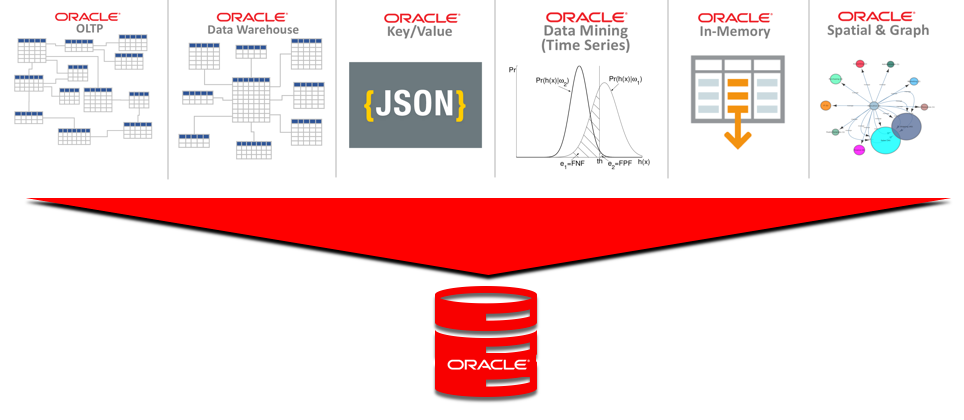
All-Inclusive Database Approach

The All-Inclusive database approach puts all of this functionality into a single database engine.  Developers can use ANY of the available functionality within ANY database instead of having to move the data to a place where the functionality resides.  Developers simply use the functionality in-place.

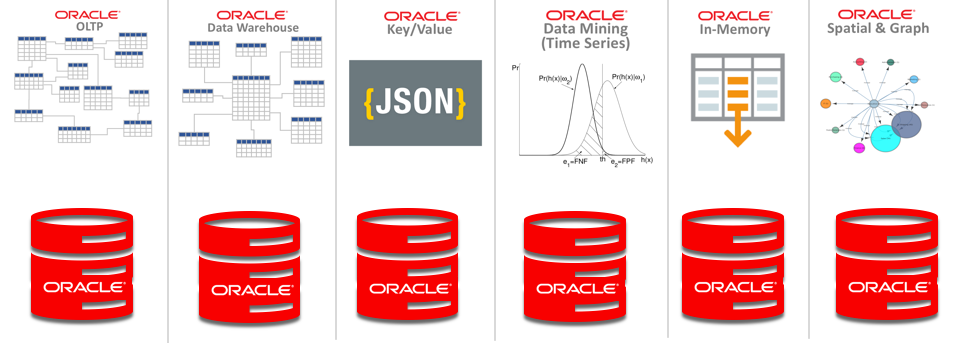
As the following diagram illustrates, Oracle includes ALL of this functionality in a single database engine.  Developers working on an OLTP database can use capabilities of Data Warehouse databases within the same database.  The data doesn’t have to be moved to take advantage of such features.  If data nee

Screen Shot 2019-06-11 at 2.13.39 PM

One Engine, Not One Database!

Notice that this means ONE ENGINE, not one database!  Just because you could put all of your data into a single database doesn’t mean you should.  In fact, you could use separate Oracle databases for each type of data & functionality as follows:

Screen Shot 2019-06-11 at 2.27.49 PM

Of course this approach doesn’t necessarily make sense either.  Nobody does data architecture like this.  Each database is created to handle specific applications or sub-components of an application.  Developers then use whatever functionality makes sense to handle the business needs of that application or sub-component.

Data Architecture

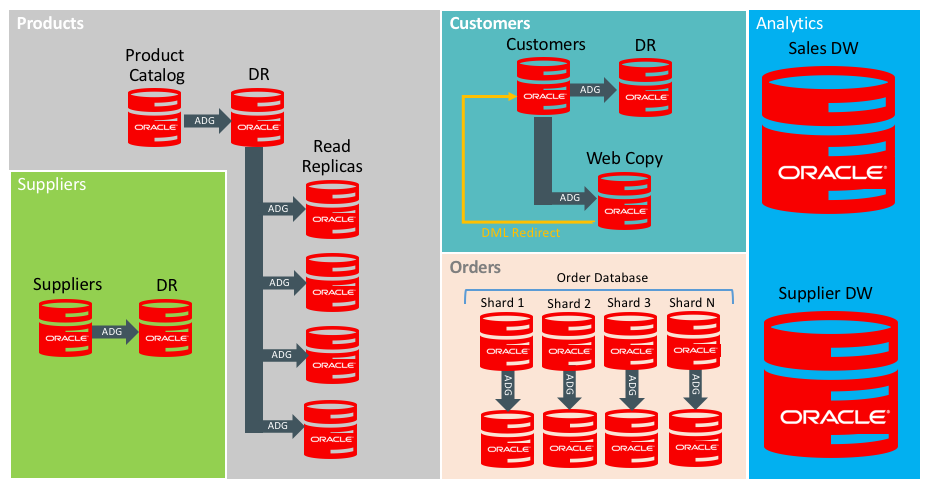
Data Architecture for an organization approaches the problem from the standpoint of business processes and data ownership.  Data architecture should not include limits on data modeling capabilities or limits on how the data can be processed.  Consider the following sample data architecture:

Screen Shot 2019-06-11 at 2.32.15 PM

Notice that Active Data Guard is used for most databases to provide availability, as well as for Read Replicas in the case of the Product Catalog.  Active Data Guard is even used for the ORDERS database, even though it’s a sharded database.  While sharding reduces the failure impact (or “blast area”) of the database, each shard still represents a single source of truth for the range data it contains.

If this data architecture included limitations in functionality, the entire architecture gets much more complex.  For example, the ORDERS database mainly uses key/value data modeling to increase agility into the data model, as well as improving response time.  Submitting an order involves a single WRITE (or INSERT) of a single record that contains a complex JSON structure.  Processing each order means a single READ (or SELECT) of a single row of data containing that JSON structure.  However, if we need a bit of relational functionality within this database, that’s certainly possible.  The main function of the database uses key/value, but developers aren’t limited to just that single data modeling capability.

All-Inclusive in the Cloud

The Oracle database has always been a rather LARGE chunk of code.  It can be hard to install and takes up lots of space.  However, once it’s up and running, Oracle has enormous depth in capability.  My original assumption was that Cloud might tend to favor purpose-built databases.  Of course you will hear that from vendors who lack an all-inclusive database engine of their own.  However, it turns out that Cloud still does favor the All-Inclusive approach.

Islands of data & functionality is still a disadvantage, even in the Cloud.


What Makes Oracle Database Number One?

With more than 30 years on the market, it’s tempting to look back at how Oracle became the number one database, but it’s really more useful to consider why it remains number one. Software engineers need to think hard about committing themselves and their code (the fruits of their labor) to a second-rate database engine.

Oracle is the #1 database in terms of market revenues, at right around DOUBLE the revenues of its nearest competitor. With the rise of open-source “free” software, some have asked whether revenue is still the best measure. Oracle has also dominated in popularity surveys and other attempts to measure market share aside from revenue comparisons. So, the question remains; what makes the Oracle Database number one? What follows is a summary and short discussion of each of these topics:

In short, Oracle is the only All-Inclusive database on the market that brings all of these capabilities in a single package, which allows developers to concentrate on building application functionality rather than working around limitations found in other databases.  We will look in detail of each topic below.

The All Inclusive Database

Oracle is the only all-inclusive database on the market. Oracle started as a relational database, and relational is still an extremely critical part of what it does. However, Oracle also provides the ability to model and PROCESS data using many different approaches, all within the same database.

One of the challenges for software engineers is to use Oracle’s capabilities correctly. Just because you CAN grow a single Oracle database forever doesn’t mean you should. In fact, you should provide some separation between applications at some point. Different applications often work better when the same data is structured differently. For example, OLTP applications typically work best with data modeled in 3rd Normal Form (3NF). Data Warehouse applications work best with Star Schema or Dimensional models. While you could put all of this data into a single Oracle database or even in a single schema within a single Oracle database, it often makes sense to put them into different databases.

If you are going to break apart your applications into separate databases, then why not use so-called “Best of Breed” or “single-purpose” databases instead? First, Software Engineers need to ask whether those single-purpose databases are somehow better than the all-inclusive Oracle database. Just because a database does 1 thing doesn’t make it better. All databases share many layers of common internal functions like caching, storage, transaction handling, connection management, API, security, and client libraries. Oracle has made and continues to make the investment necessary to leverage these common functions to build the multi-purpose, all-inclusive database.

We have seen single-purpose databases come and go over the years, including Object Databases, Columnar Databases, Key/Value Databases, In-Memory Databases, and Document Databases.  Oracle has always taken the approach of incorporating those concepts as features into a single all-inclusive database.  The all-inclusive approach has proven to offer much more powerful capabilities without the complexity of multiple single-purpose databases.  Inclusivity has multiple dimensions including scale, workload, type of data, data modeling techniques and other dimensions as we shall see below.

Database Fundamentals

There are a number of fundamentals that need to be addressed before we get deep into the all-inclusive nature of the Oracle database.  These fundamentals need to be clear because not all database technology on the market has these capabilities.

Structured Query Language (SQL) underlies the Oracle database, and is the fundamental programming interface to access the database.  Oracle supports ANSI standard SQL, and has extensions to the SQL language for features that aren’t included in ANSI standard.

Transactions are a fundamental capability of any database, dating back to the earliest days of computer science.  To be clear, supporting transactions means the database ensures the A.C.I.D. properties of Atomicity, Consistency, Independence, and Durability.  Without A.C.I.D. transaction support, a database simply isn’t performing the proper role of a database.  ACID transactions also need to span the ENTIRE scope of a transaction including everything the transaction modifies, not just a single table or partition of a table.  Transactions also need to extend to all related structures including indexes, and of course Oracle meets these needs.

Availability is a critical attribute of any database.  Unlike application servers, the fundamental purpose of a database is to manage data.  Various techniques exist to distribute and replicate data, but availability is still critically important.  The Oracle database on Exadata is one of the few technologies in the market that has ever achieve AL4 fault tolerance capabilities using Oracle’s Maximum Availability Architecture (MAA).

Programmable database features represent another foundational capability that databases need to provide.  The Oracle database has served as the model that other vendors have followed in the area of Stored Procedures and Triggers.  Some vendors have even patterned their stored procedure language after Oracle PL/SQL.  These capabilities are critical to Software Engineers who need to ensure data integrity in their applications by extending the core capabilities of the database and the relational model.  Stored procedures also play a critical role in support of other functionality such as JSON and XML support.

Backup/Recovery capabilities of the database allow users to protect against hardware failures and logical (application) failures that impact data integrity.  Oracle’s integrated RMAN (Recovery Manager) tool provides an enormous range of database backup/recovery capabilities, including the ability to recover a database to any desired point-in-time (NOT a pre-determined point-in-time) during the past N number of days, weeks, or months.  Oracle’s Flashback Database provides an “time machine” inside the database to provide additional capabilities.  Oracle’s Zero Data Loss Recovery Appliance builds upon RMAN to provide an integrated solution that reduces backup time by as much as 95%.

Disaster Recovery is built into the Oracle database in Oracle Data Guard, which provides the ability to synchronize the database with one or more copies of that same database, either at the local site or at a disaster recovery site.  Oracle’s Active Data Guard also allows the DR site database to be queryable.

All Inclusive – Scale

What is really stunning is the SCALE at which Oracle can operate, especially on the Exadata platform. Many of the largest Oracle databases in the world have moved to Exadata. Software Engineers will notice that Oracle people aren’t impressed by the size of your database unless it’s a few hundred terabytes. I know several customers on Exadata who have databases in the range of 750 terabytes and larger (!) and those are even Hybrid Columnar Compressed! Those databases would be completely unmanageable on a conventional server+storage architecture. These large scale data volumes are routine with Oracle, especially on Exadata.

With extremely large databases, you also get large numbers of users. It’s surprising to think that other databases have never been able to reach the same scale as Oracle in terms of users, connections, or transactions per second. There are several layers of capability that enable this sort of scale, and (again) the vast majority of large scale databases run on Oracle Exadata.

Of course SMALL Oracle databases certainly are not a challenge for Oracle.  The Oracle database can easily store small amounts of data, but management of large numbers of small databases can pose significant administrative burden on a DBA team.  Fortunately, the Oracle Multitenant option allows large numbers of small databases to be consolidated under a single Container Database to reduce the system overhead.  Multitenant reduces use of CPU, Memory, and I/O compared to those same databases running individually rather than combined into a Container Database.  Consolidation density is greatly improved through the use of Oracle Multitenant, and benchmarks have shown consolidation density improvements of 10X or greater.  The largest gains of more than 20X come when comparing Multitenant to Virtual Machine consolidation using one database per VM.

Non-escalating row level locking in the Oracle database is a huge enabler of scale. As a software engineer, you need to consider what this means for your code. Transactions insert, update, and delete rows of data. If two transactions attempt to modify the same data, one of them will wait. Some databases (most of them aside from Oracle) will place locks of entire BLOCKS of data (will escalate the lock to cover more rows) if your code locks too many rows. Those databases might even escalate locks. to cover entire TABLES because they can’t manage large numbers of locks. The locking model is critical, so software engineers need to be concerned.  Oracle’s non-escalating row-level locks are a critical enabler of scale.

Readers don’t block writers, and writers don’ block readers in Oracle, which also enables scale.  Most databases aside from Oracle still suffer from the problem of transactions blocking each other.  Approaches such as “dirty read” are a horrible solution because it means you’re reading BAD DATA.

In short, I am certainly NOT advising software engineers to scale your databases to the moon. In fact, you should certainly break them up if needed. However, you don’t need to be so concerned with database size if you’re using Oracle, especially on the Exadata platform. You certainly should use multiple schemas within a database. You certainly should combine multiple smaller databases into one Container Database using Oracle Multitenant. Just know that the high-end size can go much higher with Oracle than with other databases, and you won’t be stuck re-architecting applications if your data grows.

All Inclusive – Workloads

The Oracle database is inclusive on multiple dimensions, and one of these dimensions is workload type. Workloads generally break down into OLTP versus Data Warehouse, but databases might also contain a mixture of workloads. An OLTP database predominantly services OLTP transactions, and a Data Warehouse predominantly services parallel queries, but most are really a mixture.

Data Warehouse deployments should always include the Partitioning Option, which allows large tables to be broken up into multiple sections known as partitions.  Partitions can be used to simplify data maintenance such as quickly loading data through a Partition Exchange operation, or by dropping partitions to purge data.  Partitions are also used while querying because they serve like a “coarse index” into the data.  SQL queries automatically benefit from performance gained by skipping partitions that don’t contain the needed data.  For example, when a table contains data for a YEAR but is partitioned by MONTH, a user might query data for one month, and the Oracle query optimizer automatically skips the other 11 months.

Partitioning is primarily used for Data Warehousing, but is also useful for OLTP applications that store large amounts of data online.  Data can be partitioned by age, such as partitioned by month or year.  Older partitions can be easily dropped to purge data, and backups can be configured to SKIP those older partitions to make backups faster.

OLTP workloads are transactional systems with larger numbers of users including Order Entry systems, Human Resources, Manufacturing, and web sites.  The Oracle database is nearly ubiquitous in the OLTP workload market.

Mixed Workloads include both OLTP transactions as well as some amount of operational reporting or ad-hoc lookups.  While the Parallel Query capability of the Oracle database is primarily used in Data Warehousing, it can also be used to speed-up operational reports and ad-hoc queries.  This type of workload in an OLTP system is the reason why we consider most OLTP databases to be “mixed workload” databases rather than pure OLTP.

All Inclusive – Data Modeling

Oracle was originally known as a Relational Database Management System (R-DBMS) but these days it is considered a Multi-Model database due to it’s ability to work with all major data modeling techniques including:

Software engineers are not stuck with one modeling technique in the Oracle database. A single database can contain data modeled using ALL of these techniques. All of them can be used within a single schema, or schemas can be used to separate the data. Software engineers can split data into different databases, and administrators can combine multiple databases into a single Container Database to ease the administrative burden.

Relational remains the predominant method for data modeling due to the ability to ensure data integrity and avoid repetition of data elements in the structure.  Relational is not suited to EVERY type of application, but it still remains the clear leader in the database world.

Object databases arose a number of years ago to provide a better match with object oriented languages such as C++ and Java.  The object/relational capabilities of Oracle have been much more useful, allowing the application to reference data as “objects”, while the database stores the data in relational format to take advantage of the data integrity capabilities that relational provides.

Queue data includes FIFO (First In First Out), LIFO (Last In First Out) and other structures optimized for handling data in a specific order.  Many applications involve some processing of queues, although this tends to be a relatively small component of most applications.  Software Engineers can simply create those queues within the Oracle database and have them be persisted to storage, and transactionally consistent with the rest of the database.  This approach is much simpler than deploying a dedicated single-purpose database to handle queue data.

Key/Value and Document databases are essentially a simple TABLE structure with 2 columns, which are a key column and value column.  The VALUE in a key/value pair can contain a complex XML or JSON structure, but otherwise it’s simply a VALUE column.  The Oracle database provides a set of functions for storing and updating data within the XML or JSON structure, and those functions ensure the integrity of the XML/JSON structure.

Graph Databases are designed with an emphasis on understanding relationships among data elements rather than just the data elements themselves.  Oracle Spatial and Graph can be used to better understand the relationships between entities such as social networks, geographical spatial relationships, etc.

Multidimensional data is used in OLAP applications for deep analysis of data.  The most prominent single-purpose Multidimensional database is Oracle Hyperion, which is used in the suite of Hyperion business applications.  That same capability to store and process data in multidimensional (CUBE) format is also available in the Oracle Database Enterprise Edition.

All Inclusive – Types of Data

I’m saying “types of data” rather than data types for a reason. The term “data type” typically refers to typecasting of columns, but this topic is broader.  The types of data that can be stored in an Oracle database go beyond simple datatypes to include a broad range of data as follows:

  • Numeric
  • Character and variable character
  • Dates, times and time stamps
  • Spatial Data
  • Time Series Data
  • Images
  • Large Objects (LOBS, BLOBS, CLOBS)
  • XML
  • JSON

A single Oracle database can contain all of these types of data within a single schema or across multiple schemas within a single database.  Of course it’s possible to devote a single Oracle database to only a specific type of data as well.  Multiple smaller databases can always be combined together under a single Container Database using the Oracle Multitenant Option.

Time Series data is often used along with analytics of that data.  The Oracle database includes Time Series data analysis functions built into Oracle Data Mining.  Time Series is a special form of regression known as auto-regressive modeling.  Some single-purpose databases on the market are designed to store time series data, but Oracle Data Mining includes built-in functions for performing auto-regressive modeling on that data.

XML and JSON are two types of data that deserve special mention.  Both of these are markup languages that serve as complex structures containing all manner of data inside them.  The Oracle database includes functions that enable applications to store and to modify data contained within XML and JSON structures, while ensuring the integrity of those structures.

All Inclusive – Sharding

Oracle Database includes sharding, including sharding of all types of data rather than just key/value or document data. Sharding allows multiple databases to remain separate, but behave as one database.  Sharding is useful for addressing “data sovereignty” regulations, where data must reside in a given geography (country), but also needs to be used globally.  There are other uses of sharding beyond data sovereignty, including the ability to sub-divide data across multiple servers to minimize the “blast radius” of failures.

Such sub-divided or sharded data can minimize the impact of failures, but still results in a single source of truth database that needs protection.  Even sharded databases still often need the protection of Oracle’s Maximum Availability Architecture to ensure accessibility of the data in sharded databases.

You certainly don’t need a specialized database simply to meet sharding requirements such as data sovereignty.  Those needs can be easily met using the Oracle database.

All Inclusive – Analytics

The Analytic capabilities began with the acquisition of Thinking Machines, which is now known as Oracle Data Mining and is now combined with Oracle R to provide the broadest Analytic capabilities in the industry.  The Oracle SQL Dialect is powerful by itself, and includes a number of analytic functions.  Oracle Data Mining extends the SQL language by providing complex mathematical and statistical analysis capabilities.

There aren’t many single-purpose “analytic” databases on the market.  Analytics is primarily the domain of specialized analytic languages such as the R language.  Oracle Data Mining simplifies the engineering of analytic applications through built-in functions that operate INSIDE the Oracle database, and run more efficiently and therefore FASTER inside the database.  Oracle also provides support for the R language INSIDE of the database, which also improves performance of R code.

From my experience, analytics is the domain of experts such as Data Scientists and Statisticians.  The tools inside of the Oracle database can be brought to bear in engineering solutions that provide high performance at high scale with very complex analytic processing.

All Inclusive – Cloud

The Oracle Cloud is the ultimate in inclusivity. The Oracle Cloud provides a License Included (LI) capability, as well as Bring Your Own License (BYOL). The advantage of License Included is that Software Engineers don’t need to be concerned with extra-cost database options, since all Oracle database software options are included in the Cloud.

All Inclusive – Autonomous

The Oracle Autonomous Database is Oracle Enterprise Edition with all database options, running on Exadata in the Oracle Cloud, with automation that handles all database operations. Software Engineers simply build and deploy applications on the Autonomous Database without being concerned about operational tasks such as monitoring, backup, and system tuning.  A number of the database options are implemented automatically in the Autonomous Database.

All Inclusive – Columnar Data

Relational databases traditionally store data internally in a row-oriented format. The Oracle database on Exadata and Autonomous Database also includes the ability to store data in columnar orientation using Hybrid Columnar Compression.  There are a number of purpose-built columnar databases on the market, but this capability has simply become a “feature” of the Oracle database on Exadata.  Customers don’t have to deploy a specialized database simply to have data compressed into a columnar format.  Tables in Oracle simply use the COMPRESS FOR QUERY option, and data will be stored in columnar format when it’s loaded into the table.

All Inclusive – External Tables & Big Data SQL

Data stored in files outside the database can be accessed using standard SQL commands using the Oracle SQL dialect by using External Tables.  Data stored in Hadoop can be accessed from within the Oracle database using Oracle Big Data SQL.  Providing access to data outside the database while still using the Oracle SQL dialect opens up new possibilities that weren’t available previously.  Big Data is a great technology, but lacks the rich set of tools that are based on the SQL language.  Oracle’s External Tables and Big Data SQL provide users of SQL-based tools access to a wider set of data than was possible previously.

All Inclusive – In-Memory

While Oracle has always used a database buffer cache in memory, and it has long been possible to pin tables in memory, The In-Memory option allows tables to be stored and processed in pure columnar format. The In-Memory Option (included in the Oracle Cloud) processes data in memory using SIMD Vector instructions, making SQL much faster, so being stored in memory is only part of the story. Software engineers simply write SQL and the SQL runs faster. Simply use the ALTER TABLE INMEMORY command to place tables in memory. Notice that INMEMORY is really “just” a tuning exercise, so it’s done automatically when needed in Autonomous Database.

All Inclusive – Developer Tools

As the #1 database, Oracle has the widest array of developer tools of any database on the market.  Oracle’s Developer Portal is a great place to start learning about the range of possibilities.  Virtually every programming language includes native connection capabilities for Oracle database including:

  • Node.js
  • Java
  • Python
  • .NET
  • SQL
  • R
  • PHP
  • PL/SQL
  • C/C++

This is just a short listing of the most prominent languages that can be used to interface with Oracle databases.  In addition, some other notable areas for exploration are as follows:

Machine Learning is used in Oracle Autonomous Database to automate the day-to-day operation of the database including proactive database health checks and reactive problem detection and resolution.  Oracle also offers Cloud tools for AI/ML to build your own applications using these and 3rd party tools with Oracle databases.

Low Code options from Oracle include Oracle Application Express (APEX), which allows developers to quickly build database oriented web-based applications.  There is a large and robust community of developers using APEX, and extensive resources available.

Security

Database security has always been a primary concern when choosing a database, and Oracle has consistently been a leader in database security.  Oracle database security is a large topic in itself, and includes the following:

  • Core Database Security (users, roles, authentication, etc.)
  • Encryption of Network Communication
  • Transparent Data Encryption (TDE)
  • Column-level Encryption
  • Oracle Key Vault
  • Database Auditing
  • Oracle Audit Vault
  • Oracle Database Firewall
  • Oracle Database Vault
  • Label Security
  • Real Application Security
  • Virtual Private Database (VPD)
  • Data Masking and Subsetting

For more information on Oracle database security, please refer to the Oracle Database Security Guide (here) as well as Oracle’s database security page (here).

Conclusion

Oracle is the #1 database because it’s the only All Inclusive Database available.  Other vendors and Cloud providers position single-purpose databases as if they were “best of breed” because they simply can’t match the capabilities of Oracle.  Software Engineers who choose single-purpose databases are often frustrated by the lack of capability.  Data in an OLTP system needs to be copied to a DW database to simply run operational reports.  Application functions that need the speed of in-memory processing must WAIT until the data can be copied from an OLTP or DW system into an In-Memory database.  Data in a single-purpose In-Memory database is constrained by the SIZE of the memory available on a computer server.

It’s simply much more powerful and simpler to use the all-inclusive Oracle Database.

Simple Indexing Strategy for Exadata

This blog post outlines a simple strategy for indexing databases in an Exadata environment.

Does it make sense to DROP all of your indexes when moving a Data Warehouse to Exadata? How do you decide on an indexing strategy for OLTP databases?  You will generally need fewer indexes when moving to an Exadata environment, but it really doesn’t make sense to drop ALL of your indexes for Data Warehouse Databases. You will certainly need indexes for OLTP applications.  Just follow these simple steps for easy indexing…

  1. Define and Enforce Primary Key Constraints
  2. Define and Enforce Unique Key Constraints
  3. Create Foreign Key Covering Indexes
  4. Generate and Maintain Optimizer Statistics
  5. Use the SQL Plan Access Advisor for Anything Else

Following these simple rules will result in a database schema that’s easy to maintain and delivers a good balance of performance and resource consumption.  In addition to these topics, I will also cover some additional points including Storage Indexes and use of Partitions as well as indexes on partitions.

Define and Enforce Primary Key Constraints

Most relational tables include a primary key that identifies each row in the table.  Primary keys in Oracle database (including on Exadata, and in Oracle Autonomous Database) are enforced using indexes, and the index is created automatically when the constraint is enabled.

Some database engines on the market allow you to create constraints, but don’t provide the ability to ENFORCE those constraints.  Of course that might be nice for documentary purposes, but it’s otherwise useless.

You can define the primary key as part of table creation as follows…

create table DEPT
(deptno    number not null constraint dept_pk primary key,
deptname   varchar2(255)
);

Of course, you can ALTER the table to add they primary key constraint later…

create table DEPT
(deptno number not null,
deptname varchar2(255)
);
alter table dept
add constraint dept_pk primary key (deptno);

Primary keys are referenced by foreign keys, which makes them different from their related cousin, the Unique Key.

Define and Enforce Unique Key Constraints

Unique keys are not the primary identifier of a row, but are otherwise unique within the table.  For example, we might want to include the Social Security Number for the employee, and we know that Social Security Numbers are supposed to be unique.

create table EMP
(
empno       number not null constraint emp_pk primary key,
first_name  varchar2(255),
last_name   varchar2(255),
salary      number,
ssn         number not null,
deptno      number not null,
constraint emp_ssn_uk unique (ssn)
);

Of course this can also be done using an ALTER command if you prefer.  The Oracle Database enforces Unique Constraints using an index, and that index also becomes available for use by the query optimizer.

Foreign Key Covering Indexes

Foreign keys are the fundamental mechanism of Referential Integrity.  Each foreign key references the primary key of another table in a relational database.  The fundamental purpose of a database is to ensure data integrity, and referential integrity is the foundation of relational databases.

There are some databases on the market that don’t have the ability to ENFORCE referential integrity, so you need to somehow build that logic into your application.  The Oracle Database DOES enforce referential integrity, including on Exadata and in the Autonomous Database.

Our previously create table called EMP has a column called DEPTNO that obviously contains the department number.  We first ALTER table EMP to declare this as a foreign key.

alter table emp 
add constraint emp_deptno_fk 
foreign key (deptno) 
references dept (deptno);

Once we create that foreign key, we then add an index on the same column as follows:

create index emp_deptno_idx on emp(deptno);

The reason why we want to create indexes on Foreign Keys is those indexes make constraint enforcement more efficient, and you’re likely to have SQL queries that filter on those foreign keys.  For example, if you wanted to run a report of all employees in a particular department, your SQL might benefit from an index on that column.

Will a SQL query that filters on a particular column benefit from an index on that column?  The answer to that question depends on the number and distribution of values in that column.  Exadata is able to SCAN data much more efficiently than non-Exadata platforms, but at some point it still makes sense to use an index.  Of course we don’t need to GUESS at this point because we’re going to use STATISTICS to let the Oracle SQL Optimizer figure this out for us, which brings us to the 4th rule regarding statistics.

Gather and Maintain Optimizer Statistics

It’s critical to always gather and maintain optimizer statistics.  It’s important to mention that Oracle long ago deprecated the old ANALYZE command and you should be using the DBMS_STATS package to gather your statistics.  It’s great that Oracle maintains support for older syntax and tools, but anyone still using ANALYZE really needs to update their skills.

Optimizer statistics are so important that Autonomous Database doesn’t allow you to have stale statistics.  Autonomous Database automatically gathers statistics for you and keeps the statistics updated as the data changes.  It’s important to note that Oracle19c also includes automatic statistics gathering.  It’s also important to note that Exadata is MUCH faster at gathering statistics than non-Exadata platforms, so it’s much less of a burden if you’re simply using Exadata regardless of database version.

Use the SQL Access Advisor

For any additional indexes besides those mentioned above, use the SQL Access Advisor to eliminate guesswork.  As shown in the following diagram from the manual, the SQL Access Advisor uses the workload running on a database to make recommendations for performance improvements.

Screen Shot 2019-02-26 at 3.25.00 PM

In an Exadata environment, we try NOT to use Materialized Views because the Exadata system can typically execute the SQL fast enough without adding the complexity of Materialized Views.  The SQL Access Advisor is part of the Diagnostics and Tuning Packs, which are some of the most popular add-on options to Oracle Enterprise Manager.

Automatic Indexing in ADW and Oracle19c

Oracle Autonomous Database is going beyond the “advisor” approach to make indexing fully autonomous.  This feature is also coming to Oracle19c.  The SQL Access Advisor uses a SQL Tuning Set as input and provides advise regarding indexing and partitioning.  Again, customers should avoid using Materialized Views on Exadata because they often aren’t necessary and make the database schema more complex, which increases maintenance of the schema and data.

The automatic indexing feature of ADW and Oracle19c goes beyond simply providing advice to automating the testing and implementation of those index changes.

Exadata (Automatic) Storage Indexes

One reason why we don’t need lots of indexes is because of the Storage Index feature of Exadata.  Storage Indexes on Exadata are created automatically based on WHERE Clause predicates in your SQL, combined with values in the data.  Storage indexes are create in memory inside each Exadata Storage Cell.  Storage indexes provide HIGH and LOW values of columns within each block of data.  The Storage Cell Software then skips those blocks that don’t contain the column value specified in the SQL.

It’s important to note that Storage Indexes involve a “learning algorithm” that relies upon SQL being executed against data stored in the database.  The Storage Index won’t be present on the first execution of a SQL statement, but will be created over the course of time as the database gets used.

Storage Indexes are automatic.  You don’t need to manage storage indexes, and you shouldn’t design your application and database schema to drive behavior of Storage Indexes.  Rather, you should allow Storage Indexes to work naturally according to data characteristics and the natural behavior of Storage Indexes.  Although it is possible to ORDER data to improve the impact of storage indexes, SORTING the data before loading might not be worth the time or effort.

Partitions are Effectively “Coarse Indexes”

It is important to understand that partitions are essentially equivalent to a “coarse index” rather than simply a mechanism to facilitate data maintenance.  The Oracle databases will skip over partitions that aren’t needed based on WHERE clause predicates.  This applies to both partitions and sub-partitions.  The partitioning scheme should be designed more based on data access than data maintenance.

  • Design partitions based on SQL access
  • Use Partitions and Sub-Partitions

Partitioning for data maintenance makes sense, but only when it doesn’t conflict with query access.

Global vs. Local Indexes on Partitioned Tables

Partitioning brings some interesting choices when it comes to indexes on those partitions.  You will need to know something about how users will access the data before deciding whether to use “global” versus “local” indexes.

It’s first important to understand the difference between global and local indexes.  In short, “local” indexes are tied to each partition, whereas “global” indexes span all partitions of the table.  Local indexes make data maintenance easier, while global indexes make access to data across partitions faster.

In the case where you have massive numbers of partitions with a local index, accessing data through the local index means touching the ROOT block of each index partition.  In the case I mentioned previously, the customer had 525,600 partitions, which means they would also have 525,600 index root blocks to traverse if they used a local index without also doing some partition elimination.

So, before you settle on a partition scheme, and before you create any indexes, you need to know how users will query the data.

You also need to understand how the data will be maintained.  If you DROP partitions frequently, that would mean rebuilding a GLOBAL index if any are created on that table.

Invisible Indexes

Marking indexes “invisible” is a technique to determine whether an index is truly necessary before dropping the index. This feature is especially useful when migrating an existing database to Exadata.

  1. Test query using NO_INDEX hint
  2. Mark undex invisible
  3. Drop index

Indexes can be marked invisible while you evaluate whether those indexes are truly necessary. First run affected queries with the NO_INDEX hint to determine impact of dropping the index.

Summary

In summary, use this simple indexing strategy outlined in this blog post for any databases running on Exadata.  Over-use of indexes can be a challenge when it comes to maintenance of those indexes.  Excessive numbers of indexes also gives the SQL optimizer more data access choices to evaluate.

Using Oracle Incremental Merge

This article outlines the Incremental Merge feature of the Oracle database and it’s intended usage.  This article also addresses how 3rd party products have been built upon this feature of Oracle, delivering database cloning capabilities (also known as copy data management) as well as backup/recovery solutions.  Finally, this article will cover how Oracle addresses such requirements using native features of the Oracle database in a Maximum Availability Architecture (MAA) configuration rather than relying on the Incremental Merge feature.

What is Incremental Merge?

The Incremental Merge capability of  the Oracle database refers to the ability to create a copy of a database and periodically update that copy by merging incremental changes into that copy.  In short, Incremental Merge is comprised of the following capabilities:

  • Image Copy Backup of Oracle Database
  • Incrementally Updating the Image Copy
  • Archive Redo Log Management
  • Restore and Recovery from Image Copy
  • Duplicate Database from Image Copy
  • Switch to Copy Feature

Incremental Merge involves a single copy of the database as-of a single point in time.  The database is drawn forward on the change timeline by applying incremental backups.  Archived redo logs spanning the duration of backup execution are required to de-fuzzy the contents of the resulting image copy (see note1).  The resulting image copy can be used for restore and recovery, duplicating databases, and switching a database to the image copy.

The following diagram shows how RMAN is used to apply the changes from an incremental backup to an image copy of the database.

Screen Shot 2018-11-07 at 4.52.51 PM

Note 1: For the purposes of this article, we assume customers are using HOT backup.  Customers seldom use COLD backups, where the database is shut down during the backup.  Database backups (including image copy and incrementals) should be considered “fuzzy” if the database was online and active during the backup.

Intended Usage of Incremental Merge

The Incremental Merge feature was intended to be used in a transient manner for specific tasks such as:

  • Cloning Databases to DEV/TEST
  • Upgrading database/storage hardware
  • Instantiating Data Guard Standby

The Incremental Merge feature was not developed to be an operational backup/recovery capability.  Incremental Merge maintains a single image copy as of a single point-in-time, whereas backup/recovery typically requires recoverability over a much longer window of time such as weeks or months.  One solution to this problem is DELAYING the apply of incremental backups to allow as much as 7-10 day of recoverability, while most enterprises require recovery windows for 30 days or longer.  Oracle recommends using a fully functional backup/recovery solution (meeting the business mandated recovery window) for the use-cases above instead of using Incremental Merge.

3rd Party Vendor Solutions

Several 3rd party vendors have developed solutions based on the Incremental Merge feature including the following:

  • Actifio
  • Rubrik
  • Delphix
  • NetBackup Co-Pilot

Some of these vendors go beyond the intended use of Incremental Merge as a transient data copy capability and recommend using it for operational backup/recovery.  Storage snapshots are used to provide multiple restore-points, whereas Incremental Merge natively provides a single restore point.

Avoid Products that use Reverse Engineering

Customers should avoid using any 3rd party products that use undocumented interfaces or reverse engineer features of Oracle such as internal Oracle data structures, including the contents of Oracle RMAN Backups.  Oracle may modify those structures and product behavior without notice at anytime in any version, release or even with a simple patch.  Customers should evaluate 3rd party products to determine if  undocumented interfaces are being used or if the vendor has reverse engineered the Oracle database.

Custom Built Solutions

It is important to note that customers have also built custom-scripted Incremental Merge solutions using these same core Oracle database features for creating image copy backups and updating them incrementally.  Customers have used both SAN (block storage) as well as NAS storage (such as Oracle’s ZFS storage) to build these Incremental Merge solutions.

Adding Snapshots to Incremental Merge

Incremental Merge provides a single copy of the database as-of a single point in time, which fits the intended use-cases of building database for DEV/TEST, for hardware migration, or instantiating Data Guard Standby databases.  A single copy of the database is created on a different set of hardware, and the database is incrementally updated until it reaches the desired point.

The following diagram shows how snapshots are added to incremental merge to provide multiple restore points.

Screen Shot 2018-11-07 at 4.54.05 PM

Some 3rd party vendors add storage snapshots to the Incremental Merge solution to allow multiple restore points so it can serve as a backup/recovery solution.  Some customers have also built custom scripted solutions following this model as well.  The resulting snapshots can then be cataloged with RMAN to allow database recovery using those snapshots.

Critical Solution Design Issues

The Incremental Merge solution presents several issues where process must be executed correctly to avoid corruption.  Customers should be aware of the following issues when implementing an Incremental Merge solution:

  • Timing of Merge Process
  • Timing of Snapshot Execution
  • Timing of Redo Log Archival
  • Handling of Archived Redo Log Backups
  • Recovery point required to de-fuzzy Image Copy

Timing of the merge process and snapshot execution is critical to avoid corruption of snapshot copies.  Incremental Merge was not designed for use with snapshots, and does not include the “snapshot optimization” feature of the Oracle database itself.  Snapshots cannot overlap with the Incremental Merge process, or corruption will result.  It is also important to note that the resulting Image Copy is not consistent and needs some amount of redo applied to make it consistent.  The necessary change-vectors to de-fuzzy the backup must be externalized into the archived redo and backed-up.  The recovery point is also critical  to avoid “file needs more media recovery” errors.

Oracle Error: “File Needs More Media Recovery”

Incremental Merge is a “fuzzy” backup that needs recovery to be consistent, which means not corrupt.  Most experienced Oracle DBAs are familiar with the Oracle error “file needs more media recovery”, which indicates the backup is corrupt (“fuzzy”) and can occur in several circumstances with different Oracle error numbers as follows:

  • ORA-01113
  • ORA-01194
  • ORA-01195
  • ORA-19901
  • ORA-01143

In all of these cases, redo logs are required to de-fuzzy the database and make it consistent before it can be opened for use.  Recovery into the middle of a fuzzy range requires restoring a PREVIOUS backup and rolling forward.  Image copy backups should be treated as fuzzy if taken while the database is up and running.  Proper redo log handling is critical to the Incremental Merge process because redo logs are required to de-fuzzy the image copy.

Managing the Archived Redo Log Stream

The Incremental Merge feature deals with handling of DATA blocks only, and does not address how the redo stream is handled.  Redo is critical to successful operation of the Incremental Merge feature.  Proper redo handling is even more critical when used in conjunction with snapshots.  Oracle recommends switching, archiving, and backing up the redo log so that change-vectors required to de-fuzzy the image copy are included in the backup.

The following diagram (from the Oracle RMAN documentation) shows how the redo log stream records database incarnations, which are used during database recovery.

Screen Shot 2018-11-07 at 4.57.02 PM

Oracle also recommends NOT including the archived redo stream in a snapshot, and certainly not in the same snapshot that contains the Image Copy.  Redo log change-vectors generated AFTER the incremental backup are required to de-fuzzy the database.  Database recovery also requires access to ALL available incarnations of the redo stream to properly navigate incarnations as shown in the diagram above.

Data Loss During Recovery

Archived redo is typically 20 minutes or longer behind the current changes in the database depending on the log switch interval.  The image copy will be as much as 24 hours behind current, while redo backups will be at least 20 minutes behind current.  Therefore, customers should expect anywhere from 20 minutes to 24 hours of data loss (loss of transactions) when using Incremental Merge for backup/recovery.

Online REDO logs are re-used in a circular fashion.  Archived redo is sequential and provides a record of changes over the course of time.

Screen Shot 2018-11-12 at 1.08.17 PMThe structure of Oracle redo also includes incarnations (as discussed earlier), with each incarnation representing different branches of the timeline.  In the diagram above, the latest transactions are contained in log sequence 110, which is not yet available in the archived redo.  Those transactions will be lost in an Incremental Merge solution.  Customers should consider Oracle Data Guard or the Zero Data Loss Recovery Appliance (ZDLRA) to eliminate loss of transactions.

Does Switch to Copy = Instant Recovery?

Oracle provides a feature known as Switch to Copy, which allows a database to be switched to an Image Copy instead of using Media Recovery.  Some 3rd party vendors have described this as “instant recovery”, which is not correct.  Switch to copy is a SWITCH operation that can be used in place of restore as shown below.

Screen Shot 2018-11-12 at 1.19.32 PM

Switch to copy involves pointing Oracle at a different copy of the database, which is similar to a restore operation, whereas database recovery is the act of applying redo logs.  At the end of the switch to copy command, the image copy will still need recovery, which is not instantaneous.  As discussed earlier, the image copy will normally be as much as 24 hours behind current, and redo logs will be at least 20 minutes behind current.  Any Image Copy taken HOT will also need some amount of recovery (log apply) to make it consistent as well as to reach the desired point-in-time.

Again, recall that Incremental Merge does not include provisions for handling the redo logs, so switch to copy involves data loss (loss of transactions).  Depending on the intended usage, this capability isn’t usable if the Image Copy resides on lower tier (slower) storage.  The concept of “instant recovery” implies that the database is usable and will provide the same level of service that users expect of the production database.

Switching to Equivalent Storage

The switch-to-copy feature should only be used with storage that meets performance expectations.  Production databases typically cannot operate on a lower tier of storage than used for production.  It is important to note that switch-to-copy using any 3rd party storage is not compatible with Exadata and is not supported.

Oracle recommends customers use Data Guard rather than switch-to-copy.  Data Guard is more widely used and avoids the data loss issues inherence with switch-to-copy as outlined above.  Data Guard Standby databases can also be placed on equivalent storage as the production database to meet end-user performance expectations.

Resource Stealing

Incremental Merge steals resources from the source databases including CPU, memory, network I/O, and disk I/O resources.  The same Oracle software version must be used to APPLY incremental changes to the image copy, and the most common method is to simply use the source database to merge incremental changes into the image copy.  Resource Stealing needs to be considered in system capacity planning and customers need to be aware of performance impact from resource stealing.  Oracle Data Guard does not rely on resource stealing, and places minimal overhead on source servers and network.

Oracle Data Guard

Oracle Data Guard provides the ability to instantiate a copy of a database and update that copy either synchronously or asynchronously via the redo log stream.  The following diagram shows the basic Data Guard configuration including the observer capability known as the Data Guard Broker.

Screen Shot 2018-11-12 at 10.54.52 AM

In addition to keeping a standby database in close synchronization with the primary, Data Guard also provides the ability to use a TIME DELAY, which is functionally similar to Incremental Merge with a different update mechanism.  Data Guard advances a copy of a database forward on the timeline of changes by using the REDO log, whereas Incremental Merge updates a copy of a database using incremental backups.

Using Data Guard for this case assumes the use of ARCHIVELOG mode, and FORCE LOGGING is required to eliminate gaps caused by use of NOLOGGING operations.  Some legacy hardware configurations might not offer sufficient performance for this configuration, while Exadata has proven to deliver the performance necessary for fully logged databases even with high transaction volumes as well as high volume ETL processing in Data Warehouse environments.

Oracle Snapshot Standby & SPARSE Disk Groups

Oracle’s Snapshot Standby is a critical feature for creating DEV/TEST copies of databases from production.  The process is fully automated through Oracle Enterprise Manager (OEM), Data Guard Broker, and SQL Plus.  The Snapshot Standby is created from a Data Guard Physical Standby, and can be reverted back to Physical and re-synchronized with the production database.

Once a snapshot standby is created, Oracle’s SPARSE Disk Groups also provide the ability to create multiple thin-provisioned (SPARSE) clones from a Snapshot Standby.  Oracle RMAN also allows SPARSE backups, extending the thin-provisioning capability into the backup solution as well.

Screen Shot 2018-11-12 at 12.31.09 PM

Database Recovery with Incremental Merge

The Incremental Merge process involves IMAGE COPY backups that are typically fuzzy copies needing redo to be applied to make them consistent.  There are essentially 4 database recovery scenarios that any backup/recovery solution needs to support as follows:

  1. Repairing Physical Corruption
  2. Point-in-Time Database Recovery
  3. Point-in-Time Object/Table Recovery
  4. Recovery Based Cloning

Oracle’s RMAN (Recovery Manager) tool is used to perform recovery of Oracle databases in all of the use-cases above.  Some 3rd party solutions also include interactive tools or APIs that layer on top of the functionality provided by Oracle.  In this section, we will cover this from the standpoint of the RMAN tool that most DBAs are familiar with.

Repairing Physical Corruption

The first use-case for RMAN addresses the need to repair databases if physical corruption occurs, which is also referred to as “recover to current” or recovering the database to the current (or latest) transaction.  RMAN provides 3 levels of physical database repair as follows:

  • Block Media Recovery
  • Data File Restore & Recovery
  • Database Restore & Recovery

Block Media Recovery can uses a FULL or LEVEL0 backup, or can use a Virtual Full on Oracle’s Recovery Appliance (RA). Redo logs are applied to recover the block(s) forward after the block is restored from the FULL, LEVEL0 or RA Virtual Full.  Block recovery also works with Oracle Data Guard as shown below.

Screen Shot 2018-11-12 at 12.41.36 PM

Point-In-Time Database Recovery

While the Recovery Advisor can detect and automatically launch repair actions when physical corruption is encountered, it’s not possible to automatically evaluate “logical” corruption caused by factors such as application failures.  For example, an application might be defective, or a user might delete data by mistake.  Those types of failures simply cannot be detected by the database.

Point-in-Time Object/Table Recovery

In some cases, logical corruption might impact only a single or a few tables within the database.  Rather than recovering the entire database to a prior point-in-time, it might be desirable to recover only those tables effected by the wayward application or user.

Incremental Merge with snapshots was useful in previous releases to facilitate table recovery.  However, Oracle12c and above offers the ability to recover tables using backups, as well as the ability to REMAP the table into a different schema as shown below:

Screen Shot 2018-11-12 at 11.15.50 AM

Tables are often recovered to a previous point in time due to application failures or end-user errors.  Placing the recovered table in a different schema allows a developer or user to examine the data to determine what changes (if any) should be made to the production data.  This process has become much simpler in Oracle12c due to the feature outlined above.

Validation Of Image Copy Backups

The Incremental Merge process effectively validates the blocks that have changed, but un-changed blocks are never validated.  Oracle recommends periodically executing the RMAN RESTORE command with the VALIDATE option to ensure integrity of Image Copy backups.  Oracle’s Zero Data Loss Recovery Appliance provides automatic validation of backups without using resources of the database server, and without manual data validation scripts.

Conclusion

Incremental Merge is a feature of the Oracle database that was developed for transient use such as creating database clones for TEST/DEV, instantiating Data Guard standby databases, and for migrating to new hardware.  Some 3rd party vendors have used the Incremental Merge feature to replicate capabilities that are provided natively as part of the Oracle database.  This article outlined how native features of the Oracle database provide many of the capabilities that Incremental Merge solutions have provided in previous releases.  Oracle recommends customers follow the Maximum Availability Architecture (MAA) reference architectures to meet business goals.

References:

Maximum Availability Architecture: http://www.oracle.com/goto/maa

ZDLRA: https://www.oracle.com/engineered-systems/zero-data-loss-recovery-appliance/