While there is a vast array of backup products on the market that support Oracle, all of these solutions implement 1 of 4 available methods as shown below:
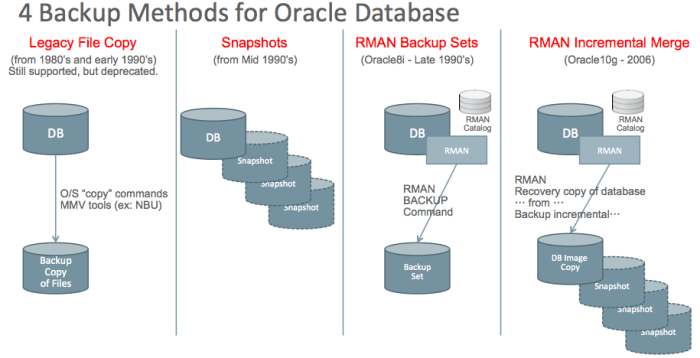
The 4 backup methods are categorized according to the method used to manipulate the data underlying the Oracle database. This blog post will outline each of these 4 methods and will explain how Oracle’s Zero Data Loss Recovery Appliance (ZDLRA) is distinctly different from these 4 methods.
Legacy File Copy
As the name implies, Legacy File Copy is an older method for backing up Oracle databases that dates from the earliest days of Oracle. I am covering this solution primarily for completeness and because it’s still used today (although rarely). This method involves using tools such as O/S “copy” commands such as “cp” on Unix/Linux, as well as 3rd party tools such as MMV (Media Manager Vendor) utilities to backup database files directly.
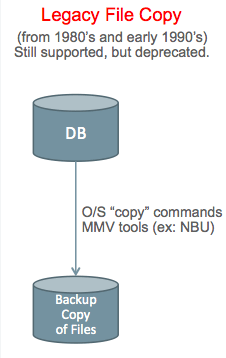
Cold Backup refers to making copies of database files while the database is in a shutdown state. The database must be shutdown cleanly using SHUTDOWN NORMAL, SHUTDOWN TRANSACTIONAL, or SHUTDOWN IMMEDIATE prior to copying the underlying files.
Hot Backup refers to copying database files while the database is running. Taking a hot backup using legacy file copy requires use of BEGIN/END BACKUP commands at the table space level or for the entire database at once. The DBMS generates extra redo logging when these commands are used, so
Redo log handling is absolutely critical in legacy file copy backup. The first challenge is to NOT backup files while they are being written by the ARCH (redo log archiver) process. The next challenge is to NOT delete redo logs unless they have been backed-up. The final challenge is to ensure all redo associated with the backup has also been backed-up so you have a complete set of redo to “de-fuzzy” the backup. There are critical timing issues down to the microsecond level that can make the difference between success and failure. Improper handling of redo was a major source of backup corruption in the days prior to RMAN.
Multi-Threading is extremely difficult in a legacy file copy solution, which ultimately limits the size of database the solution can support.
The vast majority of Oracle customers abandoned the old Legacy File Copy solution many years ago, but some customers continue using these solutions. Most customers migrated to RMAN when it was introduced, and a small number of customers use storage snapshots as discussed in the next section.
Snapshot Backups
Snapshots Backups are typically implemented in the storage layer or disk array. Snapshots were originally introduced in the late 1990’s, and were a good alternative to legacy file copy solutions, but have some critical complexities that we will explore in this section.
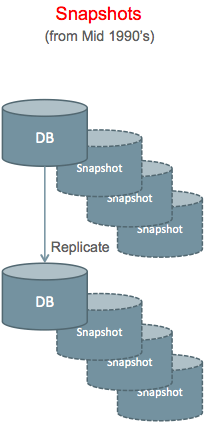
Snapshots provide a virtually instantaneous copy of files on storage, which eliminates some of the complexity involved with multi-threading required for large database backups using the Legacy File Copy method. Snapshots seem quite simple and effective on the surface, but the reality is less attractive.
Snapshot Backups are NOT Recommended
To be clear, we do NOT recommend using snapshots for backups. Snapshots should be used for transient fallback on production systems, or for storage efficiency purposes on DEV/TEST systems. Snapshots alone are not proper backups and should be used only in conjunction with storage replication or an auxiliary backup method.
Replicated Snapshots
Snapshots stored within the same storage as the database are not proper backups, especially if they are thin-provisioned (pointer-based) snapshots. Loss of ALL data contained in the storage array (database and backups) is possible if everything is contained in a single disk array. Replication is required in order to have a viable backup solution using snapshots. The above diagram shows data and snapshots that are stored locally, as well as a replicated copy of the full storage and all snapshots.
Replicating Corruption is a danger with any bit-copy storage replication solution. If the system suffers a ransomware attack, the encryption of data is dutifully replicated to the secondary site, resulting in encryption of BOTH sites.
Full Replication of storage including the database and all snapshots provides the best protection, but at higher cost. In configurations where the database and all snapshots are maintained at both sites, local snapshots can be used for recovery as long as the failure doesn’t impact the entire disk array or the “base” that snapshots reference.
Snapshots at Replica Only provides good protection at lower cost because the space required for snapshots is only incurred at the replica site. Using those snapshots for recovery on the primary site requires copying data back across the network.
ASM (Oracle’s Automatic Storage Management) needs to be used with care in conjunction with any storage replication. ASM re-balance operations are a particular concern, since large numbers of blocks are “modified” at the storage layer, even though the affected blocks haven’t changed from the database perspective. ASM re-balance results in massive numbers of blocks being replicated across the network.
Auxiliary Backup
Some customers implement an “auxiliary backup” in conjunction with snapshots rather than using storage replication. One customer referred to this as a “snap & mount” solution because they used SAN (Fiber Channel) storage, and the file systems would be mounted on another system after the snapshot. The second system would be used to run a backup of the snapshots. Running auxiliary backups is simpler with NAS storage, since the secondary system does not need to be as closely aligned with production from the standpoint of versions, patching, etc.
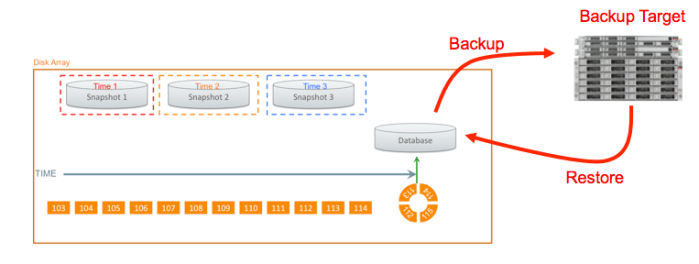
The diagram above shows storage snapshots contained within a disk array, with an auxiliary backup target (either tape or disk). The database can be reverted to any of the snapshots within the disk array, or restored from the auxiliary backup target. Setting end-user expectations for MTTR should be based on the worst-case, which is restoring from the auxiliary backup. See the section on MTTR for more discussion of this topic.
The remainder of this section assumes that snapshots are used in combination with replication or an auxiliary backup solution.
Crash Consistent Snapshots
The simplest form of snapshot backups is the Crash Consistent Backup. The configuration is relatively easy to understand, and relatively easy to operate. However, this is what I call a “guaranteed data loss” solution as shown in the following diagram.
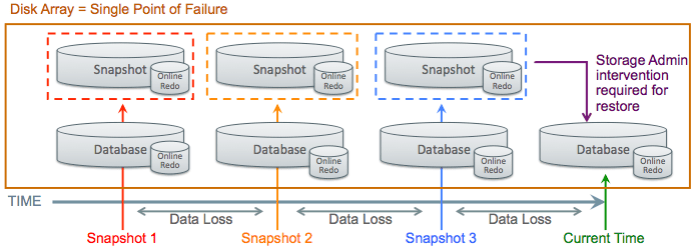
The above diagram shows a database advancing through time, and snapshots being taken at 3 points (red, orange, and blue snapshots). The entire disk array is a single point of failure, so some sort of replication is required.
Oracle’s Snapshot Requirements must be met for a valid Crash Consistent Snapshot. The snapshot solution must provide the following attributes:
- Consistent across all files or disk volumes
- Must preserve write ordering
Snapshot technologies that do not meet these criteria will not produce a crash consistent image of the database. Please refer to the section on inconsistent snapshots for more detail.
NOARCHIVELOG Mode should be used in a Crash Consistent Snapshot solution, and the online redo logs MUST be included in the snapshot. The entire database, online redo logs, and control files are all reverted to the same point in time. Oracle will automatically run through crash recovery, rolling back any in-flight transactions. It is not possible to recover to any points between snapshots in this configuration, meaning data loss (lost transactions) will occur.
Recoverable Crash Consistent Snapshots
Crash Consistent Snapshots can be made Recoverable, allowing for recovery beyond the instant a snapshot was created, or recovering to an SCN between snapshots. The following diagram shows how crash consistent snapshots can be made recoverable by keeping REDO (online and archived REDO) separate from snapshots of the datafiles.
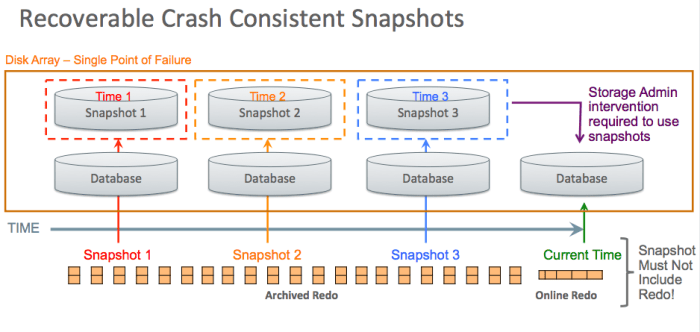
In the above example, the database can be reverted to snapshot #1, then recovered forward using the redo logs. Redo (and control files) are kept separate from the snapshot containing datafiles, which is what enables recovery.
Online Redo and Controlfiles must be kept at “current” or at a later point in time from the database to allow media recovery. Transactional changes to the database are stored in the range of online redo as well as the stream of archived redo that precedes the online redo range.
Archived Redo Retention must reach as far back as the time of the snapshot used for recovery. There is no reason to revert the stream of redo to an earlier point, since the redo represents a continuous stream or timeline. The database can be recovered to any SCN along the timeline, rolling forward from the point of any snapshot.
Snapshots (or Restore Points) on Redo/FRA can be used to protect against administrator error, viruses, ransomware attacks, etc. The Oracle database redo log is a write-ahead log, and log files are never over-written.
The High Write SCN determines the lowest point in time that can be used for recovery with any specific snapshot. Oracle’s “snapshot optimization” feature was developed in conjunction with storage vendors. The storage writes a timestamp into the snapshot, and that timestamp is then used in the RMAN commands using the SNAPSHOT TIMESTAMP clause.
The Database Scanner utility can be used with older versions of the Oracle database using storage that doesn’t support the Snapshot Optimization Feature. The utility is used to scan the entire database looking for blocks with the highest written SCN in the database. That SCN defines the point the database must be recovered to at minimum.
File Needs More Media Recovery is the error that will occur if the database is not recovered to a point after the high-write SCN. A previous snapshot will have to be used in that case to hit the desired SCN. The choice is to use the database scanner (a full scan of every block in the database) or trial and error will show whether the chosen SCN is high enough.
Inconsistent Snapshots
Some older snapshot technologies were not able to meet the data consistency requirements of Oracle. All data structures of the Oracle database (datafiles, controlfies, redo logs, etc.) must be snapped at the SAME instant in time. The order of writes also must be preserved to ensure data integrity. Customers need to be aware that some NEW snapshot technologies cannot meet these data integrity requirements, so the old “inconsistent snapshot” method has to be used. The following diagram shows how inconsistent snapshots can be used as an Oracle database backup method.
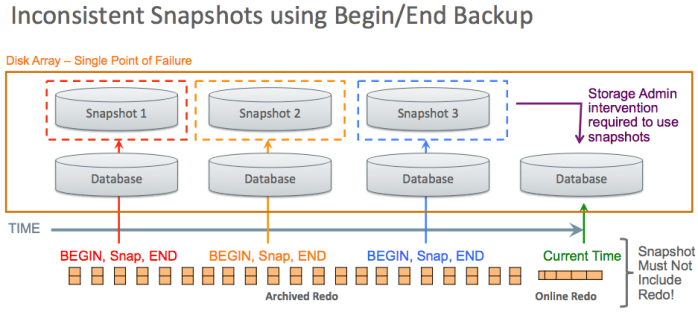
As noted previously, the disk array itself is a single point of failure. Loss of the disk array means loss of the database and all snapshots. There are specific commands that can be run on most disk arrays that will jeopardize the database and all snapshots. Customers should be sure to use storage replication or an auxiliary backup method with snapshot technologies.
BEGIN/END BACKUP commands must be used in conjunction with the snapshot, either at database or tablespace level. Database redo logging increases dramatically after executing BEGIN BACKUP. The excessive redo log rates continue until END BACKUP is executed. The BEGIN BACKUP command does not “quiesce” the Oracle database. The command causes the Oracle database to generate additional information into the redo log to “defuzzy” the backup and resolve any “split block” conditions caused by the inconsistent snapshot.
Online Redo, Archived Redo, and Controlfiles must be kept separate from the datafile snapshots as shown in the above diagram. If those data structures are placed into a separate snapshot, that snapshot must be Crash Consistent.
Archived Redo Retention (as with Recoverable Crash Consistent Snapshots) must reach as far back as the time of the snapshot used for recovery. There is no reason to revert the stream of redo to an earlier point, since the redo represents a continuous stream or timeline. The database can be recovered to any SCN along the timeline, rolling forward from the point of any snapshot.
MTTR from Snapshots
One primary rule with MTTR (Mean Time To Repair) calculations is to “plan for the worst, but hope for the best”. Recovery using a local snapshot is obviously the best case, while recovery using a remote replica or auxiliary backup will provide the worst case recovery.
One customer I was involved with used snapshots as the primary method of recovery, and set expectations with the business that recovery would be done in less than 1 hour. This customer had a 48TB database with auxiliary backup using EMC’s Data Domain. Restore from Data Domain ran at 1TB/hour, which means 48 hours for restore time alone for their 48TB database (restore is only part of the recovery process). The IT team was faced with business expectation of 1 hour recovery, but 48 hours of restore time. In the end, this customer suffered a 4-day outage due to inadequate secondary solution and a primary solution that was high risk (snapshots are not proper backups).
Snapshot Recovery is Manual
All recovery from snapshots is manual and requires coordination between DBA and Storage Administrator. Features such as Oracle’s Recovery Advisor cannot be used because all of the backups (snapshots) are done outside of Oracle’s control. Some 3rd party vendors offer specialized tools to aid in recovery using snapshots.
RMAN Backup Sets
Solutions based on RMAN Backup Sets are the most commonly used method for backup & recovery of Oracle databases. I would estimate that greater than 80% of Oracle databases are protected using RMAN Backup Sets. The vast majority of Oracle customers also implement systems according to ORacle’s Maximum Availability Architecture (MAA) guidelines, and RMAN Backup Sets are a critical component of MAA.
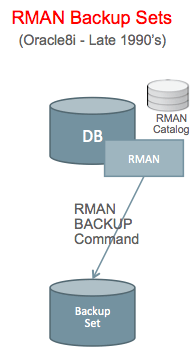
RMAN was introduced in Oracle8i with the Backup Set capability in the late 1990’s, and Backup Sets have become the most widely used method for backup/recovery of Oracle databases. There are 3 implementations of RMAN Backup Set configurations as follows, using backup to disk, backup to media manager, and staging areas as follows:
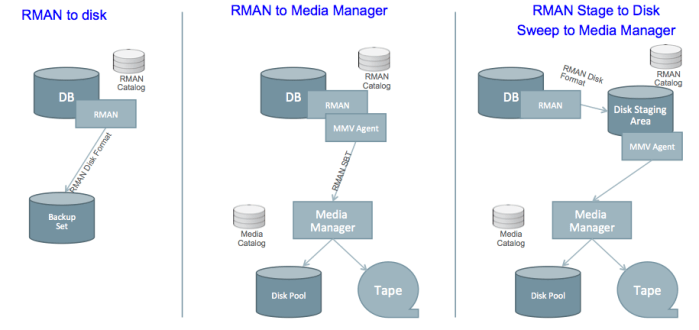
RMAN backup sets have a different format when written directly to disk as compared to SBT (Serial Backup to Tape) format sent to a Media Manager. The Media Manager might be configured to use a “disk pool” to store the data, but it’s still in SBT format.
The Stage & Sweep Configuration involves RMAN writing the backup to disk, then the Media Manager is used to “sweep” that data to whatever storage device it is using (disk, tape or VTL). The disk staging area should be sized large enough to contain at least 2 full backups, all associated incremental backups, plus all associated redo. The WFDDI (Weekly Full Daily Differential Incremental) will give this configuration:
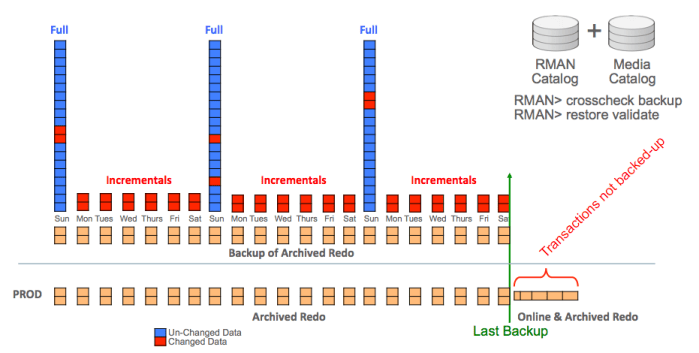
The above diagram shows space for 3 weekly full backups, plus all intervening incrementals and archived redo. The resulting RECOVERY WINDOW is 2 weeks (from disk) because the oldest backup will be deleted before running the next backup. Older backups can be stored only on the Media Manager, but a double-hop will be required during recovery using any backups coming from the Media Manager.
A Double Hop Restore is required in the Stage & Sweep configuration for cases where the needed backup is not on disk in the staging area. The Media Manager stores the data in it’s own proprietary format, and RMAN cannot access those backups directly. The Media Manager must retrieve the needed backups and write them back to the staging area before RMAN can access those backups.
Recovery from Full + Incrementals
The most common backup strategy with RMAN Backup Sets is Weekly Full Daily Differential Incremental (WFDDI). Some customers still use Daily Full (DF) backups for smaller databases, and lower Recovery Windows. The following calendar shows a 30-day Recovery Window, which requires 37 days data retention:
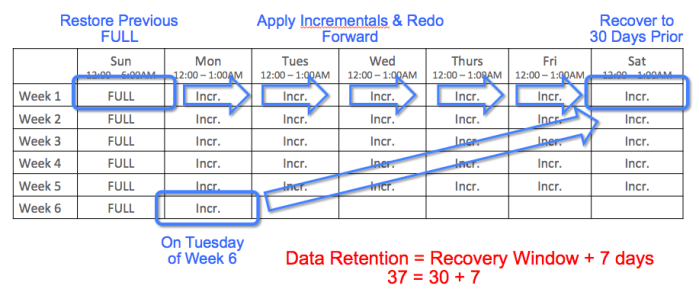
The “rule of thumb” for performance using WFDDI is that end-to-end recovery will be 2X longer as compared to recovery using a Daily Full (DF) strategy.
HA/DR and Backups
Note that Oracle’s MAA (Maximum Availability Architecture) team specifies that HA/DR (High Availability and Disaster Recovery) solutions should be used in conjunction with a backup/recovery solution. Requirements for “instantaneous recovery” (low Recovery Time Objective) should be addressed through a DR solution such as Oracle Data Guard or Oracle Golden Gate. Requirements for preventing system downtime should be addressed through HR technologies such as Real Application Clusters (RAC). Backup/Recovery is distinctly different from HA/DR, and allows a system to be recovered BACKWARD in time to a prior point.
Low RPO Requirements
It’s important to note that Oracle’s Zero Data Loss Recovery Appliance (ZDLRA) can be used to deliver extremely low RPO (Recovery Point Objective) requirements in cases where RTO (Recovery Time Objective) is not as stringent. As noted previously, a Disaster Recovery (DR) system using technologies such as Oracle Data Guard and/or Oracle Golden Gate is the recommended method for delivering low RTO. Prior to the advent of ZDLRA, RTO and RPO were essentially linked and were addressed together. We are now able to address low RPO requirements separately using ZDLRA, reducing the operational complexity of recovery in cases where time is not as critical.
RMAN Incremental Merge
The RMAN Incremental Merge feature was introduced in the Oracle10g release in 2006. This feature allows customers to create an IMAGE COPY backup of a database, then update that image copy using incremental backups. Another way to describe this feature is “Incrementally Updated Image Copy” backups. The image copy is updated as of a specific point in time. Storage snapshots can then be added to this capability to provide recoverability to multiple points in time.
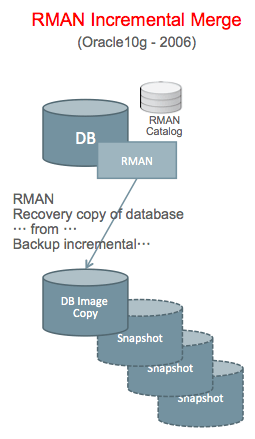
The RMAN catalog tracks the original image copy, along with each incremental that is executed. Snapshots of the Image Copy are taken at various intervals, and these are done outside the control of RMAN.
Image Copy Location – Separate storage is used to hold the image copy.
CPU Stealing – The merge operation is performed using “CPU Stealing” from the production database server. The production database server executes an incremental backup on the database, then applies those changes to the image copy. This places additional load on the database server for the duration of the Incremental Merge process.
Incremental Merge Performance is affected by the fact that changes to the database tend to involve random I/O. Performance of the incremental merge operation can be increased only by putting the image copy on faster storage.
The “Switch to Copy” capability of Incremental Merge is only useful if the image copy is stored on the same tier of storage as the primary database. We typically put backup on lower tiered (less costly, less performant) storage than the primary database. However, if that backup will potentially BECOME the primary database by doing “switch to copy”, the storage needs to be of similar performance class.
Incremental Merge Recovery is Manual
Using an RMAN Incremental Merge with Snapshots, all recovery is manual. Guided Recovery in OEM and Oracle’s Recovery Advisor aren’t used. It’s possible to mitigate this somewhat by registering the snapshots in the RMAN catalog. Third party tools that implement this method typically provide some tooling to assist Database Administrators with recovery, but those tools are not as widely used in the industry.
ZDLRA – the 5th Method
Oracle’s Zero Data Loss Recovery Appliance is nominally based on RMAN Backup Sets, but it’s a distinctly unique solution.
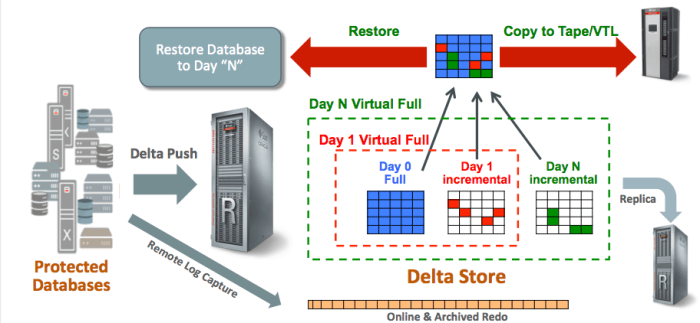
Any Oracle version and any platform (those currently supported as of this writing, meaning 10g and above) can be configured to use the Recovery Appliance.
An Initial Full (LEVEL0) Backup is used to seed the recovery appliance. That initial full backup effectively does not exist after a while, as blocks belonging to that backup are eventually purged.
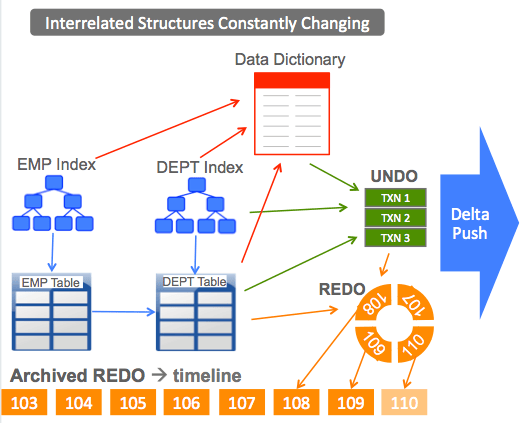
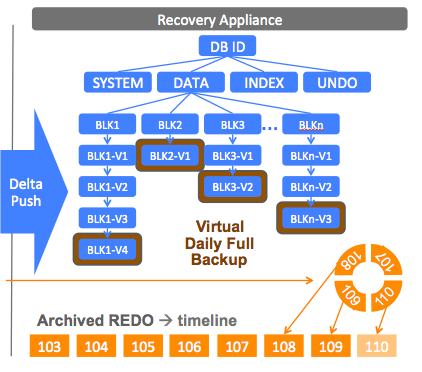
Delta Push uses the RMAN Incremental API to push changes from the database to the Recovery Appliance. While this uses the syntax of a conventional RMAN LEVEL1 (incremental) backup, it is functionally quite different. Each Delta Push is automatically transformed into a Virtual Full backup.
Virtual Full (LEVEL0) Backups appear in the RMAN catalog after the contents of each Delta Push are processed. There is a Virtual Full created for the initial physical LEVEL0, as well as for each subsequent Delta Push.
Real Time Redo Protection uses the Data Guard API to protect the leading edge of the redo stream. Redo is transmitted asynchronously to prevent the Recovery Appliance from becoming a bottleneck. The Recovery Appliance ensures Zero Loss up to the last transmitted SCN in this configuration. ZDLRA is supported for use with a Far Sync Server to allow synchronous capture of redo changes without imposing a bottleneck across multiple systems.
ZDLRA Benefits
The Zero Data Loss Recovery Appliance provides a number of unique benefits compared to other solutions on the market.
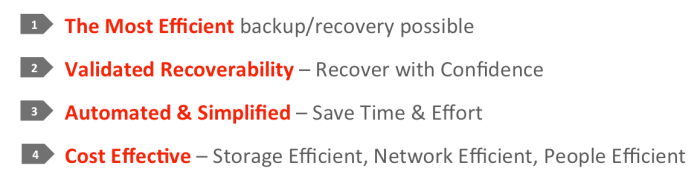
Efficiency of ZDLRA begins with impact on the production database servers, then extends through the network and into the space required on ZDLRA. Changes are pushed to ZDLRA using the Delta Push process (the most efficient possible), and those changes are automatically converted into Virtual Full Backups. The Virtual Full Backups are then used during recovery, making the recovery process more efficient as well.
Validated Recoverability is a key benefit of ZDLRA. Backups are validated proactively rather than during recovery. Customers can recover with confidence knowing the backups have been validated. The Recovery Appliance will attempt to automatically resolve validation failures (such as redo log gaps), and will report validation failures if they cannot be resolved automatically.
Automation & Simplicity is another key benefit of ZDLRA. The Recovery Appliance uses familiar tools and the full range of automation capability (such as Guided Recovery) that is already built into the Oracle ecosystem (Database, RMAN, OEM, etc.). Backups are dramatically simpler because each database simply does a Daily Delta Push rather than complex scheduling of weekly full backups that might contend with application processing.
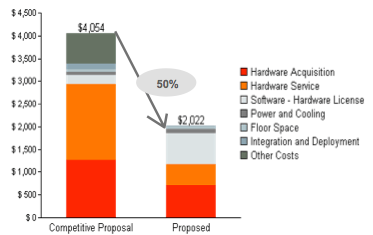
Cost Effectiveness is extremely important for any backup/recovery solution, and ZDLRA is the most cost-effective solution on the market. ZDLRA requires the least amount of storage space possible because of the change-based design that directly extracts changed blocks through the Delta Push process.
Space Usage Comparisons
All 4 of these solutions have a variety of advantages and disadvantages, but we should first compare the based purely on the amount of storage space required.
While all of these solutions provide dramatic space savings over generic solutions, ZDLRA provides the greatest storage savings of all. The most dramatic saving comes from the use of RMAN Incremental Backups (WFDDI) as opposed to Daily Full (DF) backups. As shown in this example, ZDLRA requires approximately 1/3 less storage space than all of these other solutions.
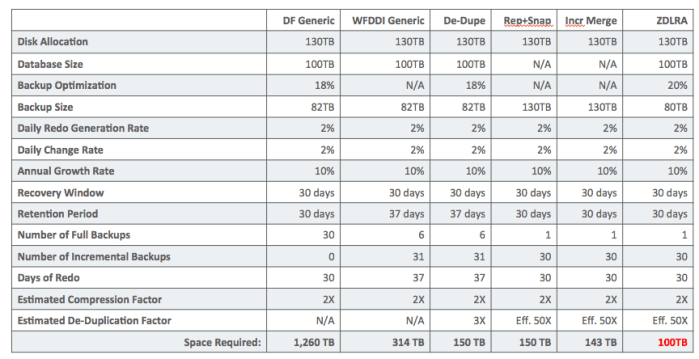
As shown in the table above, with a given database size of 100TB, and with the same redo generation rate, change rate, recovery window, etc. ZDLRA requires the least amount of space.
DF Generic means Daily Full backup to general purpose storage. Notice that the “recovery window” is equal to “Retention Period” since full backups are taken daily.
WFDDI Generic shows the impact of implementing a WDFFI (Weekly Full Daily Differential Incremental) strategy. This is a dramatic 4X savings in space as compared to Daily Full backups. Notice that the “Retention Period” is 7 days longer than the “Recovery Window” because this scenario uses a Weekly Full backup.
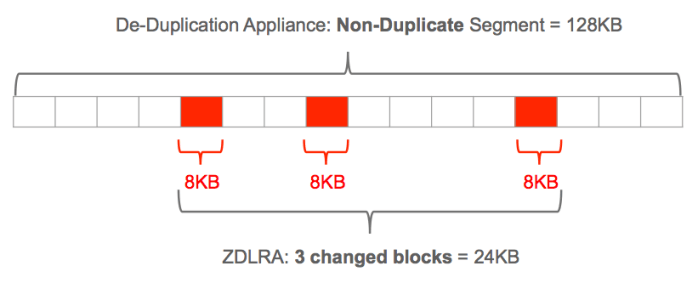
De-Dupe takes the WFDDI strategy and adds de-duplication storage. Daily Incrementals and REDO logs do not contain duplicates by definition (these contain all unique data).
Rep+Snap shows the use of storage replication with snapshots on the replica side only. This method uses a full size replica of the database, then adds daily snapshots to capture changes. The changes are space efficient, but this solution requires a full sized copy (replica) of the database.
Incr. Merge shows the storage required for an RMAN Incremental Merge solution with snapshots. As with the replication + snapshot method, RMAN Incremental Merge uses a full sized Image Copy of the database, with the same sized disk allocation. Changes contained in snapshots are space efficient, but the fully provisioned database size consumes the same amount of space as on production.