This blog post is a continuation of my series on the use of storage snapshots for backup/recovery of Oracle databases. #SnapshotBackups
Elegant Simplicity Brings Limitations
It’s very easy to see why snapshots seem so magical, especially in the Simple Snapshot implementation. This is a very simple solution and quite easy to understand. However, there are several disadvantages as we shall see below. The simplicity is both a blessing and a curse of this design.
Simple Snapshot Configuration
In a simple snapshot configuration, the entire database and online redo logs reside within a single snapshot or consistency group. A snapshot is created at a consistent point in time for all of those data structures.
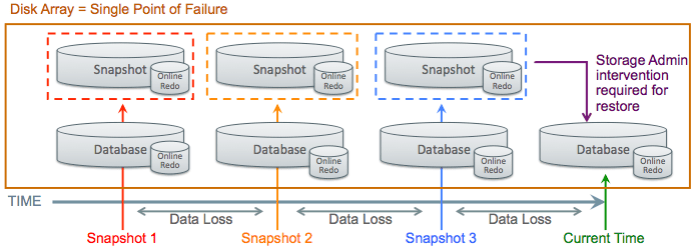
This example shows a database and online redo logs that belong to a single snapshot or consistency group. Three snapshots are taken over the course of time as indicated in red, orange, and blue. Snapshots always reside within the same disk array as the primary copy of the database, so the disk array is a single point of failure. Storage Administrator intervention is required to revert to (restore) a snapshot, so the DBA cannot work alone during recovery. Finally, the simple snapshot configuration only allows you to REVERT to a snapshot, not recovery to points in time (or SCN’s) between snapshots.
Fundamental Challenges
The fundamental challenge is that Oracle databases consist of a set of interrelated structures that are constantly changing. Oracle databases are never “quiesced” unless they are completely shutdown for a COLD backup, and very few customers can tolerate database downtime simply to perform a backup. The following diagram shows some of the object relationship that exist within an Oracle database.
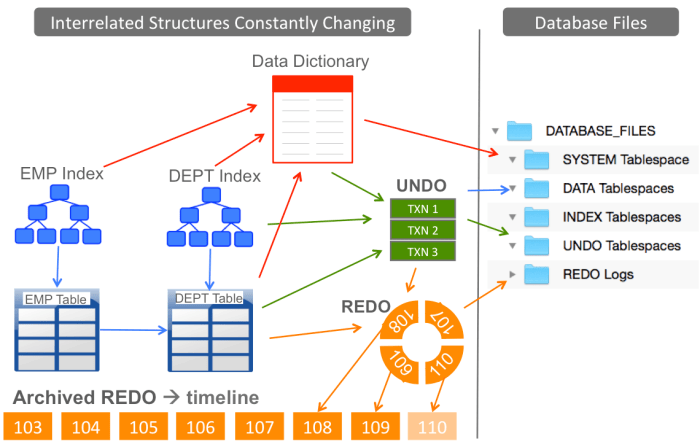
The diagram above shows a very simple database consisting of 2 tables, which are the EMP (Employee) and DEPT (Department) tables. Each employee belongs to a department, so these two tables have a relationship defined between them. Each table typically has one or more indexes defined on it, and indexes are obviously related to the data in the tables. All of the indexes, tables, and other structures are recorded in the database metadata, which is stored in the Data Dictionary. As transactions are executed against the database, Oracle stores UNDO information (needed to back-out changes) as well as REDO information, which is needed during database recovery.
All of the data in the database is mapped onto a set of files. The database is constantly changing, and the underlying files are constantly changing. Storage snapshots essentially emulate what happens during a system crash. One of the core features of any database engine is to recover from a system crash without causing corruption in the database. The Simple Snapshot configuration leverages this core feature of the database engine.
Archived Redo – Not Necessary and Not Usable
The Simple Snapshot configuration gives the ability to REVERT the entire database to specific points in time, but does not allow for RECOVERY to points on the timeline between snapshots. In this configuration, there is no reason to use ARCHIVELOG MODE in the database, and no reason to create or backup archived redo logs. The online logs contain all information needed to perform crash recovery when you REVERT to a snapshot.
Single Point of Failure
Since the database and all snapshots (the backups) reside within a single disk array, the array itself is a single point of failure. I have personally seen the failure of an entire disk array on virtually every brand of disk array on the market. It’s possible to lose the entire disk array, and this does happen in reality. Please be sure to EXTERNALIZE the backup somewhere else if you are using storage snapshots for backups.
Plan for the Worst, but Hope for the Best
Assuming you understand the exposure of having your database and all of the backups (snapshots) residing inside a single disk array, you should understand why it’s important to make a copy of those backups somewhere else (external to the disk array). While it’s very FAST to simply revert to a snapshot, this is your BEST CASE time and performance of the recovery.
When you set expectations with your business users, be sure to plan for the worst and hope for the best. Quote to your users the time it takes to bring the database back from the EXTERNAL location, then be happy if you’re able to use a snapshot instead.


This post is about the SIMPLE snapshot configuration, where everything is lumped under a single snapshot. In that configuration, the only option is to REVERT the database to a prior snapshot. You cannot recover the database (cannot roll it forward through the redo) because the redo has also been REVERTED to the same point as the database.
There is another configuration I will be covering in a separate post called the RECOVERABLE, Multi-Snapshot configuration.
It is possible to perform an “out of place restore” to another location on disk, pulling data files from one snapshot, and redo logs from another (or from the current image of the storage). This assumes you’re using a disk storage technology that allows simultaneous access to both the current storage image as well as the snapshots.
Of course doing this isn’t simple, so the whole concept of “Simple Snapshots” and the elegance of the solution is lost.
Out-of-Place restore is not fast, since you’re copying the ENTIRE database to another location. You are not simply “snapping back” the database to an earlier point. It’s not as fast as snapping your fingers.