With more than 30 years on the market, it’s tempting to look back at how Oracle became the number one database, but it’s really more useful to consider why it remains number one. Software engineers need to think hard about committing themselves and their code (the fruits of their labor) to a second-rate database engine.
Oracle is the #1 database in terms of market revenues, at right around DOUBLE the revenues of its nearest competitor. With the rise of open-source “free” software, some have asked whether revenue is still the best measure. Oracle has also dominated in popularity surveys and other attempts to measure market share aside from revenue comparisons. So, the question remains; what makes the Oracle Database number one? What follows is a summary and short discussion of each of these topics:
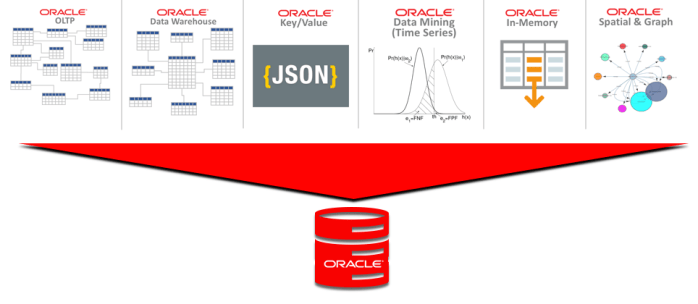
In short, Oracle is the only All-Inclusive database on the market that brings all of these capabilities in a single package, which allows developers to concentrate on building application functionality rather than working around limitations found in other databases. We will look in detail of each topic below.
The All Inclusive Database
Oracle is the only all-inclusive database on the market. Oracle started as a relational database, and relational is still an extremely critical part of what it does. However, Oracle also provides the ability to model and PROCESS data using many different approaches, all within the same database.
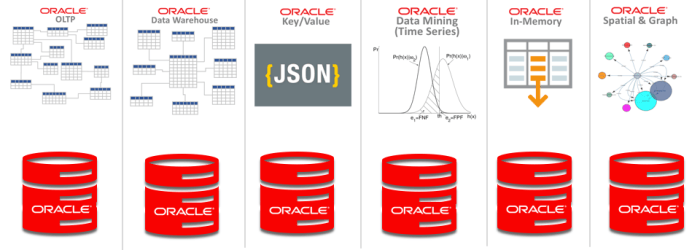
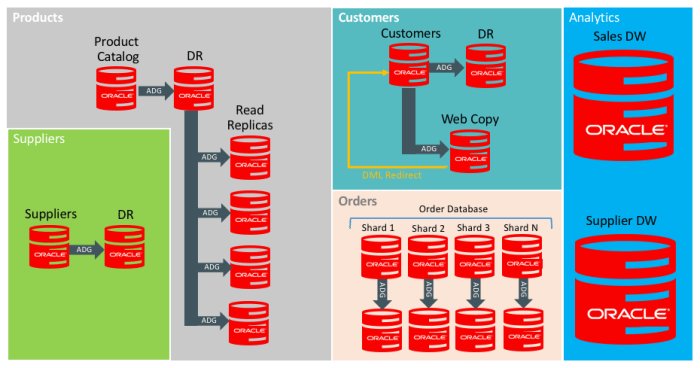
One of the challenges for software engineers is to use Oracle’s capabilities correctly. Just because you CAN grow a single Oracle database forever doesn’t mean you should. In fact, you should provide some separation between applications at some point. Different applications often work better when the same data is structured differently. For example, OLTP applications typically work best with data modeled in 3rd Normal Form (3NF). Data Warehouse applications work best with Star Schema or Dimensional models. While you could put all of this data into a single Oracle database or even in a single schema within a single Oracle database, it often makes sense to put them into different databases.
If you are going to break apart your applications into separate databases, then why not use so-called “Best of Breed” or “single-purpose” databases instead? First, Software Engineers need to ask whether those single-purpose databases are somehow better than the all-inclusive Oracle database. Just because a database does 1 thing doesn’t make it better. All databases share many layers of common internal functions like caching, storage, transaction handling, connection management, API, security, and client libraries. Oracle has made and continues to make the investment necessary to leverage these common functions to build the multi-purpose, all-inclusive database.
We have seen single-purpose databases come and go over the years, including Object Databases, Columnar Databases, Key/Value Databases, In-Memory Databases, and Document Databases. Oracle has always taken the approach of incorporating those concepts as features into a single all-inclusive database. The all-inclusive approach has proven to offer much more powerful capabilities without the complexity of multiple single-purpose databases. Inclusivity has multiple dimensions including scale, workload, type of data, data modeling techniques and other dimensions as we shall see below.
Database Fundamentals
There are a number of fundamentals that need to be addressed before we get deep into the all-inclusive nature of the Oracle database. These fundamentals need to be clear because not all database technology on the market has these capabilities.
Structured Query Language (SQL) underlies the Oracle database, and is the fundamental programming interface to access the database. Oracle supports ANSI standard SQL, and has extensions to the SQL language for features that aren’t included in ANSI standard.
Transactions are a fundamental capability of any database, dating back to the earliest days of computer science. To be clear, supporting transactions means the database ensures the A.C.I.D. properties of Atomicity, Consistency, Independence, and Durability. Without A.C.I.D. transaction support, a database simply isn’t performing the proper role of a database. ACID transactions also need to span the ENTIRE scope of a transaction including everything the transaction modifies, not just a single table or partition of a table. Transactions also need to extend to all related structures including indexes, and of course Oracle meets these needs.
Availability is a critical attribute of any database. Unlike application servers, the fundamental purpose of a database is to manage data. Various techniques exist to distribute and replicate data, but availability is still critically important. The Oracle database on Exadata is one of the few technologies in the market that has ever achieve AL4 fault tolerance capabilities using Oracle’s Maximum Availability Architecture (MAA).
Programmable database features represent another foundational capability that databases need to provide. The Oracle database has served as the model that other vendors have followed in the area of Stored Procedures and Triggers. Some vendors have even patterned their stored procedure language after Oracle PL/SQL. These capabilities are critical to Software Engineers who need to ensure data integrity in their applications by extending the core capabilities of the database and the relational model. Stored procedures also play a critical role in support of other functionality such as JSON and XML support.
Backup/Recovery capabilities of the database allow users to protect against hardware failures and logical (application) failures that impact data integrity. Oracle’s integrated RMAN (Recovery Manager) tool provides an enormous range of database backup/recovery capabilities, including the ability to recover a database to any desired point-in-time (NOT a pre-determined point-in-time) during the past N number of days, weeks, or months. Oracle’s Flashback Database provides an “time machine” inside the database to provide additional capabilities. Oracle’s Zero Data Loss Recovery Appliance builds upon RMAN to provide an integrated solution that reduces backup time by as much as 95%.
Disaster Recovery is built into the Oracle database in Oracle Data Guard, which provides the ability to synchronize the database with one or more copies of that same database, either at the local site or at a disaster recovery site. Oracle’s Active Data Guard also allows the DR site database to be queryable.
All Inclusive – Scale
What is really stunning is the SCALE at which Oracle can operate, especially on the Exadata platform. Many of the largest Oracle databases in the world have moved to Exadata. Software Engineers will notice that Oracle people aren’t impressed by the size of your database unless it’s a few hundred terabytes. I know several customers on Exadata who have databases in the range of 750 terabytes and larger (!) and those are even Hybrid Columnar Compressed! Those databases would be completely unmanageable on a conventional server+storage architecture. These large scale data volumes are routine with Oracle, especially on Exadata.
With extremely large databases, you also get large numbers of users. It’s surprising to think that other databases have never been able to reach the same scale as Oracle in terms of users, connections, or transactions per second. There are several layers of capability that enable this sort of scale, and (again) the vast majority of large scale databases run on Oracle Exadata.
Of course SMALL Oracle databases certainly are not a challenge for Oracle. The Oracle database can easily store small amounts of data, but management of large numbers of small databases can pose significant administrative burden on a DBA team. Fortunately, the Oracle Multitenant option allows large numbers of small databases to be consolidated under a single Container Database to reduce the system overhead. Multitenant reduces use of CPU, Memory, and I/O compared to those same databases running individually rather than combined into a Container Database. Consolidation density is greatly improved through the use of Oracle Multitenant, and benchmarks have shown consolidation density improvements of 10X or greater. The largest gains of more than 20X come when comparing Multitenant to Virtual Machine consolidation using one database per VM.
Non-escalating row level locking in the Oracle database is a huge enabler of scale. As a software engineer, you need to consider what this means for your code. Transactions insert, update, and delete rows of data. If two transactions attempt to modify the same data, one of them will wait. Some databases (most of them aside from Oracle) will place locks of entire BLOCKS of data (will escalate the lock to cover more rows) if your code locks too many rows. Those databases might even escalate locks. to cover entire TABLES because they can’t manage large numbers of locks. The locking model is critical, so software engineers need to be concerned. Oracle’s non-escalating row-level locks are a critical enabler of scale.
Readers don’t block writers, and writers don’ block readers in Oracle, which also enables scale. Most databases aside from Oracle still suffer from the problem of transactions blocking each other. Approaches such as “dirty read” are a horrible solution because it means you’re reading BAD DATA.
In short, I am certainly NOT advising software engineers to scale your databases to the moon. In fact, you should certainly break them up if needed. However, you don’t need to be so concerned with database size if you’re using Oracle, especially on the Exadata platform. You certainly should use multiple schemas within a database. You certainly should combine multiple smaller databases into one Container Database using Oracle Multitenant. Just know that the high-end size can go much higher with Oracle than with other databases, and you won’t be stuck re-architecting applications if your data grows.
All Inclusive – Workloads
The Oracle database is inclusive on multiple dimensions, and one of these dimensions is workload type. Workloads generally break down into OLTP versus Data Warehouse, but databases might also contain a mixture of workloads. An OLTP database predominantly services OLTP transactions, and a Data Warehouse predominantly services parallel queries, but most are really a mixture.
Data Warehouse deployments should always include the Partitioning Option, which allows large tables to be broken up into multiple sections known as partitions. Partitions can be used to simplify data maintenance such as quickly loading data through a Partition Exchange operation, or by dropping partitions to purge data. Partitions are also used while querying because they serve like a “coarse index” into the data. SQL queries automatically benefit from performance gained by skipping partitions that don’t contain the needed data. For example, when a table contains data for a YEAR but is partitioned by MONTH, a user might query data for one month, and the Oracle query optimizer automatically skips the other 11 months.
Partitioning is primarily used for Data Warehousing, but is also useful for OLTP applications that store large amounts of data online. Data can be partitioned by age, such as partitioned by month or year. Older partitions can be easily dropped to purge data, and backups can be configured to SKIP those older partitions to make backups faster.
OLTP workloads are transactional systems with larger numbers of users including Order Entry systems, Human Resources, Manufacturing, and web sites. The Oracle database is nearly ubiquitous in the OLTP workload market.
Mixed Workloads include both OLTP transactions as well as some amount of operational reporting or ad-hoc lookups. While the Parallel Query capability of the Oracle database is primarily used in Data Warehousing, it can also be used to speed-up operational reports and ad-hoc queries. This type of workload in an OLTP system is the reason why we consider most OLTP databases to be “mixed workload” databases rather than pure OLTP.
All Inclusive – Data Modeling
Oracle was originally known as a Relational Database Management System (R-DBMS) but these days it is considered a Multi-Model database due to it’s ability to work with all major data modeling techniques including:
Software engineers are not stuck with one modeling technique in the Oracle database. A single database can contain data modeled using ALL of these techniques. All of them can be used within a single schema, or schemas can be used to separate the data. Software engineers can split data into different databases, and administrators can combine multiple databases into a single Container Database to ease the administrative burden.
Relational remains the predominant method for data modeling due to the ability to ensure data integrity and avoid repetition of data elements in the structure. Relational is not suited to EVERY type of application, but it still remains the clear leader in the database world.
Object databases arose a number of years ago to provide a better match with object oriented languages such as C++ and Java. The object/relational capabilities of Oracle have been much more useful, allowing the application to reference data as “objects”, while the database stores the data in relational format to take advantage of the data integrity capabilities that relational provides.
Queue data includes FIFO (First In First Out), LIFO (Last In First Out) and other structures optimized for handling data in a specific order. Many applications involve some processing of queues, although this tends to be a relatively small component of most applications. Software Engineers can simply create those queues within the Oracle database and have them be persisted to storage, and transactionally consistent with the rest of the database. This approach is much simpler than deploying a dedicated single-purpose database to handle queue data.
Key/Value and Document databases are essentially a simple TABLE structure with 2 columns, which are a key column and value column. The VALUE in a key/value pair can contain a complex XML or JSON structure, but otherwise it’s simply a VALUE column. The Oracle database provides a set of functions for storing and updating data within the XML or JSON structure, and those functions ensure the integrity of the XML/JSON structure.
Graph Databases are designed with an emphasis on understanding relationships among data elements rather than just the data elements themselves. Oracle Spatial and Graph can be used to better understand the relationships between entities such as social networks, geographical spatial relationships, etc.
Multidimensional data is used in OLAP applications for deep analysis of data. The most prominent single-purpose Multidimensional database is Oracle Hyperion, which is used in the suite of Hyperion business applications. That same capability to store and process data in multidimensional (CUBE) format is also available in the Oracle Database Enterprise Edition.
All Inclusive – Types of Data
I’m saying “types of data” rather than data types for a reason. The term “data type” typically refers to typecasting of columns, but this topic is broader. The types of data that can be stored in an Oracle database go beyond simple datatypes to include a broad range of data as follows:
- Numeric
- Character and variable character
- Dates, times and time stamps
- Spatial Data
- Time Series Data
- Images
- Large Objects (LOBS, BLOBS, CLOBS)
- XML
- JSON
A single Oracle database can contain all of these types of data within a single schema or across multiple schemas within a single database. Of course it’s possible to devote a single Oracle database to only a specific type of data as well. Multiple smaller databases can always be combined together under a single Container Database using the Oracle Multitenant Option.
Time Series data is often used along with analytics of that data. The Oracle database includes Time Series data analysis functions built into Oracle Data Mining. Time Series is a special form of regression known as auto-regressive modeling. Some single-purpose databases on the market are designed to store time series data, but Oracle Data Mining includes built-in functions for performing auto-regressive modeling on that data.
XML and JSON are two types of data that deserve special mention. Both of these are markup languages that serve as complex structures containing all manner of data inside them. The Oracle database includes functions that enable applications to store and to modify data contained within XML and JSON structures, while ensuring the integrity of those structures.
All Inclusive – Sharding
Oracle Database includes sharding, including sharding of all types of data rather than just key/value or document data. Sharding allows multiple databases to remain separate, but behave as one database. Sharding is useful for addressing “data sovereignty” regulations, where data must reside in a given geography (country), but also needs to be used globally. There are other uses of sharding beyond data sovereignty, including the ability to sub-divide data across multiple servers to minimize the “blast radius” of failures.
Such sub-divided or sharded data can minimize the impact of failures, but still results in a single source of truth database that needs protection. Even sharded databases still often need the protection of Oracle’s Maximum Availability Architecture to ensure accessibility of the data in sharded databases.
You certainly don’t need a specialized database simply to meet sharding requirements such as data sovereignty. Those needs can be easily met using the Oracle database.
All Inclusive – Analytics
The Analytic capabilities began with the acquisition of Thinking Machines, which is now known as Oracle Data Mining and is now combined with Oracle R to provide the broadest Analytic capabilities in the industry. The Oracle SQL Dialect is powerful by itself, and includes a number of analytic functions. Oracle Data Mining extends the SQL language by providing complex mathematical and statistical analysis capabilities.
There aren’t many single-purpose “analytic” databases on the market. Analytics is primarily the domain of specialized analytic languages such as the R language. Oracle Data Mining simplifies the engineering of analytic applications through built-in functions that operate INSIDE the Oracle database, and run more efficiently and therefore FASTER inside the database. Oracle also provides support for the R language INSIDE of the database, which also improves performance of R code.
From my experience, analytics is the domain of experts such as Data Scientists and Statisticians. The tools inside of the Oracle database can be brought to bear in engineering solutions that provide high performance at high scale with very complex analytic processing.
All Inclusive – Cloud
The Oracle Cloud is the ultimate in inclusivity. The Oracle Cloud provides a License Included (LI) capability, as well as Bring Your Own License (BYOL). The advantage of License Included is that Software Engineers don’t need to be concerned with extra-cost database options, since all Oracle database software options are included in the Cloud.
All Inclusive – Autonomous
The Oracle Autonomous Database is Oracle Enterprise Edition with all database options, running on Exadata in the Oracle Cloud, with automation that handles all database operations. Software Engineers simply build and deploy applications on the Autonomous Database without being concerned about operational tasks such as monitoring, backup, and system tuning. A number of the database options are implemented automatically in the Autonomous Database.
All Inclusive – Columnar Data
Relational databases traditionally store data internally in a row-oriented format. The Oracle database on Exadata and Autonomous Database also includes the ability to store data in columnar orientation using Hybrid Columnar Compression. There are a number of purpose-built columnar databases on the market, but this capability has simply become a “feature” of the Oracle database on Exadata. Customers don’t have to deploy a specialized database simply to have data compressed into a columnar format. Tables in Oracle simply use the COMPRESS FOR QUERY option, and data will be stored in columnar format when it’s loaded into the table.
All Inclusive – External Tables & Big Data SQL
Data stored in files outside the database can be accessed using standard SQL commands using the Oracle SQL dialect by using External Tables. Data stored in Hadoop can be accessed from within the Oracle database using Oracle Big Data SQL. Providing access to data outside the database while still using the Oracle SQL dialect opens up new possibilities that weren’t available previously. Big Data is a great technology, but lacks the rich set of tools that are based on the SQL language. Oracle’s External Tables and Big Data SQL provide users of SQL-based tools access to a wider set of data than was possible previously.
All Inclusive – In-Memory
While Oracle has always used a database buffer cache in memory, and it has long been possible to pin tables in memory, The In-Memory option allows tables to be stored and processed in pure columnar format. The In-Memory Option (included in the Oracle Cloud) processes data in memory using SIMD Vector instructions, making SQL much faster, so being stored in memory is only part of the story. Software engineers simply write SQL and the SQL runs faster. Simply use the ALTER TABLE INMEMORY command to place tables in memory. Notice that INMEMORY is really “just” a tuning exercise, so it’s done automatically when needed in Autonomous Database.
All Inclusive – Developer Tools
As the #1 database, Oracle has the widest array of developer tools of any database on the market. Oracle’s Developer Portal is a great place to start learning about the range of possibilities. Virtually every programming language includes native connection capabilities for Oracle database including:
- Node.js
- Java
- Python
- .NET
- SQL
- R
- PHP
- PL/SQL
- C/C++
This is just a short listing of the most prominent languages that can be used to interface with Oracle databases. In addition, some other notable areas for exploration are as follows:
Machine Learning is used in Oracle Autonomous Database to automate the day-to-day operation of the database including proactive database health checks and reactive problem detection and resolution. Oracle also offers Cloud tools for AI/ML to build your own applications using these and 3rd party tools with Oracle databases.
Low Code options from Oracle include Oracle Application Express (APEX), which allows developers to quickly build database oriented web-based applications. There is a large and robust community of developers using APEX, and extensive resources available.
Security
Database security has always been a primary concern when choosing a database, and Oracle has consistently been a leader in database security. Oracle database security is a large topic in itself, and includes the following:
- Core Database Security (users, roles, authentication, etc.)
- Encryption of Network Communication
- Transparent Data Encryption (TDE)
- Column-level Encryption
- Oracle Key Vault
- Database Auditing
- Oracle Audit Vault
- Oracle Database Firewall
- Oracle Database Vault
- Label Security
- Real Application Security
- Virtual Private Database (VPD)
- Data Masking and Subsetting
For more information on Oracle database security, please refer to the Oracle Database Security Guide (here) as well as Oracle’s database security page (here).
Conclusion
Oracle is the #1 database because it’s the only All Inclusive Database available. Other vendors and Cloud providers position single-purpose databases as if they were “best of breed” because they simply can’t match the capabilities of Oracle. Software Engineers who choose single-purpose databases are often frustrated by the lack of capability. Data in an OLTP system needs to be copied to a DW database to simply run operational reports. Application functions that need the speed of in-memory processing must WAIT until the data can be copied from an OLTP or DW system into an In-Memory database. Data in a single-purpose In-Memory database is constrained by the SIZE of the memory available on a computer server.
It’s simply much more powerful and simpler to use the all-inclusive Oracle Database.