This blog post outlines a simple strategy for indexing databases in an Exadata environment.
Does it make sense to DROP all of your indexes when moving a Data Warehouse to Exadata? How do you decide on an indexing strategy for OLTP databases? You will generally need fewer indexes when moving to an Exadata environment, but it really doesn’t make sense to drop ALL of your indexes for Data Warehouse Databases. You will certainly need indexes for OLTP applications. Just follow these simple steps for easy indexing…
- Define and Enforce Primary Key Constraints
- Define and Enforce Unique Key Constraints
- Create Foreign Key Covering Indexes
- Generate and Maintain Optimizer Statistics
- Use the SQL Plan Access Advisor for Anything Else
Following these simple rules will result in a database schema that’s easy to maintain and delivers a good balance of performance and resource consumption. In addition to these topics, I will also cover some additional points including Storage Indexes and use of Partitions as well as indexes on partitions.
Define and Enforce Primary Key Constraints
Most relational tables include a primary key that identifies each row in the table. Primary keys in Oracle database (including on Exadata, and in Oracle Autonomous Database) are enforced using indexes, and the index is created automatically when the constraint is enabled.
Some database engines on the market allow you to create constraints, but don’t provide the ability to ENFORCE those constraints. Of course that might be nice for documentary purposes, but it’s otherwise useless.
You can define the primary key as part of table creation as follows…
create table DEPT (deptno number not null constraint dept_pk primary key, deptname varchar2(255) );
Of course, you can ALTER the table to add they primary key constraint later…
create table DEPT (deptno number not null, deptname varchar2(255) ); alter table dept add constraint dept_pk primary key (deptno);
Primary keys are referenced by foreign keys, which makes them different from their related cousin, the Unique Key.
Define and Enforce Unique Key Constraints
Unique keys are not the primary identifier of a row, but are otherwise unique within the table. For example, we might want to include the Social Security Number for the employee, and we know that Social Security Numbers are supposed to be unique.
create table EMP ( empno number not null constraint emp_pk primary key, first_name varchar2(255), last_name varchar2(255), salary number, ssn number not null, deptno number not null, constraint emp_ssn_uk unique (ssn) );
Of course this can also be done using an ALTER command if you prefer. The Oracle Database enforces Unique Constraints using an index, and that index also becomes available for use by the query optimizer.
Foreign Key Covering Indexes
Foreign keys are the fundamental mechanism of Referential Integrity. Each foreign key references the primary key of another table in a relational database. The fundamental purpose of a database is to ensure data integrity, and referential integrity is the foundation of relational databases.
There are some databases on the market that don’t have the ability to ENFORCE referential integrity, so you need to somehow build that logic into your application. The Oracle Database DOES enforce referential integrity, including on Exadata and in the Autonomous Database.
Our previously create table called EMP has a column called DEPTNO that obviously contains the department number. We first ALTER table EMP to declare this as a foreign key.
alter table emp add constraint emp_deptno_fk foreign key (deptno) references dept (deptno);
Once we create that foreign key, we then add an index on the same column as follows:
create index emp_deptno_idx on emp(deptno);
The reason why we want to create indexes on Foreign Keys is those indexes make constraint enforcement more efficient, and you’re likely to have SQL queries that filter on those foreign keys. For example, if you wanted to run a report of all employees in a particular department, your SQL might benefit from an index on that column.
Will a SQL query that filters on a particular column benefit from an index on that column? The answer to that question depends on the number and distribution of values in that column. Exadata is able to SCAN data much more efficiently than non-Exadata platforms, but at some point it still makes sense to use an index. Of course we don’t need to GUESS at this point because we’re going to use STATISTICS to let the Oracle SQL Optimizer figure this out for us, which brings us to the 4th rule regarding statistics.
Gather and Maintain Optimizer Statistics
It’s critical to always gather and maintain optimizer statistics. It’s important to mention that Oracle long ago deprecated the old ANALYZE command and you should be using the DBMS_STATS package to gather your statistics. It’s great that Oracle maintains support for older syntax and tools, but anyone still using ANALYZE really needs to update their skills.
Optimizer statistics are so important that Autonomous Database doesn’t allow you to have stale statistics. Autonomous Database automatically gathers statistics for you and keeps the statistics updated as the data changes. It’s important to note that Oracle19c also includes automatic statistics gathering. It’s also important to note that Exadata is MUCH faster at gathering statistics than non-Exadata platforms, so it’s much less of a burden if you’re simply using Exadata regardless of database version.
Use the SQL Access Advisor
For any additional indexes besides those mentioned above, use the SQL Access Advisor to eliminate guesswork. As shown in the following diagram from the manual, the SQL Access Advisor uses the workload running on a database to make recommendations for performance improvements.
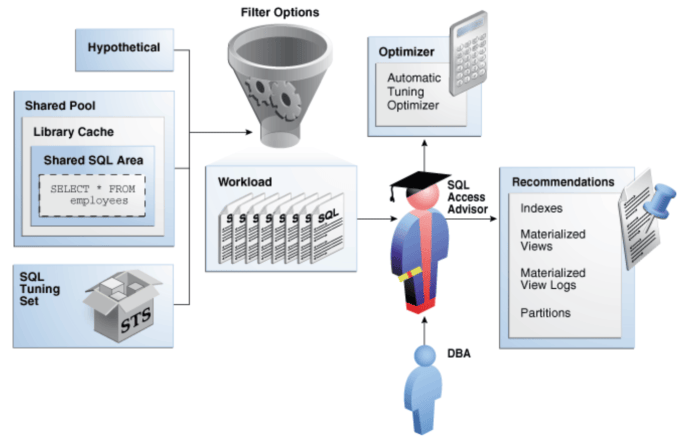
In an Exadata environment, we try NOT to use Materialized Views because the Exadata system can typically execute the SQL fast enough without adding the complexity of Materialized Views. The SQL Access Advisor is part of the Diagnostics and Tuning Packs, which are some of the most popular add-on options to Oracle Enterprise Manager.
Automatic Indexing in ADW and Oracle19c
Oracle Autonomous Database is going beyond the “advisor” approach to make indexing fully autonomous. This feature is also coming to Oracle19c. The SQL Access Advisor uses a SQL Tuning Set as input and provides advise regarding indexing and partitioning. Again, customers should avoid using Materialized Views on Exadata because they often aren’t necessary and make the database schema more complex, which increases maintenance of the schema and data.
The automatic indexing feature of ADW and Oracle19c goes beyond simply providing advice to automating the testing and implementation of those index changes.
Exadata (Automatic) Storage Indexes
One reason why we don’t need lots of indexes is because of the Storage Index feature of Exadata. Storage Indexes on Exadata are created automatically based on WHERE Clause predicates in your SQL, combined with values in the data. Storage indexes are create in memory inside each Exadata Storage Cell. Storage indexes provide HIGH and LOW values of columns within each block of data. The Storage Cell Software then skips those blocks that don’t contain the column value specified in the SQL.
It’s important to note that Storage Indexes involve a “learning algorithm” that relies upon SQL being executed against data stored in the database. The Storage Index won’t be present on the first execution of a SQL statement, but will be created over the course of time as the database gets used.
Storage Indexes are automatic. You don’t need to manage storage indexes, and you shouldn’t design your application and database schema to drive behavior of Storage Indexes. Rather, you should allow Storage Indexes to work naturally according to data characteristics and the natural behavior of Storage Indexes. Although it is possible to ORDER data to improve the impact of storage indexes, SORTING the data before loading might not be worth the time or effort.
Partitions are Effectively “Coarse Indexes”
It is important to understand that partitions are essentially equivalent to a “coarse index” rather than simply a mechanism to facilitate data maintenance. The Oracle databases will skip over partitions that aren’t needed based on WHERE clause predicates. This applies to both partitions and sub-partitions. The partitioning scheme should be designed more based on data access than data maintenance.
- Design partitions based on SQL access
- Use Partitions and Sub-Partitions
Partitioning for data maintenance makes sense, but only when it doesn’t conflict with query access.
Global vs. Local Indexes on Partitioned Tables
Partitioning brings some interesting choices when it comes to indexes on those partitions. You will need to know something about how users will access the data before deciding whether to use “global” versus “local” indexes.
It’s first important to understand the difference between global and local indexes. In short, “local” indexes are tied to each partition, whereas “global” indexes span all partitions of the table. Local indexes make data maintenance easier, while global indexes make access to data across partitions faster.
In the case where you have massive numbers of partitions with a local index, accessing data through the local index means touching the ROOT block of each index partition. In the case I mentioned previously, the customer had 525,600 partitions, which means they would also have 525,600 index root blocks to traverse if they used a local index without also doing some partition elimination.
So, before you settle on a partition scheme, and before you create any indexes, you need to know how users will query the data.
You also need to understand how the data will be maintained. If you DROP partitions frequently, that would mean rebuilding a GLOBAL index if any are created on that table.
Invisible Indexes
Marking indexes “invisible” is a technique to determine whether an index is truly necessary before dropping the index. This feature is especially useful when migrating an existing database to Exadata.
- Test query using NO_INDEX hint
- Mark undex invisible
- Drop index
Indexes can be marked invisible while you evaluate whether those indexes are truly necessary. First run affected queries with the NO_INDEX hint to determine impact of dropping the index.
Summary
In summary, use this simple indexing strategy outlined in this blog post for any databases running on Exadata. Over-use of indexes can be a challenge when it comes to maintenance of those indexes. Excessive numbers of indexes also gives the SQL optimizer more data access choices to evaluate.

