Oracle Recovery – Regarding Range Gaps

My team and I have been digging deep into Oracle database recovery lately, and we’ve noticed that some mistakes by administrators can jeopardize recoverability.  Oracle’s Recovery Manager (RMAN) product does a great job of catching issues, but it’s still possible to induce these failures.  This blog posting should help to explain how these problems occur and what can be done to correct problems with what we call “range gaps” in the recovery stream.

Restore and Recovery Range Gaps can be induced through improper use of Oracle’s Recovery Manager (RMAN) as well as through improper management of backup data stored in a Media Manager or other backup target.  Oracle’s Zero Data Loss Recovery Appliance (ZDLRA) will prevent these problems, or will detect, report and allow them to be corrected as outlined below.  Let’s start with a bit of terminology to set the stage.

Terminology

Restore Range Gaps – Restore Range Gaps refer to gaps in recoverability of data file backups as part of a full plus incremental backup strategy using a combination of LEVEL0 and LEVEL1 backups.  Lost Differential Incremental (LEVEL1) backups will essentially invalidate subsequent differential incremental backups.

Recovery Range Gaps – Recovery Range Gaps refer to gaps in recoverability of data due to lost ranges of redo logs.

Ordering Waits in ZDLRA – Oracle’s Zero Data Loss Recovery Appliance (ZDLRA)  will place backup pieces into an Ordering Wait status when Restore Range Gaps are detected.

Fetch Archive Log – When Real Time Redo Protection is used with ZDLRA, Recovery Range Gaps can be reconciled by the applications through the Fetch Archive Log (FAL) process.

Backup Polling – ZDLRA supports use of a “polling location” for ingesting backups.  RMAN backups written in Disk Format can be directly ingested into ZDLRA through the polling feature.

How Restore Range Gaps Occur

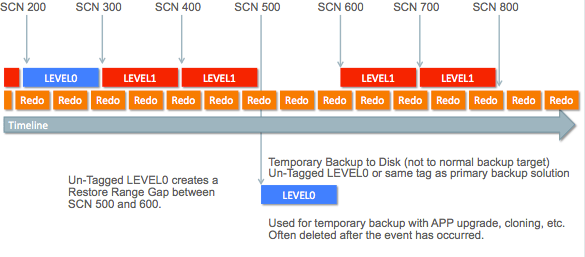
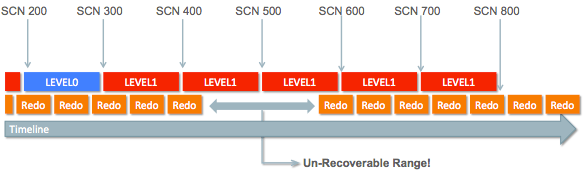
In a non-ZDLRA environment, gaps in the Restore Range can be induced through improper use of RMAN.  The following example occurs when a DBA performs a supplementary LEVEL0 backup to disk at SCN 500 in the following diagram:

Screen Shot 2018-04-12 at 1.02.54 PM

In the example above, the LEVEL0 is either un-tagged or uses the same tag as backups sent to the primary backup solution.  This means the LEVEL0 is part of the backup, even though it has been sent to a different location.

Restore Range Gaps in ZDLRA

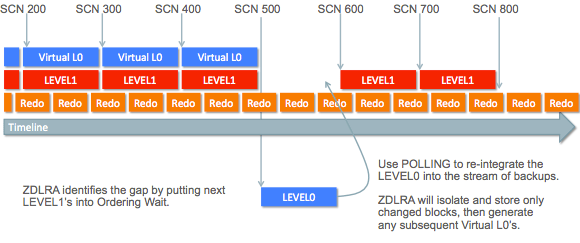
ZDLRA is susceptible to the same mistake as shown in the previous section, but ZDLRA will detect the gap and allows the gap to be filled.  The example below shows that Virtual L0 backups stop being generated due to the Restore Range Gap.

Screen Shot 2018-04-11 at 6.04.45 PM

Gap Detection – ZDLRA will identify Restore Range Gaps, and will place subsequent backup pieces into Ordering Wait status.  The above diagram shows a LEVEL0 backup being taken to an auxiliary location such as a space on disk.  The resulting LEVEL0 backup includes changed blocks that are critical to database recovery.  Generation of Virtual L0 backups will terminate when a Restore Range gap is detected.  The LEVEL1 backups following the range gap will be placed into Ordering Wait state until the gap is resolved.

Gap Resolution – ZDLRA is able to correct this problem by simply “polling” the LEVEL0 into the Delta Store.  The LEVEL0 backup contained un-changed blocks, but also contains the changed blocks require to fill the Restore Range Gap.  ZDLRA will de-duplicate the data by simply discarding the un-changed blocks.

Intermediate Recovery Range Gaps

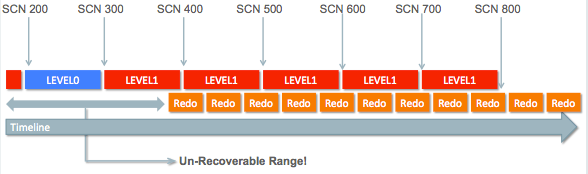
Recovery Range Gaps occur due to improper management of redo logs.   Recovery Range Gaps represent an unrecoverable range in the timeline, meaning the database simply cannot be recovered into that gap.  The example below shows a Recovery Range Gap approximately from SCN 425 to SCN 575.

Screen Shot 2018-04-12 at 11.06.13 AM

Existence of the associated LEVEL1 backups mean that the database can be recovered to points prior to SCN 425, or after SCN 600, but cannot be recovered to points between SCN 425 and SCN 600.  Recovery Range Gaps like this occur in one of 3 ways:

  • Deletion of Redo on Source Prior to Backup
  • Failed Backup Processing
  • Deletion of Redo on Backup Target

Redo logs are stored on each database server, either in an Log Archive Destination, or in a Fast Recovery Area. The Log Archive Destination (specified by the LOG_ARCHIVE_DEST_n parameter) configuration is supported for backward compatibility.   Customers should implement the Fast Recovery Area feature instead of using the older Log Archive Destination configuration.

The Fast Recovery Area simplifies management of redo logs and is designed to prevent improper deletion of redo that can jeopardize recoverability.  For more information on the Fast Recovery Area feature, please see the Oracle database documentation here.

The Fast Recovery Area allows DBAs to manage redo according to policies, and prevents deleting redo before it is backed-up.  Redo is marked as eligible for deletion only after being backed-up.  Administrators can still override this setting and delete redo even if it hasn’t been backed-up, but this will create a Recovery Range Gap.

We have seen Recovery Range Gaps generated due to failed backup processing.  Some 3rd party backup products have been known to NOT send error messages to RMAN even though the backup data was not saved.  One method to detect such problems is to execute the following RMAN command:

RMAN> CROSSCHECK BACKUP

The crosscheck command will check contents of the RMAN catalog against 3rd party media catalog and report any missing data.

Trailing Recovery Range Gaps

Trailing Recovery Range Gaps result in the same problem as described above, but are more likely to be caused by improper deletion of redo on the backup target instead of on the source.  The following diagram illustrates this type of failure:

Screen Shot 2018-04-12 at 12.32.29 PM

The above example indicates that REDO is being deleted too quickly even though it is required for recoverability.  Media recovery cannot be performed in any range prior to SCN 400 in the above example.  If all redo prior to SCN 380 has been deleted, this seems to indicate an improper deletion policy on the backup target.

Depending on change rates, redo logs can represent significant space consumption.  Redo logs tend to be less compressible, but simply will not de-duplicate because each redo log contains unique (non-duplicate) data by definition.

ZDLRA Resolves Recovery Range Gaps

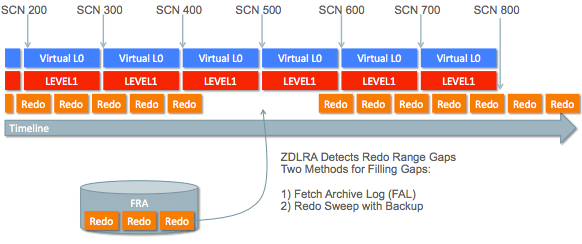
ZDLRA is able to automatically resolve Recovery Range Gaps, and will ALERT when Recovery Range Gaps are detected.  The following diagram shows this capability:

Screen Shot 2018-04-12 at 12.38.42 PM

ZDLRA will detect Recovery Range Gaps and fill those gaps using the FAL (Fetch Archive Log) process, which reaches back into the FRA (Fast Recovery Area) of the protected database.  For databases not configured for Real Time Redo protection, any un-transmitted redo will be send to ZDLRA using the following backup command:

RMAN> BACKUP DATABASE ...
      PLUS ARCHIVELOG NOT BACKED UP...

The standard RMAN backup command for use with ZDLRA always includes backup of archived redo that has not been backed-up, even when Real Time Redo Protection is enabled.  This configuration provides a failsafe that ensures the redo will be swept from the FRA regardless of whether Real Time Redo Protection is functioning or not.

Conclusion

Range Gaps occur in both the “restore” stream as well as in the redo log or “recovery” stream of data sent to a backup target.  Any experienced database administrator knows that databases cannot be recovered to SCN’s that reside within a range of redo that has been lost.  It’s important to also know that loss of incremental LEVEL1 backups will create a similar gap in the Restore Range represented by a set of LEVEL0 and LEVEL1 backups.  When such Range Gaps occur, database administrators won’t know these problems exist unless a database recovery is attempted.  Oracle’s Zero Data Loss Recovery Appliance (ZDLRA) will identify and alert when Restore & Recovery Range Gaps occur.  These gaps can also be corrected using some of the unique features of ZDLRA, preserving database recoverability and meeting business needs for data protection.


4 Oracle Backup Methods

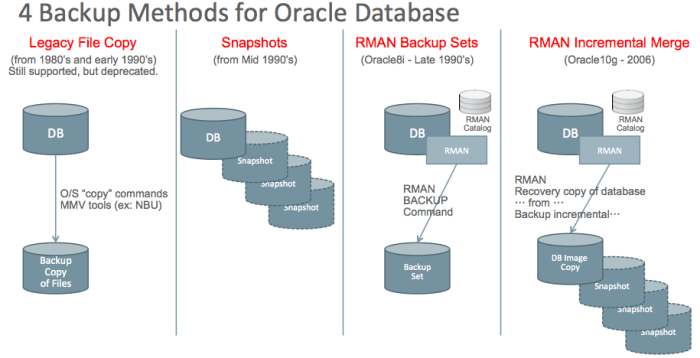
While there is a vast array of backup products on the market that support Oracle, all of these solutions implement 1 of 4 available methods as shown below:

Screen Shot 2018-02-27 at 2.42.02 PM

The 4 backup methods are categorized according to the method used to manipulate the data underlying the Oracle database.  This blog post will outline each of these 4 methods and will explain how Oracle’s Zero Data Loss Recovery Appliance (ZDLRA) is distinctly different from these 4 methods.

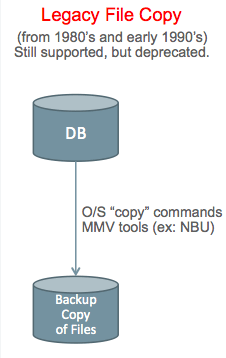
Legacy File Copy

As the name implies, Legacy File Copy is an older method for backing up Oracle databases that dates from the earliest days of Oracle.  I am covering this solution primarily for completeness and because it’s still used today (although rarely).  This method involves using tools such as O/S “copy” commands such as “cp” on Unix/Linux, as well as 3rd party tools such as MMV (Media Manager Vendor) utilities to backup database files directly.

Screen Shot 2018-02-27 at 4.41.59 PM

Cold Backup refers to making copies of database files while the database is in a shutdown state.  The database must be shutdown cleanly using SHUTDOWN NORMAL, SHUTDOWN TRANSACTIONAL, or SHUTDOWN IMMEDIATE prior to copying the underlying files.

Hot Backup refers to copying database files while the database is running.  Taking a hot backup using legacy file copy requires use of BEGIN/END BACKUP commands at the table space level or for the entire database at once.  The DBMS generates extra redo logging when these commands are used, so

Redo log handling is absolutely critical in legacy file copy backup.  The first challenge is to NOT backup files while they are being written by the ARCH (redo log archiver) process.  The next challenge is to NOT delete redo logs unless they have been backed-up.  The final challenge is to ensure all redo associated with the backup has also been backed-up so you have a complete set of redo to “de-fuzzy” the backup.  There are critical timing issues down to the microsecond level that can make the difference between success and failure.  Improper handling of redo was a major source of backup corruption in the days prior to RMAN.

Multi-Threading is extremely difficult in a legacy file copy solution, which ultimately limits the size of database the solution can support.

The vast majority of Oracle customers abandoned the old Legacy File Copy solution many years ago, but some customers continue using these solutions.  Most customers migrated to RMAN when it was introduced, and a small number of customers use storage snapshots as discussed in the next section.

Snapshot Backups

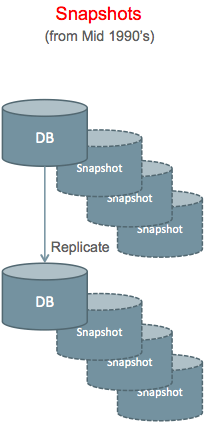
Snapshots Backups are typically implemented in the storage layer or disk array.  Snapshots were originally introduced in the late 1990’s, and were a good alternative to legacy file copy solutions, but have some critical complexities that we will explore in this section.

Screen Shot 2018-02-27 at 4.56.13 PM

Snapshots provide a virtually instantaneous copy of files on storage, which eliminates some of the complexity involved with multi-threading required for large database backups using the Legacy File Copy method.  Snapshots seem quite simple and effective on the surface, but the reality is less attractive.

Snapshot Backups are NOT Recommended

To be clear, we do NOT recommend using snapshots for backups.  Snapshots should be used for transient fallback on production systems, or for storage efficiency purposes on DEV/TEST systems.  Snapshots alone are not proper backups and should be used only in conjunction with storage replication or an auxiliary backup method.

Replicated Snapshots

Snapshots stored within the same storage as the database are not proper backups, especially if they are thin-provisioned (pointer-based) snapshots.  Loss of ALL data contained in the storage array (database and backups) is possible if everything is contained in a single disk array.  Replication is required in order to have a viable backup solution using snapshots.  The above diagram shows data and snapshots that are stored locally, as well as a replicated copy of the full storage and all snapshots.

Replicating Corruption is a danger with any bit-copy storage replication solution.  If the system suffers a ransomware attack, the encryption of data is dutifully replicated to the secondary site, resulting in encryption of BOTH sites.

Full Replication of storage including the database and all snapshots provides the best protection, but at higher cost.  In configurations where the database and all snapshots are maintained at both sites, local snapshots can be used for recovery as long as the failure doesn’t impact the entire disk array or the “base” that snapshots reference.

Snapshots at Replica Only provides good protection at lower cost because the space required for snapshots is only incurred at the replica site.  Using those snapshots for recovery on the primary site requires copying data back across the network.

ASM (Oracle’s Automatic Storage Management) needs to be used with care in conjunction with any storage replication.  ASM re-balance operations are a particular concern, since large numbers of blocks are “modified” at the storage layer, even though the affected blocks haven’t changed from the database perspective.  ASM re-balance results in massive numbers of blocks being replicated across the network.

Auxiliary Backup

Some customers implement an “auxiliary backup” in conjunction with snapshots rather than using storage replication.  One customer referred to this as a “snap & mount” solution because they used SAN (Fiber Channel) storage, and the file systems would be mounted on another system after the snapshot.  The second system would be used to run a backup of the snapshots.  Running auxiliary backups is simpler with NAS storage, since the secondary system does not need to be as closely aligned with production from the standpoint of versions, patching, etc.

Screen Shot 2018-02-28 at 8.17.53 AM

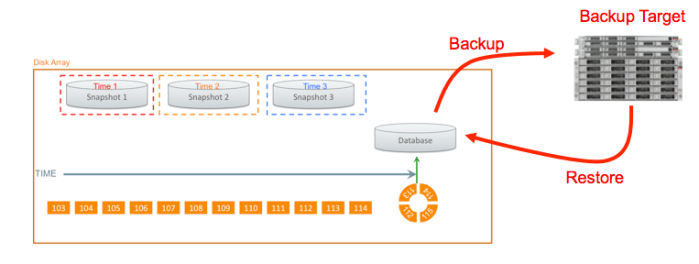
The diagram above shows storage snapshots contained within a disk array, with an auxiliary backup target (either tape or disk).  The database can be reverted to any of the snapshots within the disk array, or restored from the auxiliary backup target.  Setting end-user expectations for MTTR should be based on the worst-case, which is restoring from the auxiliary backup.  See the section on MTTR for more discussion of this topic.

The remainder of this section assumes that snapshots are used in combination with replication or an auxiliary backup solution.

Crash Consistent Snapshots

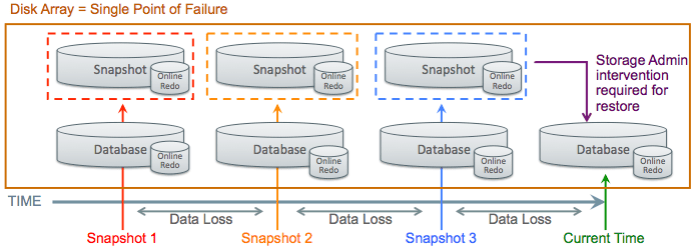
The simplest form of snapshot backups is the Crash Consistent Backup.  The configuration is relatively easy to understand, and relatively easy to operate.  However, this is what I call a “guaranteed data loss” solution as shown in the following diagram.

screen-shot-2017-01-03-at-1-00-37-pm

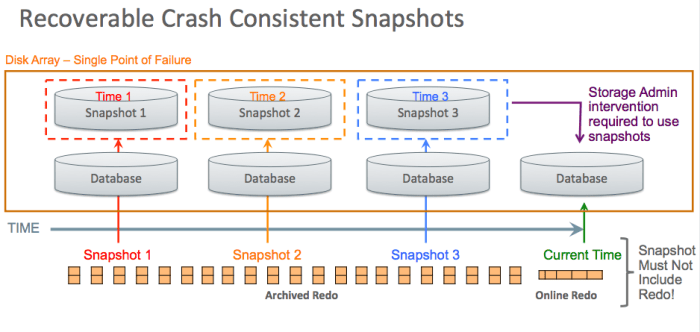
The above diagram shows a database advancing through time, and snapshots being taken at 3 points (red, orange, and blue snapshots).  The entire disk array is a single point of failure, so some sort of replication is required.

Oracle’s Snapshot Requirements must be met for a valid Crash Consistent Snapshot.  The snapshot solution must provide the following attributes:

  • Consistent across all files or disk volumes
  • Must preserve write ordering

Snapshot technologies that do not meet these criteria will not produce a crash consistent image of the database.  Please refer to the section on inconsistent snapshots for more detail.

NOARCHIVELOG Mode should be used in a Crash Consistent Snapshot solution, and the online redo logs MUST be included in the snapshot.  The entire database, online redo logs, and control files are all reverted to the same point in time.  Oracle will automatically run through crash recovery, rolling back any in-flight transactions.   It is not possible to recover to any points between snapshots in this configuration, meaning data loss (lost transactions) will occur.

Recoverable Crash Consistent Snapshots

Crash Consistent Snapshots can be made Recoverable, allowing for recovery beyond the instant a snapshot was created, or recovering to an SCN between snapshots.  The following diagram shows how crash consistent snapshots can be made recoverable by keeping REDO (online and archived REDO) separate from snapshots of the datafiles.

Screen Shot 2018-02-28 at 8.23.34 AM

In the above example, the database can be reverted to snapshot #1, then recovered forward using the redo logs.  Redo (and control files) are kept separate from the snapshot containing datafiles, which is what enables recovery.

Online Redo and Controlfiles must be kept at “current” or at a later point in time from the database to allow media recovery.  Transactional changes to the database are stored in the range of online redo as well as the stream of archived redo that precedes the online redo range.

Archived Redo Retention must reach as far back as the time of the snapshot used for recovery.  There is no reason to revert the stream of redo to an earlier point, since the redo represents a continuous stream or timeline.  The database can be recovered to any SCN along the timeline, rolling forward from the point of any snapshot.

Snapshots (or Restore Points) on Redo/FRA can be used to protect against administrator error, viruses, ransomware attacks, etc.  The Oracle database redo log is a write-ahead log, and log files are never over-written.

The High Write SCN determines the lowest point in time that can be used for recovery with any specific snapshot.  Oracle’s “snapshot optimization” feature was developed in conjunction with storage vendors.  The storage writes a timestamp into the snapshot, and that timestamp is then used in the RMAN commands using the SNAPSHOT TIMESTAMP clause.

The Database Scanner utility can be used with older versions of the Oracle database using storage that doesn’t support the Snapshot Optimization Feature.  The utility is used to scan the entire database looking for blocks with the highest written SCN in the database.  That SCN defines the point the database must be recovered to at minimum.

File Needs More Media Recovery is the error that will occur if the database is not recovered to a point after the high-write SCN.  A previous snapshot will have to be used in that case to hit the desired SCN.  The choice is to use the database scanner (a full scan of every block in the database) or trial and error will show whether the chosen SCN is high enough.

Inconsistent Snapshots

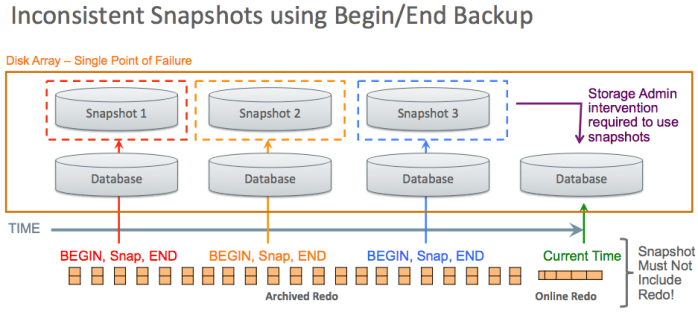
Some older snapshot technologies were not able to meet the data consistency requirements of Oracle.  All data structures of the Oracle database (datafiles, controlfies, redo logs, etc.) must be snapped at the SAME instant in time.  The order of writes also must be preserved to ensure data integrity.  Customers need to be aware that some NEW snapshot technologies cannot meet these data integrity requirements, so the old “inconsistent snapshot” method has to be used.  The following diagram shows how inconsistent snapshots can be used as an Oracle database backup method.

Screen Shot 2018-02-28 at 9.06.42 AM

As noted previously, the disk array itself is a single point of failure.  Loss of the disk array means loss of the database and all snapshots.  There are specific commands that can be run on most disk arrays that will jeopardize the database and all snapshots.  Customers should be sure to use storage replication or an auxiliary backup method with snapshot technologies.

BEGIN/END BACKUP commands must be used in conjunction with the snapshot, either at database or tablespace level.  Database redo logging increases dramatically after executing BEGIN BACKUP.  The excessive redo log rates continue until END BACKUP is executed.  The BEGIN BACKUP command does not “quiesce” the Oracle database.  The command causes the Oracle database to generate additional information into the redo log to “defuzzy” the backup and resolve any “split block” conditions caused by the inconsistent snapshot.

Online Redo, Archived Redo, and Controlfiles must be kept separate from the datafile snapshots as shown in the above diagram.  If those data structures are placed into a separate snapshot, that snapshot must be Crash Consistent.

Archived Redo Retention (as with Recoverable Crash Consistent Snapshots) must reach as far back as the time of the snapshot used for recovery.  There is no reason to revert the stream of redo to an earlier point, since the redo represents a continuous stream or timeline.  The database can be recovered to any SCN along the timeline, rolling forward from the point of any snapshot.

MTTR from Snapshots

One primary rule with MTTR (Mean Time To Repair) calculations is to “plan for the worst, but hope for the best”.  Recovery using a local snapshot is obviously the best case, while recovery using a remote replica or auxiliary backup will provide the worst case recovery.

One customer I was involved with used snapshots as the primary method of recovery, and set expectations with the business that recovery would be done in less than 1 hour.  This customer had a 48TB database with auxiliary backup using EMC’s Data Domain.  Restore from Data Domain ran at 1TB/hour, which means 48 hours for restore time alone for their 48TB database (restore is only part of the recovery process).  The IT team was faced with business expectation of 1 hour recovery, but 48 hours of restore time.  In the end, this customer suffered a 4-day outage due to inadequate secondary solution and a primary solution that was high risk (snapshots are not proper backups).

Snapshot Recovery is Manual

All recovery from snapshots is manual and requires coordination between DBA and Storage Administrator.  Features such as Oracle’s Recovery Advisor cannot be used because all of the backups (snapshots) are done outside of Oracle’s control.  Some 3rd party vendors offer specialized tools to aid in recovery using snapshots.

RMAN Backup Sets

Solutions based on RMAN Backup Sets are the most commonly used method for backup & recovery of Oracle databases.  I would estimate that greater than 80% of Oracle databases are protected using RMAN Backup Sets.  The vast majority of Oracle customers also implement systems according to ORacle’s Maximum Availability Architecture (MAA) guidelines, and RMAN Backup Sets are a critical component of MAA.

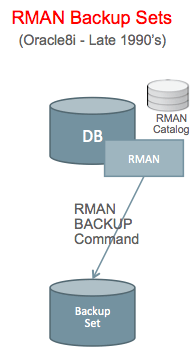
Screen Shot 2018-02-28 at 10.18.42 AM

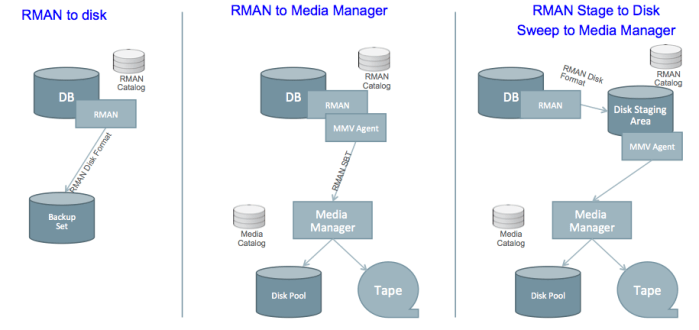
RMAN was introduced in Oracle8i with the Backup Set capability in the late 1990’s, and Backup Sets have become the most widely used method for backup/recovery of Oracle databases.  There are 3 implementations of RMAN Backup Set configurations as follows, using backup to disk, backup to media manager, and staging areas as follows:

Screen Shot 2018-02-28 at 10.31.41 AM

RMAN backup sets have a different format when written directly to disk as compared to SBT (Serial Backup to Tape) format sent to a Media Manager.  The Media Manager might be configured to use a “disk pool” to store the data, but it’s still in SBT format.

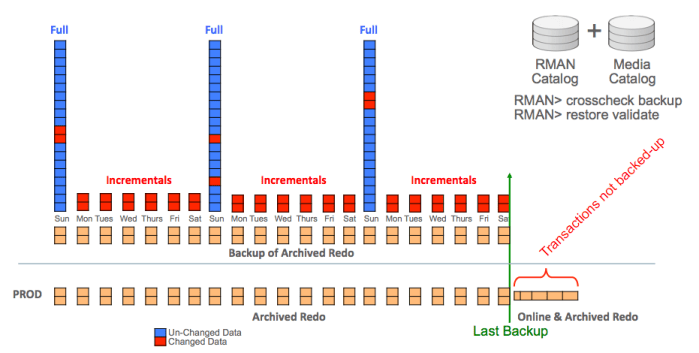
The Stage & Sweep Configuration involves RMAN writing the backup to disk, then the Media Manager is used to “sweep” that data to whatever storage device it is using (disk, tape or VTL). The disk staging area should be sized large enough to contain at least 2 full backups, all associated incremental backups, plus all associated redo.  The WFDDI (Weekly Full Daily Differential Incremental) will give this configuration:

Screen Shot 2018-02-27 at 2.05.34 PM

The above diagram shows space for 3 weekly full backups, plus all intervening incrementals and archived redo.  The resulting RECOVERY WINDOW is 2 weeks (from disk) because the oldest backup will be deleted before running the next backup.  Older backups can be stored only on the Media Manager, but a double-hop will be required during recovery using any backups coming from the Media Manager.

A Double Hop Restore is required in the Stage & Sweep configuration for cases where the needed backup is not on disk in the staging area.  The Media Manager stores the data in it’s own proprietary format, and RMAN cannot access those backups directly.  The Media Manager must retrieve the needed backups and write them back to the staging area before RMAN can access those backups.

Recovery from Full + Incrementals

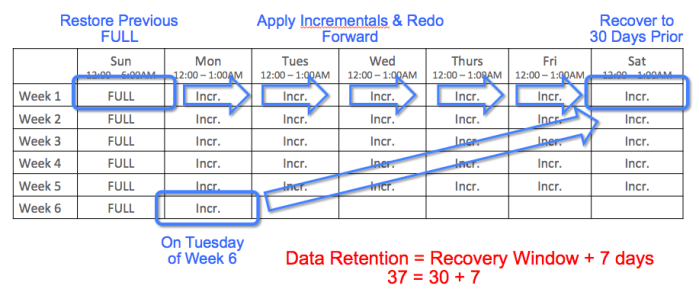
The most common backup strategy with RMAN Backup Sets is Weekly Full Daily Differential Incremental (WFDDI).  Some customers still use Daily Full (DF) backups for smaller databases, and lower Recovery Windows.  The following calendar shows a 30-day Recovery Window, which requires 37 days data retention:

Screen Shot 2018-02-26 at 12.27.27 PM

The “rule of thumb” for performance using WFDDI is that end-to-end recovery will be 2X longer as compared to recovery using a Daily Full (DF) strategy.

HA/DR and Backups

Note that Oracle’s MAA (Maximum Availability Architecture) team specifies that HA/DR (High Availability and Disaster Recovery) solutions should be used in conjunction with a backup/recovery solution.  Requirements for “instantaneous recovery” (low Recovery Time Objective) should be addressed through a DR solution such as Oracle Data Guard or Oracle Golden Gate.  Requirements for preventing system downtime should be addressed through HR technologies such as Real Application Clusters (RAC).  Backup/Recovery is distinctly different from HA/DR, and allows a system to be recovered BACKWARD in time to a prior point.

Low RPO Requirements

It’s important to note that Oracle’s Zero Data Loss Recovery Appliance (ZDLRA) can be used to deliver extremely low RPO (Recovery Point Objective) requirements in cases where RTO (Recovery Time Objective) is not as stringent.  As noted previously, a Disaster Recovery (DR) system using technologies such as Oracle Data Guard and/or Oracle Golden Gate is the recommended method for delivering low RTO.  Prior to the advent of ZDLRA, RTO and RPO were essentially linked and were addressed together.  We are now able to address low RPO requirements separately using ZDLRA, reducing the operational complexity of recovery in cases where time is not as critical.

RMAN Incremental Merge

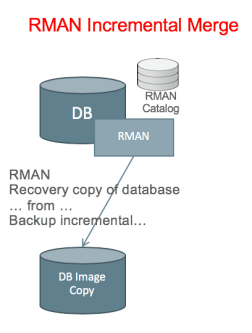
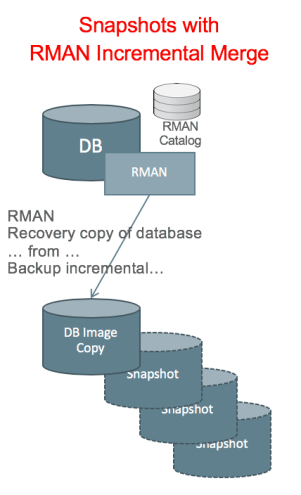
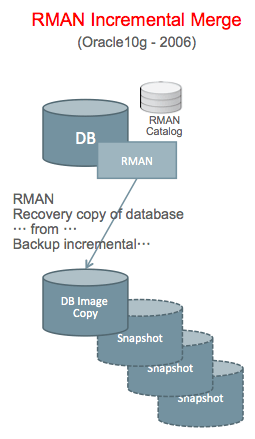
The RMAN Incremental Merge feature was introduced in the Oracle10g release in 2006. This feature allows customers to create an IMAGE COPY backup of a database, then update that image copy using incremental backups.  Another way to describe this feature is “Incrementally Updated Image Copy” backups.  The image copy is updated as of a specific point in time.  Storage snapshots can then be added to this capability to provide recoverability to multiple points in time.

Screen Shot 2018-02-28 at 12.20.22 PM

The RMAN catalog tracks the original image copy, along with each incremental that is executed.  Snapshots of the Image Copy are taken at various intervals, and these are done outside the control of RMAN.

Image Copy Location – Separate storage is used to hold the image copy.

CPU Stealing – The merge operation is performed using “CPU Stealing” from the production database server.  The production database server executes an incremental backup on the database, then applies those changes to the image copy.   This places additional load on the database server for the duration of the Incremental Merge process.

Incremental Merge Performance is affected by the fact that changes to the database tend to involve random I/O.  Performance of the incremental merge operation can be increased only by putting the image copy on faster storage.

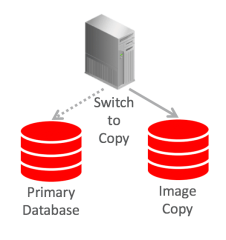
The “Switch to Copy” capability of Incremental Merge is only useful if the image copy is stored on the same tier of storage as the primary database.  We typically put backup on lower tiered (less costly, less performant) storage than the primary database.  However, if that backup will potentially BECOME the primary database by doing “switch to copy”, the storage needs to be of similar performance class.

Incremental Merge Recovery is Manual

Using an RMAN Incremental Merge with Snapshots, all recovery is manual.  Guided Recovery in OEM and Oracle’s Recovery Advisor aren’t used.  It’s possible to mitigate this somewhat by registering the snapshots in the RMAN catalog.  Third party tools that implement this method typically provide some tooling to assist Database Administrators with recovery, but those tools are not as widely used in the industry.

ZDLRA – the 5th Method

Oracle’s Zero Data Loss Recovery Appliance is nominally based on RMAN Backup Sets, but it’s a distinctly unique solution.

screen-shot-2017-01-03-at-3-29-11-pm


Any Oracle version and any platform (those currently supported as of this writing, meaning 10g and above) can be configured to use the Recovery Appliance.

An Initial Full (LEVEL0) Backup is used to seed the recovery appliance.  That initial full backup effectively does not exist after a while, as blocks belonging to that backup are eventually purged.

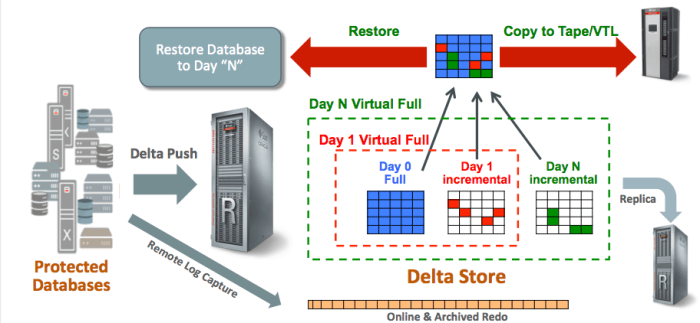
Delta Push uses the RMAN Incremental API to push changes from the database to the Recovery Appliance.  While this uses the syntax of a conventional RMAN LEVEL1 (incremental) backup, it is functionally quite different.  Each Delta Push is automatically transformed into a Virtual Full backup.

Virtual Full (LEVEL0) Backups appear in the RMAN catalog after the contents of each Delta Push are processed.  There is a Virtual Full created for the initial physical LEVEL0, as well as for each subsequent Delta Push.

Real Time Redo Protection uses the Data Guard API to protect the leading edge of the redo stream.  Redo is transmitted asynchronously to prevent the Recovery Appliance from becoming a bottleneck.  The Recovery Appliance ensures Zero Loss up to the last transmitted SCN in this configuration.  ZDLRA is supported for use with a Far Sync Server to allow synchronous capture of redo changes without imposing a bottleneck across multiple systems.

ZDLRA Benefits

The Zero Data Loss Recovery Appliance provides a number of unique benefits compared to other solutions on the market.

screen-shot-2016-12-25-at-4-18-12-pm

Efficiency of ZDLRA begins with impact on the production database servers, then extends through the network and into the space required on ZDLRA.  Changes are pushed to ZDLRA using the Delta Push process (the most efficient possible), and those changes are automatically converted into Virtual Full Backups.  The Virtual Full Backups are then used during recovery, making the recovery process more efficient as well.

Validated Recoverability is a key benefit of ZDLRA.  Backups are validated proactively rather than during recovery.  Customers can recover with confidence knowing the backups have been validated.  The Recovery Appliance will attempt to automatically resolve validation failures (such as redo log gaps), and will report validation failures if they cannot be resolved automatically.

Automation & Simplicity is another key benefit of ZDLRA.  The Recovery Appliance uses familiar tools and the full range of automation capability (such as Guided Recovery) that is already built into the Oracle ecosystem (Database, RMAN, OEM, etc.).  Backups are dramatically simpler because each database simply does a Daily Delta Push rather than complex scheduling of weekly full backups that might contend with application processing.

Cost Effectiveness is extremely important for any backup/recovery solution, and ZDLRA is the most cost-effective solution on the market.  ZDLRA requires the least amount of storage space possible because of the change-based design that directly extracts changed blocks through the Delta Push process.

Space Usage Comparisons

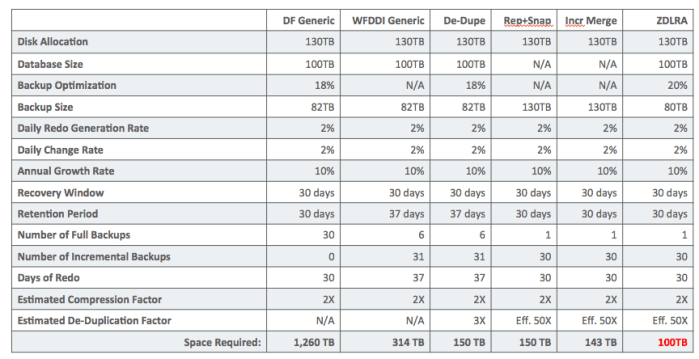
All 4 of these solutions have a variety of advantages and disadvantages, but we should first compare the based purely on the amount of storage space required.

While all of these solutions provide dramatic space savings over generic solutions, ZDLRA provides the greatest storage savings of all.  The most dramatic saving comes from the use of RMAN Incremental Backups (WFDDI) as opposed to Daily Full (DF) backups.  As shown in this example, ZDLRA requires approximately 1/3 less storage space than all of these other solutions.

Screen Shot 2018-02-28 at 1.33.47 PM

As shown in the table above, with a given database size of 100TB, and with the same redo generation rate, change rate, recovery window, etc. ZDLRA requires the least amount of space.

DF Generic means Daily Full backup to general purpose storage.  Notice that the “recovery window” is equal to “Retention Period” since full backups are taken daily.

WFDDI Generic shows the impact of implementing a WDFFI (Weekly Full Daily Differential Incremental) strategy.  This is a dramatic 4X savings in space as compared to Daily Full backups.  Notice that the “Retention Period” is 7 days longer than the “Recovery Window” because this scenario uses a Weekly Full backup.

De-Dupe takes the WFDDI strategy and adds de-duplication storage.  Daily Incrementals and REDO logs do not contain duplicates by definition (these contain all unique data).

Rep+Snap shows the use of storage replication with snapshots on the replica side only.  This method uses a full size replica of the database, then adds daily snapshots to capture changes.  The changes are space efficient, but this solution requires a full sized copy (replica) of the database.

Incr. Merge shows the storage required for an RMAN Incremental Merge solution with snapshots.  As with the replication + snapshot method, RMAN Incremental Merge uses a full sized Image Copy of the database, with the same sized disk allocation.  Changes contained in snapshots are space efficient, but the fully provisioned database size consumes the same amount of space as on production.


De-Duplication in ZDLRA

Customers often ask whether ZDLRA has de-duplication capabilities, and (if so) how ZDLRA performs de-duplication.  This blog post will explore this question and explain how de-duplication works inside of ZDLRA.

Change-Based – The Opposite of De-Duplication

ZDLRA is change-based, which is the opposite of de-duplication.  The primary purpose of the Oracle database engine (any database engine, in fact) is to track and manage changes to data.  ZDLRA essentially taps into those change management mechanisms of the Oracle database to capture and store changes.

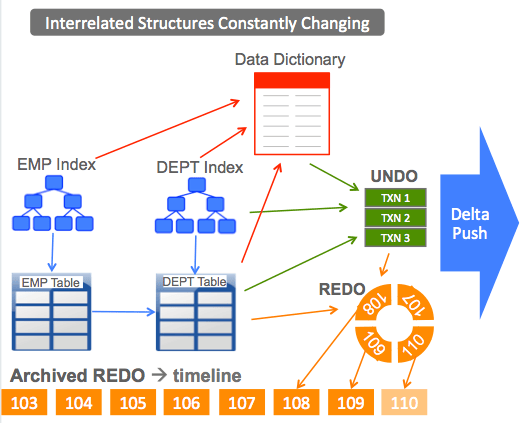
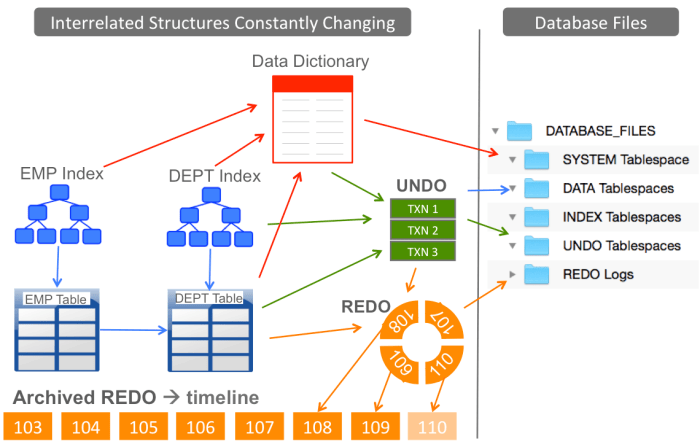
An Oracle database is comprised of interrelated data structures that are constantly changing.  Data in a Relational DBMS is organized into tables and tables have relationships between them.  Each table might have one or more indexes, and the pointers in each index are pointing to rows in the corresponding table.  These structures are represented in the Data Dictionary, which is tightly related to all of the tables, indexes, and other structures in the database.

The following diagram shows an extremely simple database comprised of 2 tables (EMP and DEPT) and 2 indexes.  Small production databases might have several hundred tables, and large databases might have TENS of THOUSANDS of tables, indexes and other data structures.

Screen Shot 2018-02-21 at 9.08.33 AM

Oracle databases are constantly changing.  The only way to “quiesce” an Oracle database is to force all users to disconnect and shutdown the database.  As long as the database engine is running, the data it contains will be changing.  Changes in the database (made by transactions) are written into the REDO log.  The opposite of those changes are written into an UNDO “log” in case those changes need to be reversed.  Changes to the database are sent to ZDLRA using the Delta Push process.

Delta Push = Virtual Full Backup

ZDLRA uses the RMAN “incremental backup” API to capture changes on the source database.  While this incremental backup might appear to be the same as a conventional incremental backup, it is fundamentally different in ZDLRA.  When a DELTA PUSH is executed, the results are automatically transformed into a VIRTUAL FULL backup in what is known as the Delta Store inside of ZDLRA.

Creation of the Virtual Full backup also means that changes in the database are tracked from the previous Virtual Full instead of the last Physical Full backup.  Although ZDLRA makes use of the RMAN INCREMENTAL backup API, the results are quite different.  ZDLRA is often referred to as an “incremental forever” solution, but that terminology has a certain connotation.  Other products on the market might appear to be similar (such as solutions based on the RMAN Incremental Merge feature), but they are based on a fundamentally different operating principal.

I prefer to use the term Delta Push instead of “incremental forever” because ZDLRA is vastly different than anything else on the market.

Delta Store – A Database of Block Versions

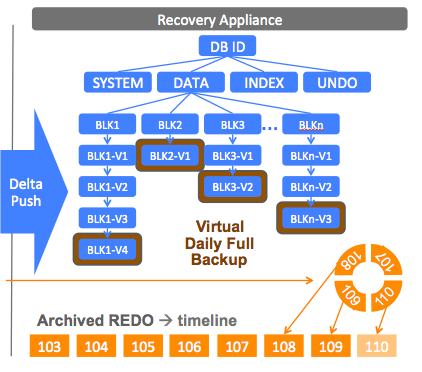
The Delta Store within ZDLRA is a database containing versions of database blocks.  Every Oracle database  is comprised of tablespaces such as SYSTEM, DATA, INDEX, UNDO, etc.  Customers can add their own tablespaces and name them as desired to organize data within the database.  Each tablespace is comprised of many blocks.  ZDLRA captures a copy of each block and arranges that block into the hierarchy.

Screen Shot 2018-02-21 at 8.52.06 AM

Each Delta Push sends the latest version of each changed block.  Those changed blocks are indexed into the Delta Store and combined with previous un-changed blocks to form a Virtual Full Backup.

Frequency of Delta Push (Daily)

The vast majority of databases will push changes to ZDLRA once per day, resulting in a Daily Virtual Full Backup.  Some databases might have extremely HIGH or LOW change rates and customers might want to use more frequent or less frequent Delta Pushes on those databases.  However, these will be extremely rare circumstances and the vast majority of databases will simply use a Daily Delta Push.

Initial Physical Full

ZDLRA begins with a PHYSICAL FULL (LEVEL0) backup of each database.  That full backup is arranged into the Delta Store and serves as the basis for all Virtual Full Backups moving forward.  Some Oracle database blocks will never change for the life of the database, while other blocks change continuously.  Over the course of time, many block versions from the initial LEVEL0 will be purged when the Recovery Window is reached.  The initial physical full essentially doesn’t exist any longer, although the oldest Virtual Full will be available in the Delta Store.

Fast Incremental (Block Change Tracking)

We recommend using the “Fast Incremental” feature of the Oracle database, which is also known a Block Change Tracking (BCT).  With Block Change Tracking, the Oracle database records all blocks that have changed since the last backup.  BCT tracks changes since the last VIRTUAL FULL backup when ZDLRA is being used.  The BCT pointers are reset each time RMAN connects to ZDLRA and performs an implicit SYNC operation.

De-Duplication (Subsequent Physical Full)

De-Duplication occurs in ZDLRA whenever a subsequent physical full backup is executed. It is possible (but certainly not recommended) to execute subsequent full backups to ZDLRA after the first physical full.  ZDLRA will identify the changed blocks and insert them into the hierarchy in the Delta Store, discarding all of the un-changed or “duplicate” blocks.

The “Global” De-Duplication Question

As shown in the above diagram, ZDLRA organizes backups database under the DBID (Database Identifier) for each database.  This obviously means that data from one database will not be associated with and de-duplicated against data contained in a different database.

Database Blocks – Data within an Oracle database is contained in database blocks.  If the same data is insert into 2 separate databases, the physical blocks are virtually guaranteed to be different.  Each database block contains a row directory, interested transaction list (ITL), header metadata, footer metadata, etc.  Each database block records the SCN (System Change Number), which is unique to a particular database.  Two physically separate databases might contain the same logical data, but the physical database blocks will be different at the bit/byte level.

Cloned Databases – The only way to generate duplicate physical blocks across 2 or more databases is to “clone” the database.  A cloned database is a physical copy of a database, but a different DBID is assigned to that database.  Backups of cloned databases will contain physically duplicate blocks of data.

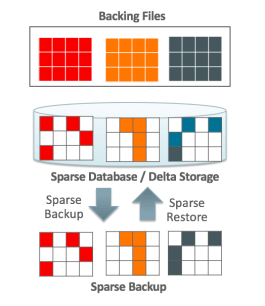
Sparse Clones – Oracle supports what are known as “sparse clones” of databases using SPARSE disk groups in ASM (Automatic Storage Management).  In a sparse clone configuration, there is a “master” copy of the data with multiple clones.  Each clone writes changed blocks (different from the master) into a SPARSE disk group.  The SPARSE disk group contains only the changes for a particular clone.  The database engine reads from the “master” or from the “cloned” blocks as necessary.

Sparse Backups – The next logical step in the evolution of sparse clones is to have Sparse Backups.  Sparse backups only contained the uniquely different (changed) blocks for the clone.  The sparse backup is merged with the master copy to generate a physically unique database upon restore.  ZDLRA currently supports backup of sparse clones, but these are done as physical backups.  Oracle can discuss future plans in this area under NDA (non-disclosure agreement).

As we can see from the discussion above, “global” de-duplication, or de-duplication across multiple databases will only occur in a TEST/DEV environment.  It’s virtually impossible to have physically duplicate blocks across multiple production databases, even if those databases contain the same data in tables and indexes.  Oracle’s direction is the use of sparse clones for TEST/DEV environments, extending the sparse clone capability into sparse backups.

Change Rate vs. De-Duplication Factor

The rate of change in an Oracle database is generally expressed in terms of a percentage, meaning the changed blocks as a percentage of total blocks within the database.  For any large population of Oracle databases, the AVERAGE change rate will be in the range of 2% to 4% each day.  The average change rate typically varies by industry.  Industries with longer data retention periods (retention of data within the database) will have databases with a low daily change rate compared to industries with shorter data retention.  Each company might have specific databases with higher or lower than average daily change rates, but such outliers are not common across a large population of databases.

De-Duplication is typically expressed as a factor, such as 3X or 4X de-duplication.  A database with a 3X de-duplication factor is the same as a 33% change rate.

Changed Blocks vs. De-Duplicated Segments

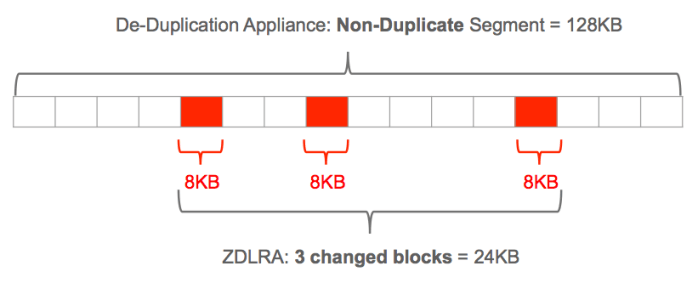
The Oracle database engine tracks and manages changes to blocks of data.  The typical Oracle database block is 8KB in size.  By contrast, de-duplication storage appliances process data in larger “segments” of data, typically at 128KB in length.  Each 128KB segment typically contains 16 Oracle database blocks (assuming 8KB block size).

The typical Oracle database with an OLTP workload will have changes that are fairly distributed across the database from a physical perspective.  Data Warehouse databases tend to have more changes that are concentrated into contiguous blocks.  Large sequential data loads will be more tightly sequenced into blocks on disk, whereas INDEX changes will be more distributed.  The following diagram shows 3 changed blocks (8KB each) within a string of 16 blocks (128KB total segment length).

Screen Shot 2018-02-21 at 11.47.35 AM

Using a de-duplication appliance, the entire string of 128KB will be stored as a non-duplicate segment, while ZDLRA will store only the 3 changed blocks (24KB).

Variable Length De-Duplication

Some de-duplication vendors support what is known as “variable length” de-duplication, which simply means the segment size is tunable.  For de-duplication to work, the segment size must be consistent.  For example, a string of data 64KB in length logically cannot equal a 128KB string of data.

We have tested de-duplication of Oracle backups using 8KB segment lengths.  While tuning a de-duplication appliance to use an 8KB segment size will equal the effective de-duplication rate of ZDLRA, we have found that performance suffers greatly.

ZDLRA is Cost Effective

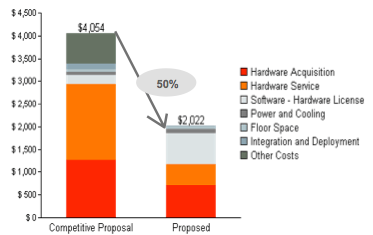
The efficiency of ZDLRA makes it more cost effective than other solutions on the market. ZDLRA only captures the specific CHANGED data each day, resulting in the smallest possible volume of data stored.  ZDLRA is not the lowest cost on the market when measured by cost per terabyte, but ZDLRA needs fewer terabytes than other solutions. In most cases, ZDLRA needs 1/3 less storage space than competing products on the market, regardless of the competing product architecture.  Less space means lower cost as we see in the following example:

Screen Shot 2018-02-21 at 11.49.13 AM

Less space means a lower acquisition cost (purchase price), lower cost of services such as support, etc.  Less disk space means less physical space in the data center, lower costs for electrical power, etc.

Solutions such as Replicated Snapshots and De-Duplication appliances simply cannot match the space efficiency of ZDLRA, giving ZDLRA the edge from a cost standpoint.  ZDLRA then offers numerous advantages beyond simple storage savings and cost, driving more value than we covered in this blog post.


Data Warehouse for Everyone

Oracle’s new Autonomous Data Warehouse Cloud is democratizing the world of Data Warehousing so that literally anyone can gain access to industrial strength data analytics.

Gone are the days when millions of dollars and months of time are needed to setup a Data Warehouse using Teradata, Exadata, or some other system just to gain insight into your business data. Users can now easily and quickly gain access to the fastest, most secure, and most capable analytic platform in the Cloud.

Autonomy = Eliminating DBA Tasks

Oracle’s Autonomous Data Warehouse Cloud eliminates back-end DBA tasks such as software installation, patching, upgrades, system optimization, system tuning, database backup, and other mundane but time consuming tasks that don’t drive business value. Oracle has taken control of the back-end system and turned it over to Artificial Intelligence algorithms, allowing database Administrators to focus on more high value work such as data modeling, data architecture, and optimizing business processes.

Database Administrators should NOT worry about Autonomous Data Warehouse making their job obsolete. Oracle has been automating administrative tasks for decades, making the role of DBA’s even more valuable. DBA’s will be able to put even greater focus on business processes, data modeling, data architecture, and performance of business processes rather than mundane tasks like patching software.

One Warehouse, Many Users

In typical Oracle parlance, one Data Warehouse can serve many users who often share data, sections of data, or what is known as subject areas within the same Warehouse. Sales, Marketing, Customer Service, and other users can have their own separate data within the Warehouse, but can also easily share data between them.

Fast & Flexible Data Loading

Oracle Autonomous Data Warehouse Cloud supports all of the leading data loading or ETL products that customers are familiar with. The following 3 sources can be used for loading data directly into your Data Warehouse:

  • Load from on-premise sources
  • Load from Amazon Cloud Storage
  • Load from Oracle Object Cloud Storage

Autonomous Data Warehouse also allows data to be loaded using simple SQL statements with data in these sources defined using what are known as external tables. For extremely large volumes of data, Oracle also provides data transport services.

No matter which method you choose for loading data, Autonomous Data Warehouse makes it fast, easy, and secure.

Directly Access External Data (Amazon S3, etc.)

Autonomous Data Warehouse provides the fastest access to data that has already been loaded into tables within the Warehouse, but users can also directly query data in Amazon S3, in Oracle Object Cloud Storage, as well as from on-premise data sources.  These external data sources are mapped as external tables, giving users direct access to that data using simple SQL statements.

No Indexes to Create

Autonomous Data Warehouse Cloud greatly simplifies administration by eliminating the need for users to create indexes. ADWC does have indexes, but users don’t need to create them. ADWC provides excellent performance even for single row queries.

Internal Performance Technologies

Automated Data Warehouse delivers unsurpassed performance through several technologies including the following:

  • Automatic Multi-Level Caches
  • Active Storage
  • Automatic Data Indexing
  • Automatic Optimizer Statistics

Users need not be concerned with these technologies beyond knowing they exist and give excellent performance.  Prior to the advent of the Autonomous Data Warehouse Cloud, database administrators would often spend countless hours using manual methods to tune what is now done autonomously.

Automatic Data Caches

One mechanism used by ADWC is a multi-level system of data caches. As data is used more and more often, ADWC stores or “caches” that data in faster layers of caches. Data automatically moves from spinning disk to Flash, to memory in the Active Storage layer, to DRAM caches in the CPU processing layer. Data is automatically brought into In-Memory data stores, and results are even cached to speed later access to the same data.  The size and uses of each cache is handled autonomously by ADWC.

Active Storage

Data in the Autonomous Data Warehouse is housed in storage, of course, but not in convention disk storage as with other Cloud services.  Instead, ADWC uses an “active storage” layer, which transparently brings additional processing power to handle user queries without any user effort.

Active Storage in the Autonomous Data Warehouse simply makes warehouse queries run faster without any user intervention or performance tuning. Exadata users know this as SQL Offloading, but it simply means that queries run faster by sending query work down to the storage layer for processing.  This is a time-tested approach in computer science, shipping processing logic to the data, rather than shipping data to the processing logic.  Whenever processing happens closer to the data (without moving the data), users simply see faster processing.

Automatic Data Indexing

Anyone who knows even the basics of databases and data warehousing knows that indexes make data access faster. People often wonder if Autonomous Data Warehouse doesn’t allow users to create indexes, how can it possibly be fast? The simple answer is that ADWC does have indexes, but they are created internally and automatically.  For example, ADWC uses a feature pioneered in Exadata called “Storage Indexes” that automatically creates indexes in the Active Storage layer on ADWC.

Automatic Optimizer Statistics

Users of conventional Oracle Data Warehouses on Exadata and other platforms might have heard about optimizer statistics from their DBA.  Optimizer statistics can be difficult to manage and often have a critical impact on performance of business processes.  The Autonomous Data Warehouse automates the collection and management of optimizer statistics to ensure optimal performance.

Pay as You Go – Compute vs. Storage

Customers pay for storage space on the Autonomous Data Warehouse Cloud Service in increments of 1TB. Compute power is charged on an hourly basis by the OCPU, and can be easily scaled up or down as needed using. Customers can completely TURN OFF the compute power if it’s not being used (such as during off-hours, on a weekend, etc.).

Encrypted by Default

Autonomous Data Warehouses are encrypted by default, providing protection for user data regardless of source or sensitivity. Oracle has always been a leader in data security since its inception, and those security technologies are built into the Autonomous Data Warehouse Cloud.

Simple Snapshots – Guaranteed Data Loss

This blog post is a continuation of my series on the use of storage snapshots for backup/recovery of Oracle databases.  #SnapshotBackups

Elegant Simplicity Brings Limitations

It’s very easy to see why snapshots seem so magical, especially in the Simple Snapshot implementation.  This is a very simple solution and quite easy to understand.  However, there are several disadvantages as we shall see below.  The simplicity is both a blessing and a curse of this design.

Simple Snapshot Configuration

In a simple snapshot configuration, the entire database and online redo logs reside within a single snapshot or consistency group.  A snapshot is created at a consistent point in time for all of those data structures.

screen-shot-2017-01-03-at-1-00-37-pm

This example shows a database and online redo logs that belong to a single snapshot or consistency group.  Three snapshots are taken over the course of time as indicated in red, orange, and blue.  Snapshots always reside within the same disk array as the primary copy of the database, so the disk array is a single point of failure.  Storage Administrator intervention is required to revert to (restore) a snapshot, so the DBA cannot work alone during recovery.  Finally, the simple snapshot configuration only allows you to REVERT to a snapshot, not recovery to points in time (or SCN’s) between snapshots.

Fundamental Challenges

The fundamental challenge is that Oracle databases consist of a set of interrelated structures that are constantly changing.  Oracle databases are never “quiesced” unless they are completely shutdown for a COLD backup, and very few customers can tolerate database downtime simply to perform a backup.  The following diagram shows some of the object relationship that exist within an Oracle database.

screen-shot-2017-01-03-at-1-17-03-pm

The diagram above shows a very simple database consisting of 2 tables, which are the EMP (Employee) and DEPT (Department) tables.  Each employee belongs to a department, so these two tables have a relationship defined between them.  Each table typically has one or more indexes defined on it, and indexes are obviously related to the data in the tables.  All of the indexes, tables, and other structures are recorded in the database metadata, which is stored in the Data Dictionary.  As transactions are executed against the database, Oracle stores UNDO information (needed to back-out changes) as well as REDO information, which is needed during database recovery.

All of the data in the database is mapped onto a set of files.  The database is constantly changing, and the underlying files are constantly changing.  Storage snapshots essentially emulate what happens during a system crash.  One of the core features of any database engine is to recover from a system crash without causing corruption in the database.  The Simple Snapshot configuration leverages this core feature of the database engine.

Archived Redo – Not Necessary and Not Usable

The Simple Snapshot configuration gives the ability to REVERT the entire database to specific points in time, but does not allow for RECOVERY to points on the timeline between snapshots.  In this configuration, there is no reason to use ARCHIVELOG MODE in the database, and no reason to create or backup archived redo logs.  The online logs contain all information needed to perform crash recovery when you REVERT to a snapshot.

Single Point of Failure

Since the database and all snapshots (the backups) reside within a single disk array, the array itself is a single point of failure.  I have personally seen the failure of an entire disk array on virtually every brand of disk array on the market.  It’s possible to lose the entire disk array, and this does happen in reality.  Please be sure to EXTERNALIZE the backup somewhere else if you are using storage snapshots for backups.

Plan for the Worst, but Hope for the Best

Assuming you understand the exposure of having your database and all of the backups (snapshots) residing inside a single disk array, you should understand why it’s important to make a copy of those backups somewhere else (external to the disk array).  While it’s very FAST to simply revert to a snapshot, this is your BEST CASE time and performance of the recovery.

When you set expectations with your business users, be sure to plan for the worst and hope for the best.  Quote to your users the time it takes to bring the database back from the EXTERNAL location, then be happy if you’re able to use a snapshot instead.


Overview of Backup using Snapshots

This blog posting is one in a series of posts from my years working in the Oracle field support organization known as Advanced Customer Services (ACS).  #DatabaseParamedics

I will also be making a series of blog posts regarding how customers use storage snapshots for backup/recovery of Oracle databases.  #SnapshotBackups

Magical Qualities of Storage Snapshots

Storage Snapshots seem to have a magical quality when it comes to data protection, but not so magical once you’ve seen the dark side.  One of my first managers (before I joined Oracle) used to say that people often need a “Significant Emotional Event” before they truly understand the concept of risk.  In this series of blog posts, I hope everyone will come to understand in more detail why Oracle backup/recovery experts don’t like using snapshots for backups.  I also hope you can avoid having your own Significant Emotional Event and learn from the experience of others.

Snapshots for Cloning & Transient Fallback – Good Idea!

It’s important to begin by saying that storage snapshot have a place in this world.  Snapshots are excellent for cloning Oracle databases, especially with thin-provisioned snapshots.  The typical Oracle EBS development environment might have 6 application modules and 6 project phases, resulting in 36 development instances (6×6=36).  All of these 36 instances only have slight variations in the data they contain, making them perfect candidates for thin-provisioned cloning.

Transient fallback is another great use-case for storage snapshots, providing an easy method to back-out from a failed upgrade including system (O/S) upgrade, database engine upgrade, application upgrade, etc.  It’s still critical to have a proper backup & recovery solution, but snapshots can provide additional options.  Just don’t rely on snapshots as your only data protection solution.

17+ Variations of Snapshots

I have encountered no fewer than 17 variations of storage snapshot implementations for protecting Oracle databases.  It normally takes a lengthy conversation to fully understand how the customer has implemented snapshots in their environment and what exposure they might have.

  • Simple Snapshot of primary DB storage
  • Simple Snapshot of primary DB storage with Storage Replication
  • Simple Snapshot of primary DB storage with Sweep
  • Recoverable, Multi-Snapshot of primary DB storage
  • Recoverable, Multi-Snapshots of primary DB storage with Storage Replication
  • Recoverable, Multi-Snapshots of primary db storage with Sweep
  • Snapshot of primary DB storage using User Managed Backup
  • Snapshot of primary DB storage using User Managed Backup with Redo Snapshot
  • Snapshots as RMAN Proxy Copy
  • Snapshots as RMAN Proxy Copy with Storage Replication
  • Snapshots as RMAN Proxy Copy with Sweep
  • Snapshot of RMAN Backup Sets
  • Snapshots of RMAN Backup Sets with replication
  • Snapshots of RMAN Backup Sets storage with sweep
  • Snapshots of RMAN Incremental Merge
  • Snapshots of RMAN Incremental Merge with Storage Replication
  • Snapshots of RMAN Incremental Merge with Sweep

Each of these implementations brings a variety of advantages and disadvantages.  The variety of implementations are one indication that snapshots aren’t so “magical” after all.

Simple Snapshots

The simplest to understand and most “elegant” snapshot solution is what I call the simple snapshot configuration.  I have also called this a guaranteed data loss configuration, since you can only REVERT to a previous snapshot rather than applying redo logs to recover to a specific SCN.  In the simple snapshot configuration, the entire database is contained within a single snapshot, including data files, online redo logs, control files, etc.

In a simple snapshot configuration, there is no reason to run the database in Archive Log Mode because it’s not possible to recover the database.  The only option is to REVERT the database to the time of a previous snapshot.

It’s also important to note that a “valid” simple snapshot emulates a database “crash” by snapshotting all database files (data files, redo logs, control files, etc.) at a specific moment in time.  This technique cannot be used on storage that doesn’t provide consistency across all files or across all disk volumes under the datagbase.

Storage Replication vs. Sweep

There is essentially very little functional difference between use of storage replication versus “sweep” processing, but these are vastly different to implement.  Sweep processing means that you are writing code (usually shell script) to copy files to another location.  Storage Replication is a feature of a disk storage array or NAS filer.  You get more control with a custom-written “sweep” process, but nothing is automated out of the box.

Recoverable Snapshots

The word “recoverable” means that Oracle database recovery or the “log apply” process, moving the database forward in time to the desired SCN.  The recoverable snapshot configuration means that online redo, archived redo, and control files are kept in a separate snapshot from the data files.  You then revert the data files to the desired snapshot and use the redo logs (archived and online) to move the database forward in time to the desired SCN.

One challenge with Recoverable Snapshots is that the Oracle database is never quiesced, and data files can have blocks written at a higher SCN than the data file checkpoint SCN.  This simple fact means that you must determine the highest SCN written of all data files in the database, then recover to any SCN that’s equal to or higher than the high-written SCN.  Oracle12c includes a feature that can be used to determine the high-write SCN using the timestamp of the snapshot, so this will get easier moving forward.

Snapshots with User Managed Backups

The legacy Oracle database backup method used BEGIN and END commands to signal the start and end of a hot backup.  The BEGIN and END commands were originally done for each tablespace, but Oracle later added the ability to put the entire database into hot backup mode.  This old feature generated a spike in redo log activity, since the DBMS writes entire BLOCKS into the redo log for any blocks written while in hot backup mode.

Oracle supports the old User Managed Backups mainly for backward compatibility.  Some storage technologies still aren’t able to generate a consistent snapshot across all disk volumes that underlie a database, making this legacy feature a necessity.

This old User Managed Backup feature (of course) doesn’t involve RMAN, so doesn’t have any sort of catalog.  You will have to develop your own scheme for locating backups, determining which files belong together as a group, ensuring all of the backup files are handled as a group, etc.

Proxy Copy

For storage arrays that support the “proxy copy” feature of RMAN, this is a good way to use snapshots and still get benefits from RMAN such as RMAN Catalog capability.  Third party vendor solutions such as Commvault’s IntelliSnap implement the Proxy Copy capability of RMAN.  Some conventional Media Manager products also work with RMAN Proxy Copy.

Snapshots of RMAN Backup Sets

An RMAN Backup Set is a discrete set of files that won’t change after they are generated, so this doesn’t seem to be a good use of snapshot technologies.  However, I have seen customers who implemented snapshots of RMAN Backup Sets in order to prevent the DBA from deleting the backups.  The DBA has access to the files of the Backup Set and can freely modify or delete those files, but the DBA cannot modify the snapshot.

Of course once you implement snapshots of RMAN Backup Sets, you can then either replicate or sweep those backups to another location (usually on a different disk array).

Snapshots of Incremental Merge

The most intriguing implementation of snapshots is in combination with the RMAN Incremental Merge feature.  RMAN includes a feature that allows you to generate an Image Copy backup, then generate incremental backups and merge those incremental into the image copy.  This is functionally very similar to Oracle Data Guard, in that you have a database that is constantly rolling forward.  The main differences are that the database moves forward through incremental apply instead of through log-apply, and the roll forward is typically done using horsepower of the primary database server.  Incremental Merge typically happens once per day, but you can match that capability with Data Guard using a delay setting.

Once you have a database being moved forward in time using Incremental Merge, you then layer storage snapshots on top, providing multiple “restore points” for that copy of the database.  You can also add storage replication, making a remote copy of the Image Copy to another location.

In my next blog post on this topic, I will get into details of the “simple snapshot” implementation including why this is a guaranteed data loss solution.


Broken Backup after DR Test

This is the first is a series of blog posts from my years working in the Oracle field support organization known as Advanced Customer Services (ACS). #DatabaseParamedics

Postmortem analysis is often critical to avoiding problems in the future.  In a cruel twist of fate, one customer suffered a failed recovery immediately following their annual DR test.  They had spent 3 long, sleepless days testing all of their recovery mechanisms, so everything should have been fine. We discovered the source of the problem during postmortem, but I’ll tell more about that later. 

Failure Scenario

The entire IT organization had just finished their annual DR test over a long weekend. All of the testing came off without a hitch, and the team was satisfied with a job well done.  All databases and applications came up successfully at the DR site according to plan, and the team celebrated their success. On the following weekend, a database upgrade was completed successfully on Saturday afternoon. Everything ran without any issues until the following weekend, when they suffered a hardware failure on their disk array. The DR test 2 weeks earlier had shown their backup/recovery solution had been working perfectly, but this time the recovery failed.

How could a flawless backup/recovery solution suddenly go bad in such a short time?  As we shall see, the database upgrade played a role in this failure and for a very simple reason. The customer had been using a fatally flawed backup script without solid error trapping.  The database was upgraded to a new version, but the backup script was not updated to reflect the new software location. The backup script failed, but the error code was not properly trapped an reported.

Potential Impact

Database recovery obviously failed because the backups had been failing for a week.  The last good backup was taken over a week before the disk array crash, so the customer was faced with losing an entire week of transactions.  The IT team was looking at a loss of data on their corporate financial system in the middle of their annual financial close. Not only would their end users be losing time due to the outage, they were also facing a week of rework due to lost data!  The business was facing delays in SEC (Securities Exchange Comission) filings and potential fines.  This was a very serious situation.
Another DUL Job

Going back to the last good backup (taken a week before) was going to be painful for the business.  The only copy of the database was corrupt and wouldn’t open because the database files were inconsistent.  My team and I had a solution, but it wasn’t pretty (still some potential data loss) and required special expertise and a proprietary tool called the Data Unloader or DUL for short.

Data Unloader is a proprietary tool used by Oracle ACS (Advanced Customer Services) to extract data from corrupted databases. DUL is a tool of last resort, and is only used under a special services contract.  DUL is a virtual guarantee of data loss, but can often recover more data than other methods. The ACS team typically uses all of the other tricks in the recovery book along with the DUL tool. In this case, we used DUL to extract all of the data, then rebuilt the database from scratch.  In the end, we lost just a few transactions, but saved almost a week of effort by the business.

Postmortem & Lessons Learned

The postmortem analysis showed that a simple scripting error can cause failed backups.  Our main recommendation was to code the script to trap for positive success rather than simply trapping for errors.  This is based on the principal that absence of failure does not necessarily mean success.

The other lesson we learned from this engagement is that you never truly know the state of your backup until it comes time to recover. This customer had followed best practices by performing comprehensive tests of their backup/recovery solution, but a change was introduced less than 1 week later and caused a silent failure of the solution.

What customers need is a solution that will validate backups and validate the ability to recover using those backups instead of waiting until they are needed.

The Database Paramedics

Early in my career at Oracle, I worked as what you might call a “paramedic” for Oracle databases.  Our team was originally called Field Support, but was later renamed Advanced Customer Services (ACS).  Most of us worked on full-time contracts, but we also worked short duration emergency jobs that we called “Fly & Fix” engagements.

During a Fly & Fix engagement, you could encounter just about any problem imaginable with Oracle databases.  We worked on database performance issues, crashing databases, corrupted databases, and corrupted databases with failing recovery.  By far, the most challenging engagement was the failing recovery situation. 

Consider the situation where a database is corrupted and the backup is either corrupted, doesn’t exist, or the backup isn’t usable for some reason.  Most importantly, think about the business impact in these situations as well as the human impact to the people involved.  These are very stressful situations.  People’s lives are disrupted and careers are impacted. Backup/recovery is a critical part of any IT operation, and it normally works unless mistakes were made. Like I said, it’s a very stressful situation.  Making such serious mistakes can be career limiting. 

120 Stories

In this blog, I will tell a sampling of stories from my years doing Fly & Fix work, with a focus on the events that taught important lessons to everyone involved. I will also tell how the failure started and some of the human and business impact it caused.  I went on a Fly & Fix engagement about once per month for 11 years, so I have about 120 stories to draw from.

Some of these stories are known to the industry and business press, but most of them went unreported. All of these cases are highly confidential, so I won’t divulge names of companies or people involved. I hope this blog will serve as a warning to IT professionals so you can avoid these sorts of issues in your own operations.  All of these stories will be told from my perspective and I will tell you the lessons I learned through the process. Others involved might have taken different lessons.  I hope you enjoy the re-telling.

Home

Introducing Total Session History

Attribution of time in database application determines potential benefits of Exadata

Exadata is a technology that delivers superior database performance, so it attacks the portion of time an application spends INSIDE the database.  Exadata will not make the network faster, and will not make application tiers faster.  Oracle database applications will have some transactions and/or batch jobs that show small increases in performance and transactions or jobs that show large performance increases.  It’s all a matter of where  the time is being spent.

Every Oracle database application includes portions that will show a LARGE benefit from Exadata, while other portions of that same application will show SMALL performance benefits.  To determine which portions of an application will show more or less performance benefit from a faster database, there are built-in features of the Oracle database that enable such analysis.

The Oracle Automated Workload Repository (AWR)

Oracle’s Automated Workload Repository (AWR) feature enables performance analysis of Oracle databases at the system level.  AWR reports show performance statistics for the system as a whole, including the SQL statements that consume the most resources on the system.  AWR is a great tool for doing analysis of system-wide performance issues.

The Oracle Active Session History (ASH)

Active Session History (ASH) facilitates performance tuning of SQL statements that consume the most resources in the system.  ASH provides a historical repository, making it possible to go back in time and find high resource consuming SQL statements.  This is a truly revolutionary capability for performance tuning because it allows the DBA to go back in time to see what performance problems existed when users were having troubles.

Total Session History (TSH) Utility

While AWR and ASH are great tools, they don’t facilitate analysis of the complete application from a session perspective.  The Total Session History (TSH) utility allows database administrators to analyze what factors account for time consumed by sessions in the database.  TSH gives a better picture of where time is being spent and how Exadata might help performance as viewed from the perspective of an end-user or within a batch job.

The TSH utility relies on built-in features of the database engine to track performance statistics and facilitate analysis of those statistics for all active sessions in the database.  Unlike the Active Session History (ASH) feature of Oracle, TSH captures the TOTAL session history.  This includes the full duration of each session as well as ALL sessions in the database regardless of whether they are active or not.