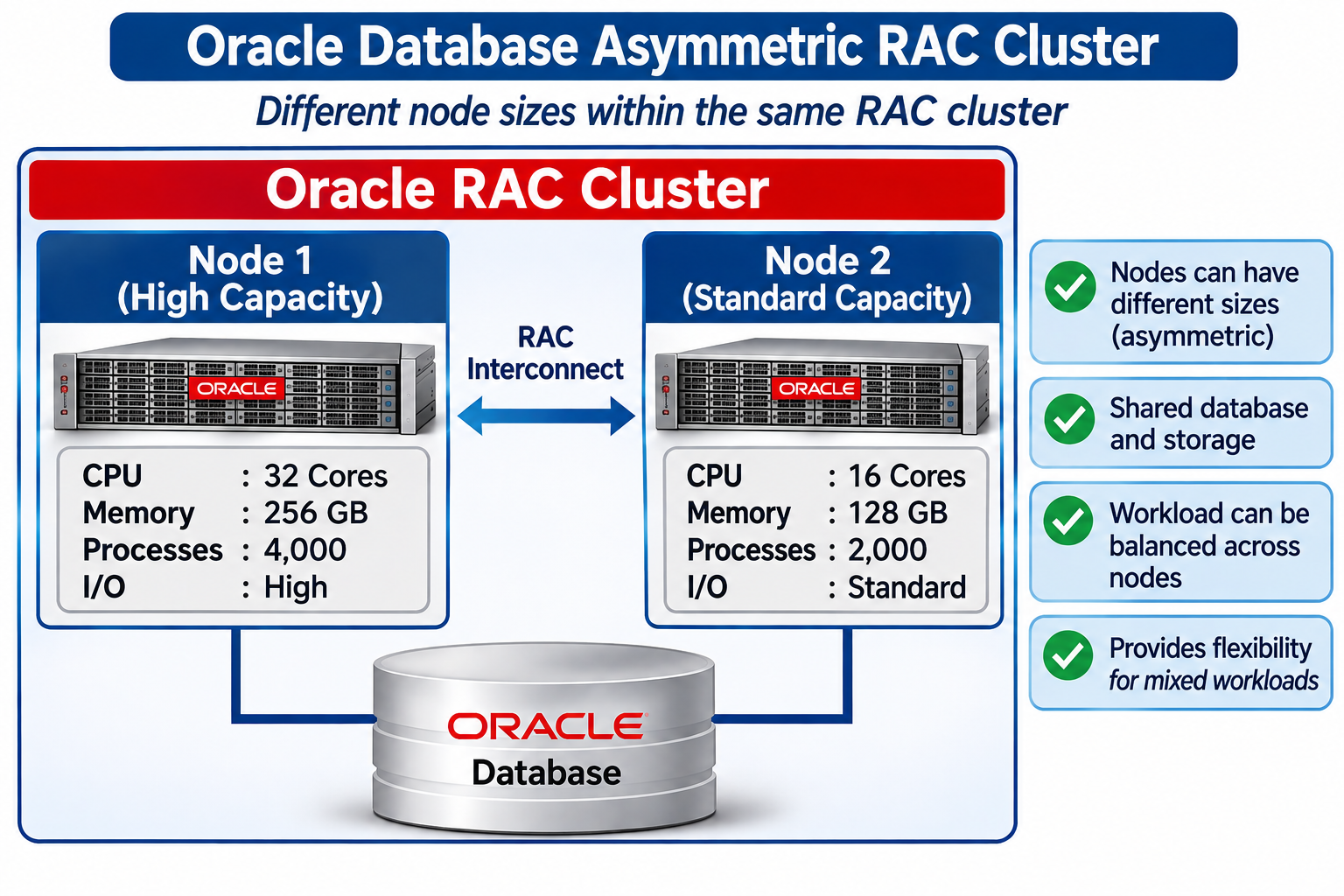
Oracle Real Application Clusters (RAC) allows workloads to be routed to cluster nodes in a fully load-balanced manner, or certain portions of the workload can be routed to specific nodes. The first case results in a symmetric workload with all nodes receiving approximately the same load. The second case can result in an asymmetric workload, with some nodes receiving a different amount of load. Asymmetric clusters can result in higher that expected costs for Exadata Cloud customers because Dynamic CPU Scaling is built for symmetry with all nodes using the same OCPU/ECPU setting. In this article, we will explore how to detect this condition and provide the proper sizing.
Under Sizing CPU for Cloud
Oracle Cloud database services (ExaDB-D, ExaDB-C@C, etc.) are designed for modern workloads with symmetrical distribution of work across instances or nodes of a RAC cluster. Asymmetric RAC clusters or workloads can result in under-sizing, resulting in higher than expected OCPU/ECPU charges in Oracle Cloud. RAC systems in the Cloud (whether BaseDB or Exadata) are configured for symmetric workloads, so the OCPU/ECPU setting has to match the node or instance with the highest CPU consumption. Let’s look at the distinctions between asymmetric clusters and asymmetric workloads.
Asymmetric Clusters
The nodes of a physical or virtual cluster can be symmetric or asymmetric. The number of processor cores, SMT threads, or relative “horsepower” of cluster nodes can be the same (symmetric) or can be different (asymmetric). Even in cases where the number of cores or threads are the same, the processors in the nodes can be different hardware generations, which can have different performance characteristics. This generally applies to on-premises systems because Oracle doesn’t support RAC on 3rd party Clouds as of this writing.
One example of an Asymmetric Cluster is a customer who deployed powerful multi-chip servers (multiple processor chips with many cores/threads per chip) to run EBS batch processing, while a set of less powerful servers were used for on-line OLTP user sessions. RAC Services can be used to route workloads to specific servers, or workloads can connect to a specific host and SID (Oracle System Identifier) rather than using Services. While this can be done to enable use of different sized servers, it can also help in the case of a low performance cluster interconnect in non-Exadata systems (spreading work to reduce data sharing).
Asymmetric Workloads
Physical server configurations can be entirely symmetric, but running a workload that is asymmetric. Rather than looking at server configuration, it’s more effective to interrogate CPU consumption metrics generated by Oracle and surfaced as “DB CPU Seconds per Second” metrics for each RAC instance. It’s not necessary to even determine how the application connects to the database because the resource consumption metrics tell what needs to be known.
It’s important to understand that RAC clusters will never be perfectly symmetrical. Oracle provides load balancing through several mechanisms, but there will always be some variance in how work is distributed across the cluster. What we are looking for is the DEGREE of asymmetry, answering the question of whether the workload is highly asymmetrical or not.
Percentage of Workload by Instance
The degree of asymmetry is determined by calculating the percentage of workload for each instance, which can be viewed as a pie chart or bar chart. Workload distribution is not expected to be perfectly equal, so there will always be some degree of asymmetry in the workload distribution across instances. Workload distribution across instances will change continuously. The following diagram shows a 4-node cluster running a RAC Database with 4 instances.
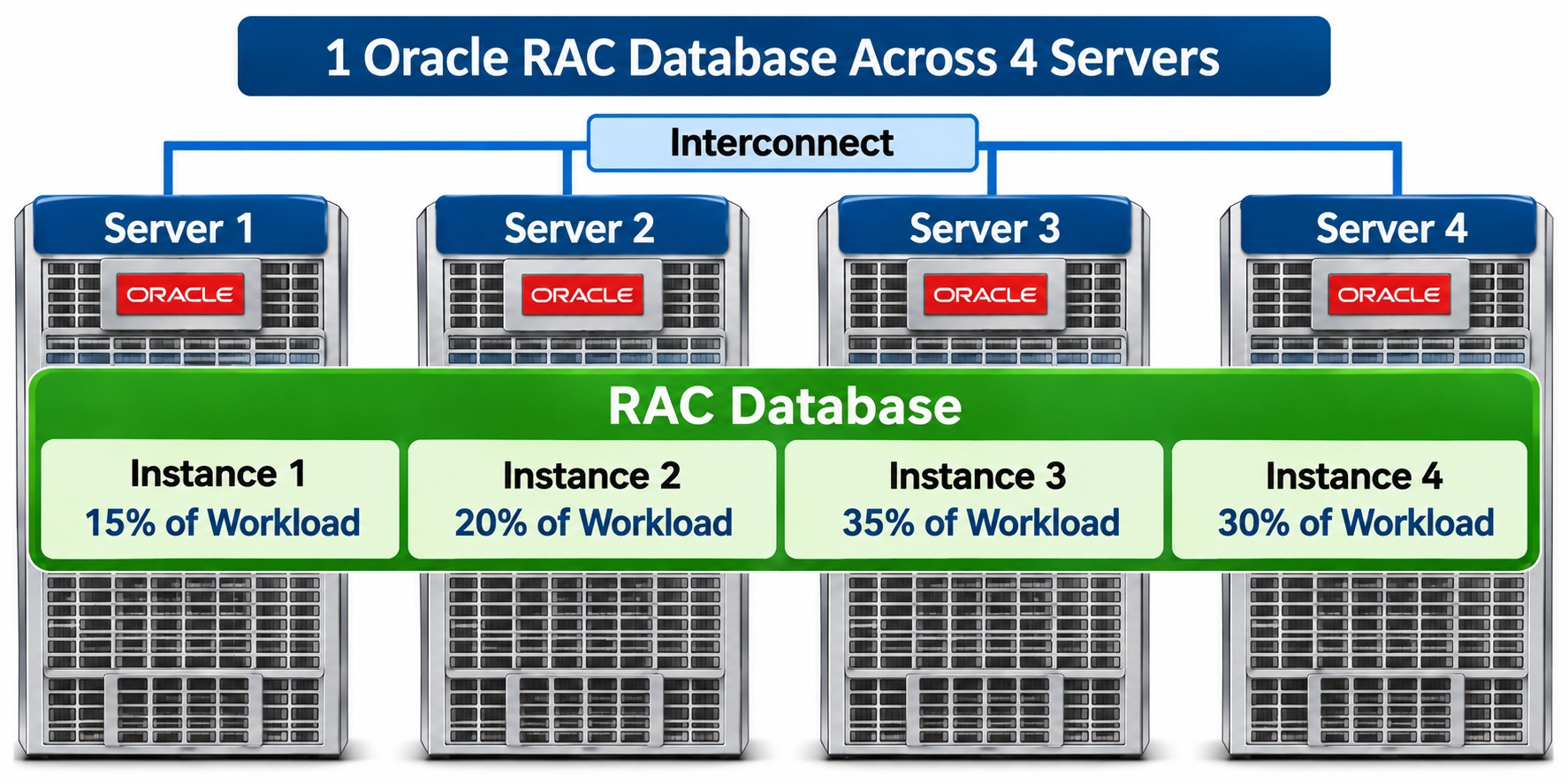
Note that Oracle RAC allows up to 100 instances in a RAC cluster, but the majority of deployments have much fewer than the maximum.
Changing RAC Instance Count During Migration
Migrating an existing RAC database often involves changing the number of RAC nodes (servers) or Database Instances. For example, an existing RAC database might run across 8 Database Servers (nodes) in an on-premises environment, but might be moved to an Exadata Cloud system with only 2 Database Servers. The number of processor cores has increased dramatically over the past several hardware generations, so decreasing the number of RAC nodes required is a natural response to the hardware evolution. Depending on how applications manage their connections to Oracle, it can be complex to make this change.
Sizing by Aggregate Resource Consumption
If sizing for OCPU/ECPU of a RAC cluster is done on aggregate resource consumption, the implication is you need to ensure the workload is balanced across the nodes of the cluster. This sizing methodology assumes work will be done to distribute the workload across nodes of the resulting cluster. This can be done manually for applications with asymmetric workloads, or it can be handled automatically by Oracle Database.
Manually Distributing Workloads
For targets that will run multiple consolidated databases, workloads can be more evenly distributed by assignment of connections to instances in a more evenly distributed fashion. The approach is to first reduce the number of instances see on the source to the number of instances that will be configured on the target. the second step is to bin-pack database instances into server nodes starting with the most heavily loaded instances first. The following diagram shows a conceptual view of this approach using 2 servers and 2 RAC databases that are evenly distributed across them. Remember this is the END-STATE architecture running 2 servers, while the source system might have been running more servers/nodes in the cluster.
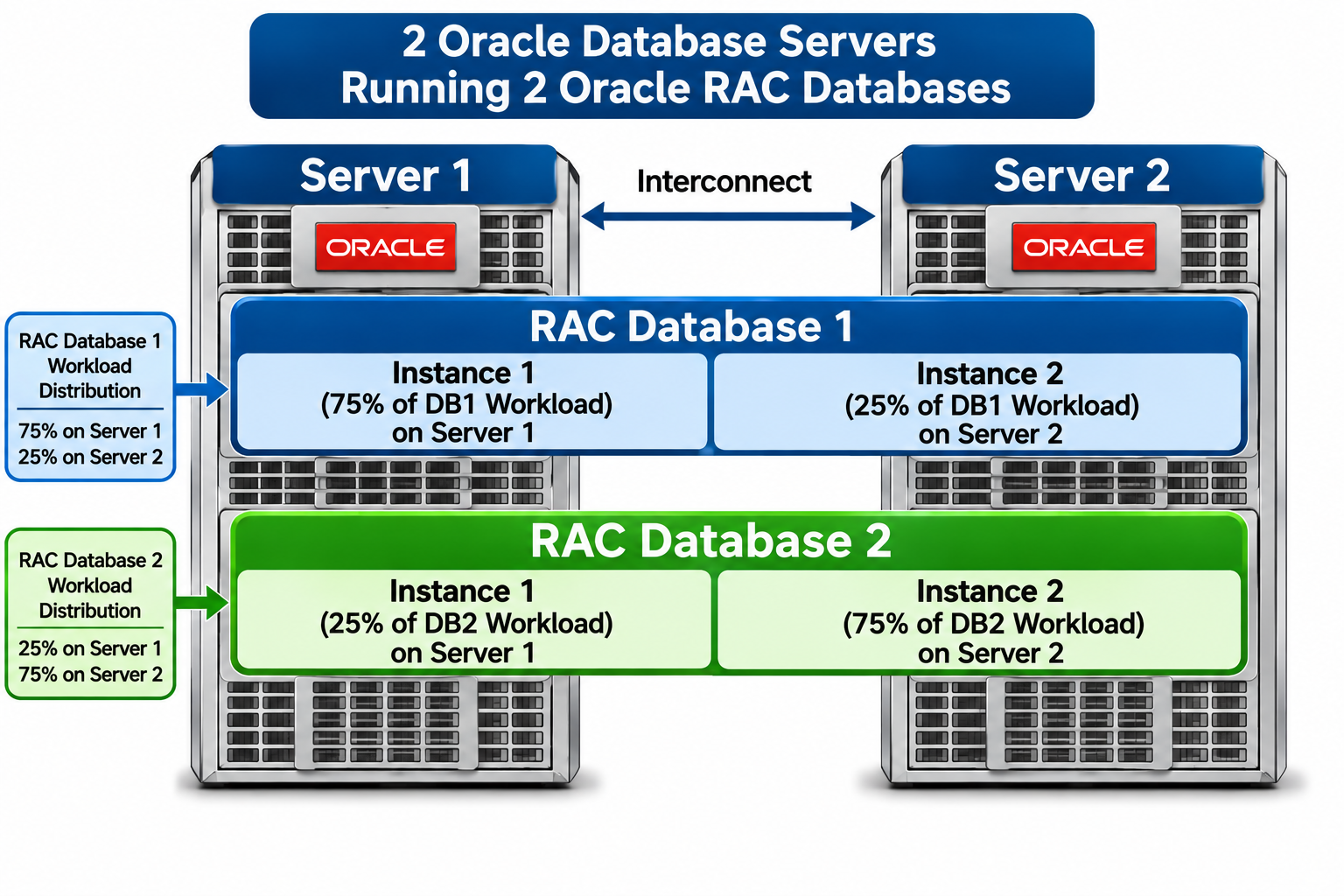
The above diagram shows a simple example of evenly balancing the workload of two databases across two servers. In this example, both databases have a 75/25 split of work across instances (assume these databases have similarly sized workloads). Application connections that generate 75% of the workload for RAC database 1 are routed to the first server, with 25% of the workload routed to the second sever. The opposite is done for the second database, resulting in an even workload distribution across the two servers.
With larger deployments, this will be dramatically more complex. For example, consider a deployment of 50 databases running on a single on-premises Exadata system with 8-nodes (400 instances), moving to an Exadata Cloud system with 4 nodes (200 database instances). That means consolidating from 400 RAC instances to 200 instances, then evenly distributing the work across those 200 instances. Any collected metrics will come from the existing 400 RAC instances.
Automatically Distributing Workloads
Whether databases are consolidated or not, workloads can be automatically distributed across nodes on Exadata targets. The high performance cluster interconnect runs high performance network hardware, but also uses higher performance protocols in software that are unique to Exadata. While it might be possible to deploy physical hardware that performs as well as Exadata, the software is another matter. Exadata software uses Remote Direct Memory Access (RDMA) on the cluster interconnect in a feature called Exafusion (short for Exadata Cache Fusion) that provides latencies as low as 6 µsec (microseconds). You can see the effects of this performance boosting feature in AWR (Automatic Workload Repository) reports on Exadata systems.
The most common approach to automatic distribution of workloads across instances of a RAC database involves connecting via the SCAN (Single Client Access Network) address rather than connecting to specific nodes or instances. There are several methods to accomplish load balancing. The best choice depends on the existing application/database architecture.
Conclusion
Asymmetric workloads can result in under-sized OCPU/ECPU in Exadata Cloud. Asymmetric workloads are more common on asymmetric clusters, but may also exist on symmetric clusters as well. Properly distributing workloads on the target will avoid cluster asymmetry, resulting in OCPU/ECPU savings.

